How to spot a scam text before you tap
The six tells behind toll, package, bank and "wrong number" texts, what to do instead of tapping, how to report with 7726, and how to filter a parent's phone.
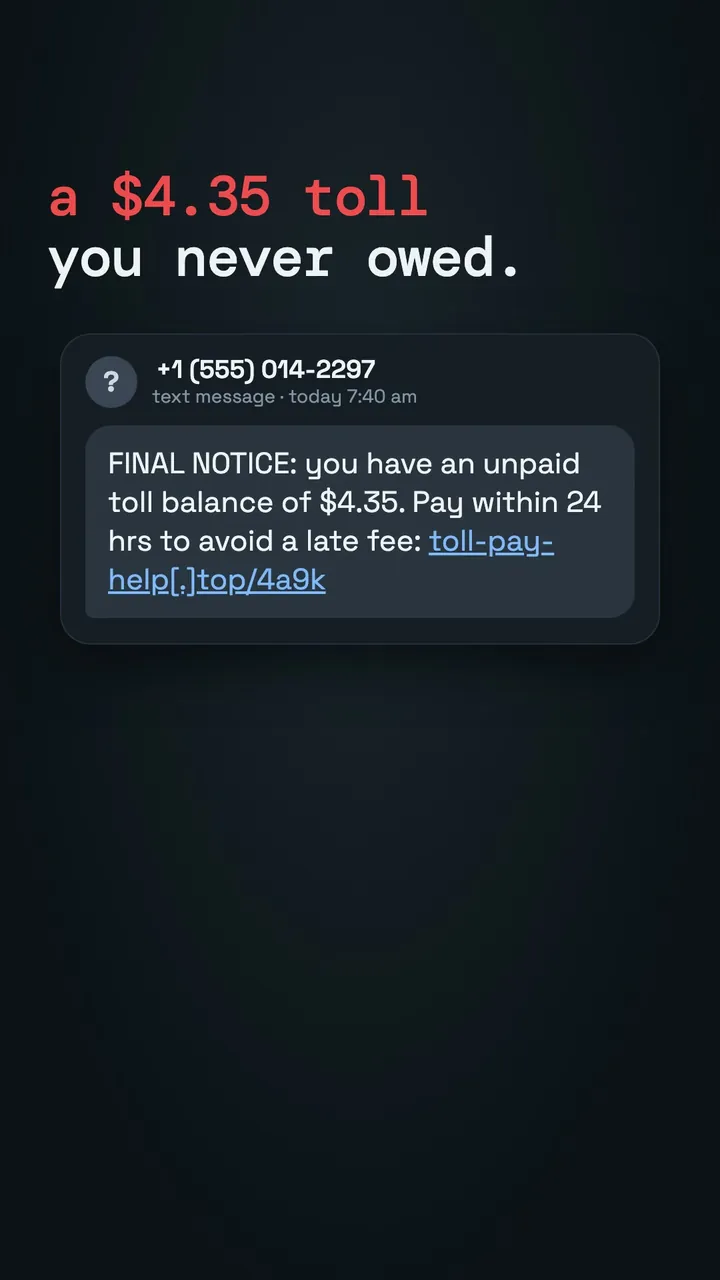
"Final notice: you have an unpaid toll balance of $4.35. Pay now to avoid a late fee." It arrives at 7:40 on a Tuesday, the amount is small, and you did drive through a toll last week. That is exactly why it works. Americans reported losing $470 million to text scams in 2024, according to the FTC, and most of those losses started with a single tap.
The six tells
Scam texts come in a few flavors: unpaid tolls, a package that "couldn't be delivered," a fraud alert from "your bank," and the friendly "wrong number" that turns into a long chat. Almost all of them share these signs:
- Urgency with a deadline. "Within 24 hours," "final notice," "account suspended." Real companies rarely give you hours.
- A link you didn't ask for. Especially a short link or a long, odd web address that isn't the company's real site.
- A small, believable amount. $3.95 for redelivery, $4.35 for a toll. Small sums make people pay without thinking, and the goal is your card number, not the fee.
- A sender that isn't a short code or a contact. A random 10-digit number, an email address, or a foreign number texting about a local service.
- A request to reply or verify. "Reply Y to confirm," "text back your code." Replying tells scammers the number is live, and a one-time code is the key to your account.
- Unexpected warmth from a stranger. "Hi, is this Linda? Sorry, wrong number!" followed by small talk and, weeks later, a crypto or investment tip.
If a text makes you hurry, that's the moment to slow down.
What to do instead of tapping
- Go around the message. Open the toll agency's site, the carrier's app or your bank's app yourself, or call the number on the back of your card. If there's a real problem, you'll see it there.
- Never read out or forward a code. No real bank or delivery service will ask for the one-time code it just sent you.
- Don't reply, even "STOP," to a message you don't recognize.
- If you already tapped and paid, call your card issuer right away to dispute the charge and replace the card, and change any password you typed in.
Report it, then filter it
Reporting takes 15 seconds and helps carriers block the next wave:
- Forward the text to 7726 (it spells SPAM). Your carrier may reply asking for the sender's number; paste it in.
- Tap "Report Junk" under the message in Messages.
- File a report at ReportFraud.ftc.gov, especially if you lost money.
To cut down what reaches a parent's phone, set up the iPhone filter. On iOS 26 it's in Settings > Apps > Messages: turn on Screen Unknown Senders and Filter Spam. Texts from numbers that aren't in Contacts go to a separate Unknown Senders list without a notification, so the scary "final notice" doesn't buzz at dinner. Then add the people and businesses they actually hear from, like the pharmacy, the doctor's office and the grandkids, to Contacts so those messages still come through.
Make one family rule while you're at it: anyone who gets a text about money calls a family member before acting on it. Our guide to setting up a phone for an aging parent covers the rest of that setup.
Scam scripts will keep changing, but these six tells change slowly, so they're worth learning once and teaching to everyone you love.
Videos
Watch this post as a reel
Related posts
-
How-to
How to set up a phone for an aging parent
Oct 12, 2026
-
How-to
How to spot the errors hiding on a hospital bill
Sep 25, 2026
-
How-to
How to warm up before lifting in 8 minutes (and what to skip)
Oct 18, 2026
Recent posts
-
How-to
How to learn a trade as an adult (electrician, plumber, HVAC, welding)
Oct 20, 2026
-
How-to
How to watch a game later without spoilers
Oct 19, 2026
-
How-to
How to photograph fall colors with your phone
Oct 19, 2026
-
How-to
How to warm up before lifting in 8 minutes (and what to skip)
Oct 18, 2026
-
How-to
How to steam milk for a latte at home
Oct 17, 2026
-
How-to
How to compare Medicare plans for a parent during open enrollment
Oct 16, 2026
0 comments
No comments yet — be the first.
Leave a reply
Sign in with Google to join the conversation. We require a quick sign-in to keep comments spam-free.
Sign in with Google to comment