
Education
Sight Staff: sight-reading trainer
Daily five-minute note reading drill.
No account, no install. What you do stays in your browser.
This app is a community proposal.
Try the full browser version now. We build the iPhone and Android app once 100 people upvote it.
We'll email you once, when it ships. Unsubscribe anytime.
| Price | Free, no subscription |
|---|---|
| Account | None needed to try |
| Works offline | Yes |
| Data | On your device, never on our servers |
| Platforms | Browser |
| Status | Community proposal (built for phones at 100 upvotes) |
| Last updated | 2026-04-17 |
Accessibility: Larger Text · VoiceOver labels · iPad layout · Browser version How we checked →
 Try it live
The full Sight Staff, right here in your browser.
No account and no install. What you enter is saved in this browser only, never on our servers.
Open Sight Staff →
Try it live
The full Sight Staff, right here in your browser.
No account and no install. What you enter is saved in this browser only, never on our servers.
Open Sight Staff →


About this app
What Sight Staff does
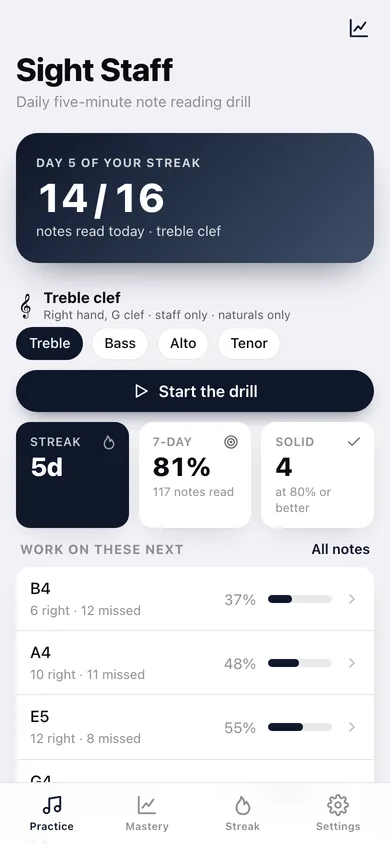
Sight Staff is the offline sight-reading trainer for the 10 million US adults learning piano — the demographic Piano Marvel's $290 subscription locks out, Tenuto's 24 fixed drills bore, and Notevision's middle-C-equals-octave bug has frustrated for years. What Sight Staff does: — A daily 5-minute streak. A note appears on the staff. Tap the matching key on the keyboard at the bottom. Right answer plays the note. Wrong answer shows the correct key for half a second. — Adaptive per-note mastery. Each pitch on each clef has an Elo-style score. The app shows the notes you're worst at twice as often as the ones you've nailed. — Treble + bass + alto + tenor clefs. Switch clefs in a tap. Practice for ABRSM, RCM, or just to get faster at chamber music. — Ledger lines + accidentals. Up to four ledger lines above/below, sharps, flats, naturals. Difficulty unlocks as you master the easier notes. — Beautiful staff rendering. Drawn in SwiftUI Canvas — crisp on every iPhone screen. — Optional piano sounds. A bundled grand piano sample plays each note you correctly identify. AVAudioEngine, on-device, no streaming. — Daily streak that doesn't punish. Miss a day, your mastery scores stay. No "streak lost" guilt. — No account, no cloud, no subscription. Free, forever. Your mastery data lives on this phone. 86% of piano teachers say sight-reading is important but only 7% teach it systematically (Hardy study). Sight Staff is what they would have built.
Features
Built to be useful, not noisy.
Daily drill
Note on staff → tap matching key; immediate feedback
Clef switcher
Treble / bass / alto / tenor — tap to toggle
Mastery
Per-note Elo score chart across all clefs
Difficulty unlock
Ledger lines + accidentals enabled as mastery rises
Streak
Days drilled — supportive (no streak-lost penalty)
Why it exists
The problem
Piano students need daily sight-reading drill but Tenuto has only 24 fixed exercises, Notevision has known audio bugs (middle C and octave register as same note), and Piano Marvel costs $290+ — there's no free, comprehensive, offline alternative.
What's different
How Sight Staff stands out
Sight Staff is the only iOS sight-reading trainer with per-note Elo-style adaptive mastery across treble + bass + alto + tenor clefs + ledger lines + accidentals, drawn in SwiftUI Canvas, with bundled piano samples played via AVAudioEngine entirely on-device — Tenuto is $4.99 with only 24 drills, Notevision has known…
You might also like
All apps →
Readfox
Education
Any book. Listens as they read.

Sayline
Education
Learn any speech or script by heart.

SpellHive
Education
Spelling Bee Prep — Spell It Out Loud

Podium: Speech Coach
Education
Live filler-word coach

IEP Vault
Education
Your IEP paper trail, offline

Minutes Owed
Education
Scheduled vs delivered minutes
FAQ
Questions about Sight Staff
How much does Sight Staff cost?▾
Sight Staff is free. All features are included from day one — no subscription, no in-app purchases, no paid tiers. Everything you see in this listing works the moment you install it.
Where does Sight Staff store my data?▾
On your device. Sight Staff is built privacy-first: no account is required, no analytics SDKs, no third-party trackers. Nothing is uploaded to a server we control — the app works without one.
What platforms does Sight Staff support?▾
iOS, on iPhone and iPad. You can find the latest availability on this page.
How do I get support for Sight Staff?▾
Use the Support link on this page, or email support@allthingsn.com. We answer every message and keep responses on the same thread.
More in Education

