
Web app · Education
Sight Staff
Five minutes of note reading a day — treble, bass, alto and tenor, in your browser
A note appears on the staff, you tap the matching key. Every pitch on every clef keeps its own Elo-style mastery score, so the notes you keep missing come back three times as often. Ledger lines and accidentals unlock as your scores climb. Free, no install, no account.
Stored in your browser only. Nothing you do in the web version is sent to our servers. Clear your browser data and it's gone — so export a backup from the in-app menu if you want to keep it.
This app is a community proposal.
Try the full browser version now. We build the iPhone and Android app once 100 people upvote it.
We'll email you once, when it ships. Unsubscribe anytime.
In your browser
What you can do in Sight Staff on the web
The daily drill
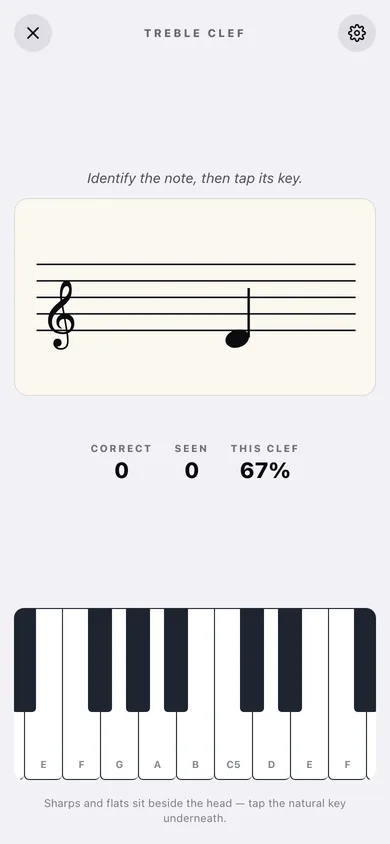
A full-screen staff and a real piano keyboard: read the note, tap its key, get the pitch played back on a correct answer and the right key shown on a miss.
Four clefs, four score sets
Treble, bass, alto and tenor — switch in a tap, and each clef keeps its own per-note mastery so learning viola C clef never touches your treble scores.
Per-note Elo mastery
Every pitch starts at 50%. A right answer moves it 20% of the way to 100, a miss takes 20% off, and the drill weights the worst notes roughly three times heavier than mastered ones.
Ledger lines and accidentals
Up to four ledger lines above and below the staff, plus sharps and flats drawn beside the head — off by default, and the app tells you when your clef average says you are ready.
A streak that never punishes
Current and longest streak, days drilled, notes-per-week bars and a 12-week heatmap. Miss a day and your mastery scores stay exactly where they were.
Stays in this browser
No account and nothing sent anywhere; export every score and drilled day as a JSON backup whenever you like.
Screens
Every screen, rebuilt for the browser
-
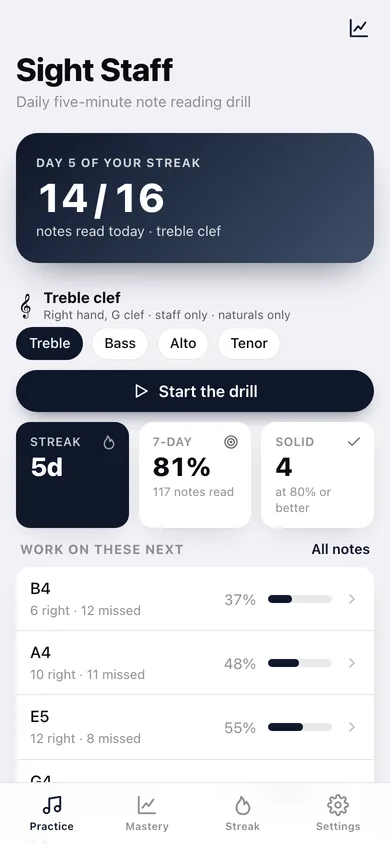
1
Practice
Streak, today's tally, clef picker, the notes you are worst at, and the button into the drill.
-
2
The drill
Full-screen staff with the current note and a scrollable two-to-four octave keyboard.
-
3
Mastery
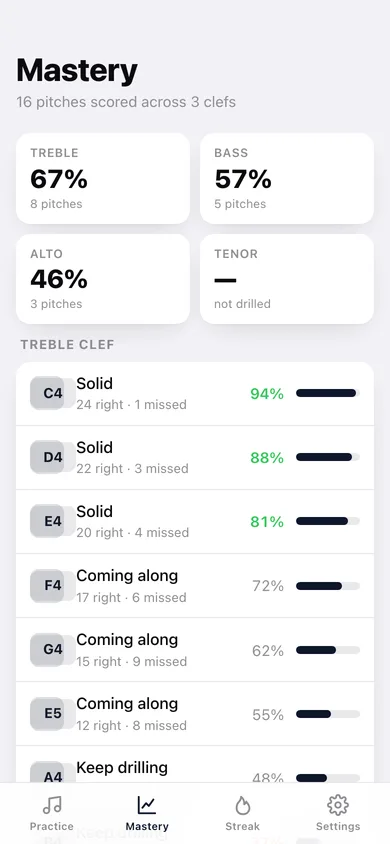
Every pitch you have drilled, grouped by clef, with its score bar and right/missed counts.
-
4
Difficulty
Ledger lines and accidentals toggles, the clef switcher, and the unlock suggestion for your current average.
-
5
Streak
Current and longest streak, notes per week, a 12-week heatmap and every drilled day.
-
6
Settings
Play the note on a correct answer, name the note in the prompt, scope defaults, backup and erase.
Try it with sample data: Loads sixteen drilled days across the last three weeks and mastery scores for sixteen pitches spread over the treble, bass and alto clefs. You can start fresh at any time.
Ready? It's free.
No account, no install, no subscription. Everything you do stays in this browser.
Your say
What should Sight Staff do? Tell us before we build it.
Tell us what to build next.
Comments need a free Google sign-in, so every one is from a real person.
Sign in with Google to commentNo comments yet — be the first to say what this app should do next.
Questions
Is the web version of Sight Staff free?+
Yes. Every screen is free to use: no subscription, no in-app purchases, no account.
Do I need an account?+
No. Open Sight Staff and start using it right away. Sign in with Google only if you want to upvote an app, save it to your list, or leave a comment.
Where is my data stored?+
Only in this browser's local storage. Nothing you enter is sent to our servers, so we can't see it, back it up, or restore it. Clearing site data, a private window, or another device starts empty. Export a backup from the in-app menu to keep it.
Is there a Sight Staff app for iPhone or Android?+
Not yet. Sight Staff is a community proposal: the browser version is complete, and we build the iPhone and Android app once 100 people upvote it. Upvoters get one email when it ships.