
Education
Nightsight: astronomy observation log
What you saw, the night you saw it.
No account, no install. What you do stays in your browser.
This app is a community proposal.
Try the full browser version now. We build the iPhone and Android app once 100 people upvote it.
We'll email you once, when it ships. Unsubscribe anytime.
| Price | Free, no subscription |
|---|---|
| Account | None needed to try |
| Works offline | Yes |
| Data | On your device, never on our servers |
| Platforms | Browser |
| Status | Community proposal (built for phones at 100 upvotes) |
| Last updated | 2026-04-13 |
Accessibility: Larger Text · iPad layout · Browser version How we checked →
 Try it live
The full Nightsight, right here in your browser.
No account and no install. What you enter is saved in this browser only, never on our servers.
Open Nightsight →
Try it live
The full Nightsight, right here in your browser.
No account and no install. What you enter is saved in this browser only, never on our servers.
Open Nightsight →


About this app
What Nightsight does
Nightsight is the offline observation log for backyard astronomers. It does the one thing SkyView Lite, Stellarium Mobile, and Star Walk 2 all refuse to do: lets you save what you actually observed, when you observed it, and from where. What Nightsight does: — Tap-to-log. You're at the eyepiece. Tap a star, planet, or Messier object. Nightsight saves it to a life-list with the date, your location (CoreLocation), and tonight's seeing conditions (you grade 1-10 on your own). — Bundled sky catalog. ~50,000 stars (Hipparcos), all 110 Messier objects, all 88 constellations, all 8 planets — on this phone, no network. Browse, search by Messier number, search by constellation. — AR sky finder. Hold up the phone. Constellations and planets are drawn in correct sky position via CoreMotion and your GPS. No subscription, no ads, no 'upgrade for planets.' — Sketch the eyepiece. PencilKit sketch pad. Your visual notes go in the entry. Beat charcoal-on-paper without giving up the paper feel. — Plate-solve your photos. Snap a photo of the sky with your phone. A small on-device CoreML constellation classifier tells you what region you captured. Save it to the entry. — Life list. Sortable by date, by object, by location. Export to CSV via the share sheet for your astronomy club. — No account, no cloud, no analytics. Stays on this phone. — Free. For the 100,000-300,000 active US amateur astronomers and the millions of telescope-curious — and for everyone tired of SkyView's compass bugs and Stellarium's spinner-only numeric input.
Features
Built to be useful, not noisy.
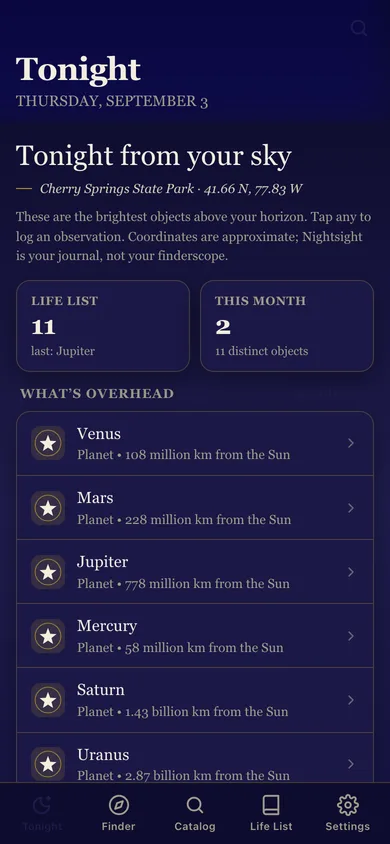
Tonight sky
What's up right now from your latitude; tap to log
AR finder
Hold the phone up; on-device sky alignment via CoreMotion
Catalog
Browse stars / Messier / constellations / planets, search
Eyepiece sketch
PencilKit pad; attach to a log entry
Life list
Sortable observation log; CSV export via share sheet
Why it exists
The problem
Backyard astronomers need a place to log what they observed — the Hipparcos catalog is huge but every iOS planetarium app is either a sub-charged AR toy with a compass bug (SkyView, Star Walk 2) or a spinner-only UX (Stellarium Mobile).
What's different
How Nightsight stands out
Nightsight is the only iOS stargazing app whose primary verb is 'logged it' — bundled Hipparcos + Messier catalog runs entirely on-device with CoreLocation + CoreMotion alignment, PencilKit sketches, and a SwiftData life list — SkyView's compass is widely reported as wrong, Stellarium charges $13.99 for spinner-only n…
You might also like
All apps →
Readfox
Education
Any book. Listens as they read.

Sayline
Education
Learn any speech or script by heart.

SpellHive
Education
Spelling Bee Prep — Spell It Out Loud

Podium: Speech Coach
Education
Live filler-word coach

IEP Vault
Education
Your IEP paper trail, offline

Minutes Owed
Education
Scheduled vs delivered minutes
FAQ
Questions about Nightsight
How much does Nightsight cost?▾
Nightsight is free. All features are included from day one — no subscription, no in-app purchases, no paid tiers. Everything you see in this listing works the moment you install it.
Where does Nightsight store my data?▾
On your device. Nightsight is built privacy-first: no account is required, no analytics SDKs, no third-party trackers. Nothing is uploaded to a server we control — the app works without one.
What platforms does Nightsight support?▾
iOS, on iPhone and iPad. You can find the latest availability on this page.
How do I get support for Nightsight?▾
Use the Support link on this page, or email support@allthingsn.com. We answer every message and keep responses on the same thread.
Related guide
Best iPhone apps with no subscription (one-time purchase & free), 2026
More notes & productivity apps with no subscription →
More in Education

