
Web app · Education
Nightsight
What you saw, the night you saw it — an offline observation log with the whole sky catalog built in
221 bright stars, all 110 Messier objects, all 88 constellations and the 7 observable planets ship inside the page. See what’s overhead from your latitude, turn a planisphere finder, tap to log an observation with seeing, notes and an eyepiece sketch, and keep a life list you can export as CSV. Free, no account.
Stored in your browser only. Nothing you do in the web version is sent to our servers. Clear your browser data and it's gone — so export a backup from the in-app menu if you want to keep it.
This app is a community proposal.
Try the full browser version now. We build the iPhone and Android app once 100 people upvote it.
We'll email you once, when it ships. Unsubscribe anytime.
In your browser
What you can do in Nightsight on the web
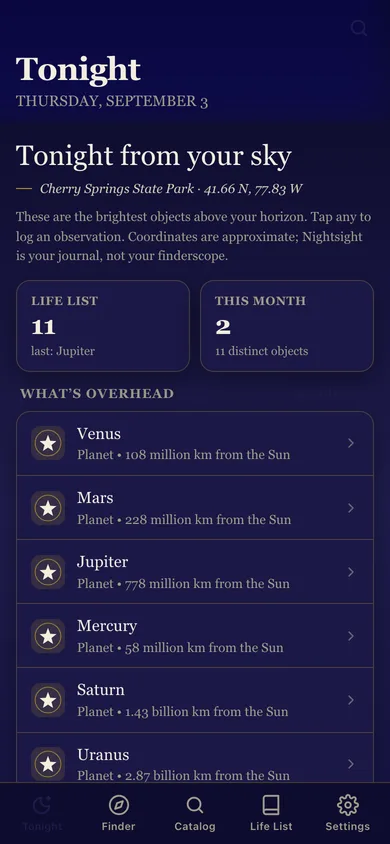
Tonight from your sky
The brightest catalog objects above your horizon for your latitude, planets first, with each star’s altitude right now — tap any to log it.
Bundled catalog
Search 221 stars, 110 Messier objects, 88 constellations and 8 planets by name, constellation or type; every object has coordinates, magnitude and a detail page.
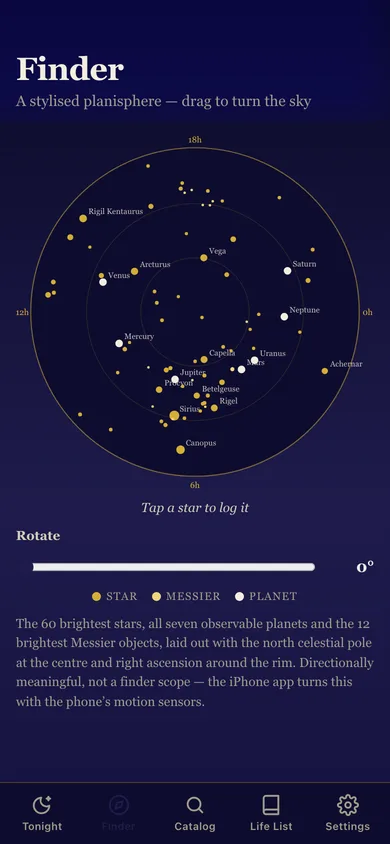
Planisphere finder
The 60 brightest stars, the planets and the 12 brightest Messier objects laid out around the north celestial pole — drag or slide to turn the sky, tap a point to log it.
Tap-to-log with a sketch
Date and time, your location, a 1–10 seeing rating with plain-language blurbs, notes, and a draw-with-your-finger eyepiece sketch saved with the entry.
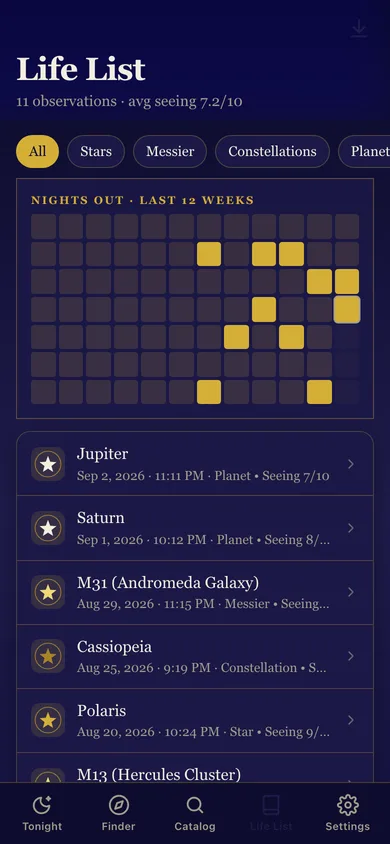
Life list
Every observation, filterable by kind, with a 12-week nights-out heatmap, average seeing, and CSV export for your astronomy club.
Observing sites
Use the browser’s location or type a latitude and longitude, and save named dark-sky sites to stamp on entries.
Screens
Every screen, rebuilt for the browser
-
1
Tonight
Date, your site, life-list stats and the objects overhead.
-
2
Finder
The gold-on-indigo planisphere; drag to rotate, tap to log.
-
3
Catalog
Search and filter the whole bundled catalog.
-
4
Object
Coordinates, magnitude, altitude right now, a blurb and your past sightings of it.
-
5
Life List
Filterable observation log with heatmap and CSV export.
-
6
Observation
One saved entry: seeing, site, notes, sketch; edit or delete.
-
7
Settings
Observing site, saved sites, life-list stats, export, sample data and erase.
Try it with sample data: Adds eleven observations across the last five weeks from Cherry Springs State Park — Jupiter, Saturn, M31, Cassiopeia, Polaris, M13, M42, Vega, the Moon, M57 and Arcturus — and saves the site. You can start fresh at any time.
Ready? It's free.
No account, no install, no subscription. Everything you do stays in this browser.
Your say
What should Nightsight do? Tell us before we build it.
Tell us what to build next.
Comments need a free Google sign-in, so every one is from a real person.
Sign in with Google to commentNo comments yet — be the first to say what this app should do next.
Questions
Is the web version of Nightsight free?+
Yes. Every screen is free to use: no subscription, no in-app purchases, no account.
Do I need an account?+
No. Open Nightsight and start using it right away. Sign in with Google only if you want to upvote an app, save it to your list, or leave a comment.
Where is my data stored?+
Only in this browser's local storage. Nothing you enter is sent to our servers, so we can't see it, back it up, or restore it. Clearing site data, a private window, or another device starts empty. Export a backup from the in-app menu to keep it.
Is there a Nightsight app for iPhone or Android?+
Not yet. Nightsight is a community proposal: the browser version is complete, and we build the iPhone and Android app once 100 people upvote it. Upvoters get one email when it ships.