
Utilities
Loadwise: load-shedding schedule tracker
Beat load-shedding, stay ready
No account, no install. What you do stays in your browser.
This app is a community proposal.
Try the full browser version now. We build the iPhone and Android app once 100 people upvote it.
We'll email you once, when it ships. Unsubscribe anytime.
| Price | Free, no subscription |
|---|---|
| Account | None needed to try |
| Works offline | Yes |
| Data | On your device, never on our servers |
| Platforms | Browser |
| Status | Community proposal (built for phones at 100 upvotes) |
| Last updated | 2026-06-07 |
Accessibility: Larger Text · Light & Dark · VoiceOver labels · iPad layout · Browser version How we checked →
 Try it live
The full Loadwise, right here in your browser.
No account and no install. What you enter is saved in this browser only, never on our servers.
Open Loadwise →
Try it live
The full Loadwise, right here in your browser.
No account and no install. What you enter is saved in this browser only, never on our servers.
Open Loadwise →


About this app
What Loadwise does
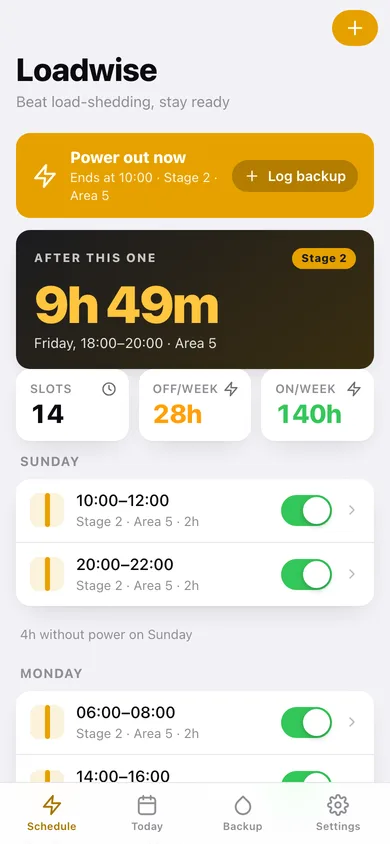
Loadwise helps you stay one step ahead of power cuts. Enter your area's load-shedding schedule and Loadwise shows the next outage, counts down to it, and warns you in time to charge devices, save your work, and fill the kettle. When the power's out, log your generator or inverter runtime and fuel so you understand your true backup cost and never get caught with an empty tank. A clear daily view lays out exactly when you'll have power and when you won't. No account. No connection needed — it all runs on your phone, even mid-blackout.
Features
Built to be useful, not noisy.
Schedule
Define recurring load-shedding slots by day and area/stage.
Countdown & reminders
Show the next outage with a countdown and a pre-outage notification.
Backup log
Record generator/inverter runtime and fuel; compute cost.
Timeline
A daily view of power vs. no-power periods.
Why it exists
The problem
Scheduled and rolling power cuts disrupt daily life and work, but people rely on scattered PDFs, SMS, and memory to know when power will go; they also lose track of generator/inverter fuel and cost. Many existing apps need a connection precisely when there's no power.
What's different
How Loadwise stands out
An offline-first outage planner that turns your area's schedule into next-cut countdowns and pre-outage reminders and adds a generator/inverter runtime-and-fuel log — all computed on-device so it works during a blackout, unlike utility apps that need connectivity exactly when the lights (and routers) are off.
You might also like
All apps →
Moment: Run of Show
Utilities
Run the event. Everyone's in the loop.

Sofa
Utilities
The last remote you'll buy.

CoverKit: Paint & Tile
Utilities
Measure walls, buy exactly enough

CurbDay
Utilities
Beat street sweeping tickets

PackCycle
Utilities
Battery fleet & cycle tracker

TongueCheck
Utilities
Decode your CAT scale slip
FAQ
Questions about Loadwise
How much does Loadwise cost?▾
Loadwise is free. All features are included from day one — no subscription, no in-app purchases, no paid tiers. Everything you see in this listing works the moment you install it.
Where does Loadwise store my data?▾
On your device. Loadwise is built privacy-first: no account is required, no analytics SDKs, no third-party trackers. Nothing is uploaded to a server we control — the app works without one.
What platforms does Loadwise support?▾
iOS, on iPhone and iPad. You can find the latest availability on this page.
How do I get support for Loadwise?▾
Use the Support link on this page, or email support@allthingsn.com. We answer every message and keep responses on the same thread.
More in Utilities

