
Photo And Video
CullKit: photo culling tool
Cull before Lightroom. On your phone.
No account, no install. What you do stays in your browser.
This app is a community proposal.
Try the full browser version now. We build the iPhone and Android app once 100 people upvote it.
We'll email you once, when it ships. Unsubscribe anytime.
| Price | Free, no subscription |
|---|---|
| Account | None needed to try |
| Works offline | Yes |
| Data | On your device, never on our servers |
| Platforms | Browser |
| Status | Community proposal (built for phones at 100 upvotes) |
| Last updated | 2026-04-06 |
Accessibility: Larger Text · VoiceOver labels · iPad layout · Browser version How we checked →
 Try it live
The full CullKit, right here in your browser.
No account and no install. What you enter is saved in this browser only, never on our servers.
Open CullKit →
Try it live
The full CullKit, right here in your browser.
No account and no install. What you enter is saved in this browser only, never on our servers.
Open CullKit →


About this app
What CullKit does
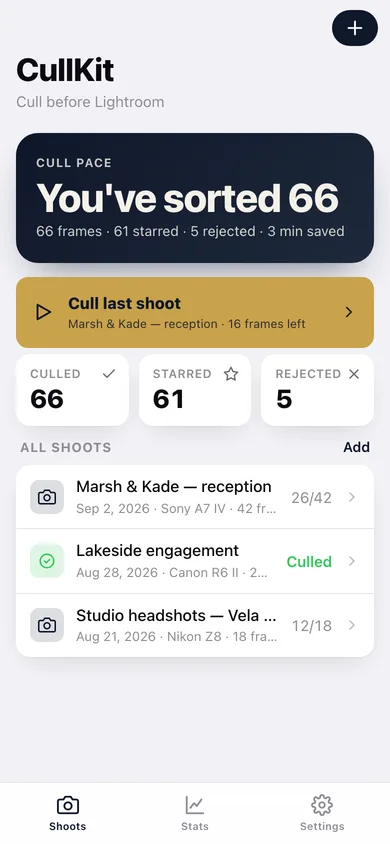
CullKit is the offline pre-Lightroom photo culler for iPhone shooters. Cull 2,000 frames during a flight, on the bus, in the field — and write 1-to-5-star ratings directly into the Photos library so Lightroom Classic picks them up on next import. What CullKit does: — Burst + near-duplicate detection on-device. Vision framework groups your photo bursts and visually-similar shots automatically. Swipe through one group at a time. — On-device blur detection. Vision flags soft focus and motion blur. CullKit suggests a pick within each burst, you keep or override. — Eyes-closed + face detection. If everyone's eyes are open, the photo bubbles up. — Big-thumb star rating. 1-to-5 stars per shot with one tap. Or reject with a swipe-left. — Writes back to Photos. The star rating becomes a real Photos rating. When you import to Lightroom Classic, the rating travels with the photo. — Cull from any folder. Your last shoot, your last trip, an entire month, a smart album. — No cloud. No upload. No AI service. No subscription. Vision + CoreML runs entirely on your iPhone's Neural Engine. Photographers shoot 2,500-4,500 frames per wedding (Aftershoot). The culling step costs them 3+ hours per event. CullKit cuts it to one — without ever leaving the phone.
Features
Built to be useful, not noisy.
Album picker
Pick the album/shoot to cull; Photos permission asked once
Cull view
Single-photo big preview; star rating + reject buttons; swipe between bursts
Burst grouping
Vision-based; jump between burst groups instead of single shots
Stats
How many culled, how many kept, time saved
Settings
Toggle: auto-suggest pick / detect eyes closed / detect blur
Why it exists
The problem
Photographers spend hours culling photos before Lightroom but every iOS culler is either Mac-only (OptiCull), cloud-AI-dependent (Aftershoot), or doesn't write XMP-compatible star ratings into Photos.
What's different
How CullKit stands out
CullKit is the only iOS culler that runs burst grouping + blur + face/eyes-closed detection 100% on-device with Vision and writes 1-5 star ratings directly into the Photos library (round-trips to Lightroom Classic on import) — PhotoPicker writes ratings but has complex UI, OptiCull is Mac-only, Aftershoot requires clo…
You might also like
All apps →
Throughline: You Over Time
Photo And Video
A time-lapse of you

Filmroll
Photo And Video
Offline film logbook & develop log

GhostFrame
Photo And Video
Photo-a-day timelapse camera

Casebook: Claims & Care
Medical
Fight a denial. Keep every promise on file.

Show Me Once
Productivity
Film it once. Get the step-by-step guide.

Moment: Run of Show
Utilities
Run the event. Everyone's in the loop.
FAQ
Questions about CullKit
How much does CullKit cost?▾
CullKit is free. All features are included from day one — no subscription, no in-app purchases, no paid tiers. Everything you see in this listing works the moment you install it.
Where does CullKit store my data?▾
On your device. CullKit is built privacy-first: no account is required, no analytics SDKs, no third-party trackers. Nothing is uploaded to a server we control — the app works without one.
What platforms does CullKit support?▾
iOS, on iPhone and iPad. You can find the latest availability on this page.
How do I get support for CullKit?▾
Use the Support link on this page, or email support@allthingsn.com. We answer every message and keep responses on the same thread.
More in Photo And Video