
Web app · Photo And Video
CullKit
Cull a whole card before Lightroom — burst by burst, in your browser
Lay out a shoot as frames with real capture times, let the 2-second burst grouper find the sequences, judge focus and eyes as you go, and star or reject with one tap. Out comes a keepers list and a ratings CSV. Free, no account, nothing uploaded.
Stored in your browser only. Nothing you do in the web version is sent to our servers. Clear your browser data and it's gone — so export a backup from the in-app menu if you want to keep it.
This app is a community proposal.
Try the full browser version now. We build the iPhone and Android app once 100 people upvote it.
We'll email you once, when it ships. Unsubscribe anytime.
In your browser
What you can do in CullKit on the web
Real burst grouping
The same rule the iPhone app uses: frames captured within a set gap of each other (2 seconds by default) are one burst, and singletons stay on their own — so you cull a sequence, not a scroll.
Suggested pick per burst
Score each frame Tack / OK / Soft and Eyes open / closed, and CullKit surfaces the highest sharpness × eyes-open score in the burst as the suggested pick — the phone's exact formula, with your eye supplying the readings.
Big-thumb star rating
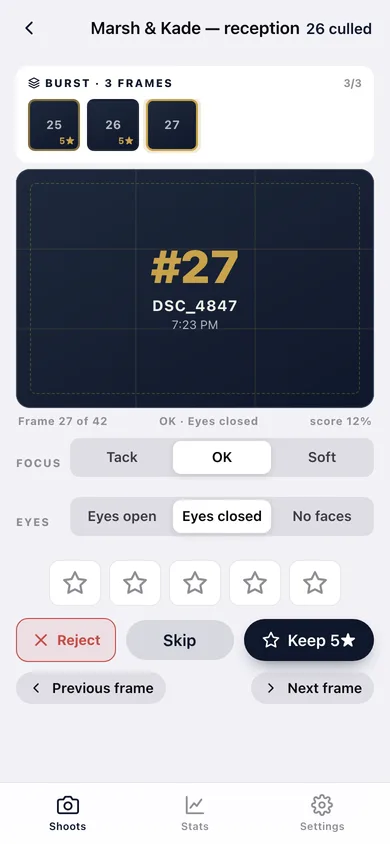
One tap for 1–5 stars, a Reject button for the misses, Skip when you can't decide, and a burst strip you can jump around in. The next frame comes up automatically.
Keepers list and ratings CSV
Copy every keeper at your star threshold as a comma-separated filename list to paste into a Lightroom filter, or download a CSV with the stars, rejects, capture times and pick scores.
Build a shoot from the card
Give it a filename prefix, first frame number, frame count and how fast you were shooting — or paste a list of filenames — and CullKit lays out the frame list with capture timestamps.
Cull pace and time saved
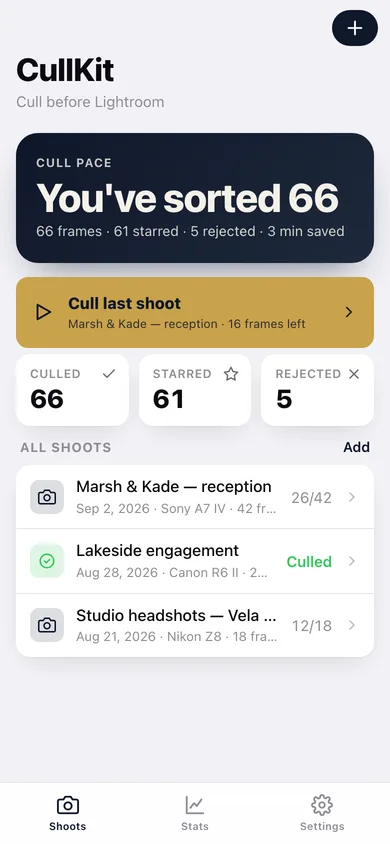
Running totals of frames culled, starred and rejected, a star distribution, culls per shoot, and minutes saved against the three-second desktop baseline.
Screens
Every screen, rebuilt for the browser
-
1
Shoots
Cull pace, a Cull last shoot button, and every shoot with how far through it you are.
-
2
Shoot detail
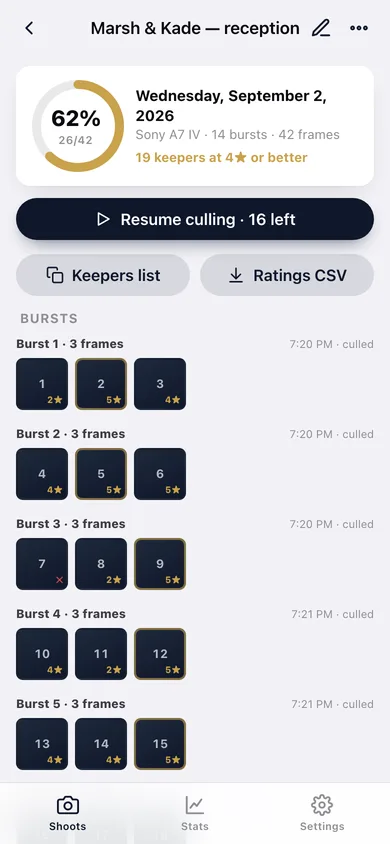
Progress ring, keeper count, every burst as a strip of rated frames, and the export buttons.
-
3
Cull
The burst strip, the frame proof card with its suggested-pick badge, the focus and eyes controls, and the star row.
-
4
Add a shoot
Title, date, camera, filename pattern, frame count and shooting rhythm — or paste filenames straight in.
-
5
Stats
Culled, starred and rejected totals, minutes saved, star distribution and culls per shoot.
-
6
Settings
Suggested picks, the focus and eyes controls, burst gap, keeper threshold, backup, sample data and erase.
Try it with sample data: Loads three shoots — a wedding reception, a lakeside engagement and a studio headshot session — with 88 frames laid out in bursts, focus and eyes judged on every frame, and 66 of them already starred or rejected. You can start fresh at any time.
Ready? It's free.
No account, no install, no subscription. Everything you do stays in this browser.
Your say
What should CullKit do? Tell us before we build it.
Tell us what to build next.
Comments need a free Google sign-in, so every one is from a real person.
Sign in with Google to commentNo comments yet — be the first to say what this app should do next.
Questions
Is the web version of CullKit free?+
Yes. Every screen is free to use: no subscription, no in-app purchases, no account.
Do I need an account?+
No. Open CullKit and start using it right away. Sign in with Google only if you want to upvote an app, save it to your list, or leave a comment.
Where is my data stored?+
Only in this browser's local storage. Nothing you enter is sent to our servers, so we can't see it, back it up, or restore it. Clearing site data, a private window, or another device starts empty. Export a backup from the in-app menu to keep it.
Is there a CullKit app for iPhone or Android?+
Not yet. CullKit is a community proposal: the browser version is complete, and we build the iPhone and Android app once 100 people upvote it. Upvoters get one email when it ships.