
Health And Fitness
TrendVial: longevity blood panel tracker
Longevity blood panel trends, offline
No account, no install. What you do stays in your browser.
This app is a community proposal.
Try the full browser version now. We build the iPhone and Android app once 100 people upvote it.
We'll email you once, when it ships. Unsubscribe anytime.
| Price | Free, no subscription |
|---|---|
| Account | None needed to try |
| Works offline | Yes |
| Data | On your device, never on our servers |
| Platforms | Browser |
| Status | Community proposal (built for phones at 100 upvotes) |
| Last updated | 2026-06-20 |
Accessibility: Larger Text · Light & Dark · iPad layout · Browser version How we checked →
 Try it live
The full TrendVial, right here in your browser.
No account and no install. What you enter is saved in this browser only, never on our servers.
Open TrendVial →


About this app
What TrendVial does
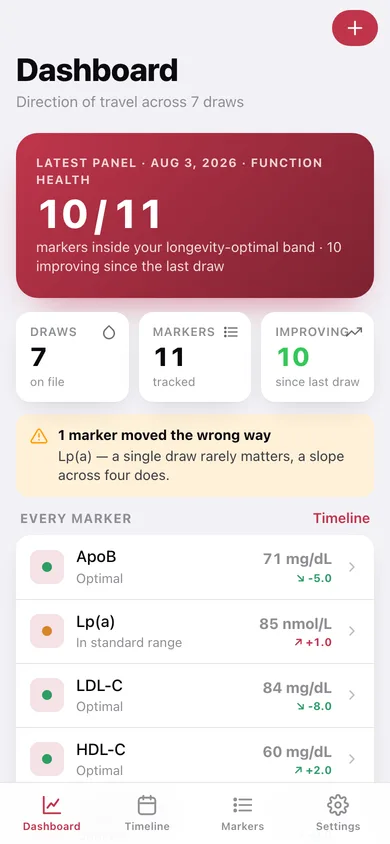
Your lab report says "normal." Your longevity goals say otherwise. TrendVial is the offline timeline for the people tracking ApoB, Lp(a), HbA1c, fasting insulin, hsCRP and the rest of the modern longevity panel draw after draw, year after year. Most lab portals show you one result at a time and grade it against a population-wide "reference range" — a band that only tells you whether you're unusual, not whether you're optimal. TrendVial flips that. Enter the markers from each blood draw and the app plots every value on a clean longitudinal chart, side by side with two bands: the standard lab reference range and the stricter optimal-for-longevity band that clinicians like Peter Attia and the 2026 dyslipidemia guidance increasingly point to. In one glance you see whether your ApoB drifted from 95 to 78 after six months of diet changes, or whether your hsCRP is quietly creeping the wrong way. Because biomarkers only mean something in motion, TrendVial adds direction-of-travel notes: a small up or down arrow on every marker, the change since your last draw, and a plain-language reminder of which way you want it heading. A single high reading rarely matters; a slope over four draws does. This is literacy, not diagnosis — the app never tells you what to do, never flags you as sick, and never replaces your physician. It simply makes your own numbers legible so your next conversation with your doctor is sharper and your interventions are something you can actually measure. The optimal bands aren't one-size-fits-all. Set your age and risk context once during onboarding and the longevity-optimal target for ApoB and friends adjusts accordingly — the band a healthy 38-year-old aims for is not the band a 62-year-old with cardiovascular history aims for, and TrendVial reflects that. The standard reference band stays visible alongside it so you always have both frames at once. Everything is on-device. There's no login, no portal scraping, no data broker in the middle. You can log a draw in under a minute, attach the lab name, and revisit it offline on a plane. Mark a draw as fasted, tag an intervention (started rosuvastatin, cut refined carbs), and watch how the line bends around it. TrendVial covers the markers the longevity world actually orders — ApoB, Lp(a), LDL-C, HDL-C, triglycerides, HbA1c, fasting glucose and insulin, hsCRP, ALT, eGFR, and a custom slot for anything else your panel includes. Add your age and risk context once and the optimal bands adjust to you. If labread explained a single result and cuffbook tracked your blood pressure, TrendVial is the piece that's been missing: the long-game artifact that holds your whole panel across the years.
Features
Built to be useful, not noisy.
Panel timeline
Every blood draw becomes a dated entry; tap any marker to see its full longitudinal chart across all draws with standard and optimal bands overlaid.
Quick draw entry
Add a draw in under a minute: pick markers from the curated library, type values and the draw date, tag it as fasted, and optionally note an intervention.
Optimal-vs-standard bands
Each marker renders both the population reference range and the stricter longevity-optimal band, adjusted to the user's age and risk context set during onboarding.
Direction of travel
A panel dashboard shows every marker with an up/down arrow, the delta since the last draw, and plain-language literacy notes on which way is favorable.
Why it exists
The problem
Lab portals show one result at a time graded against a population-wide reference range that says 'normal' even when a value is far from longevity-optimal, and offer no clean multi-year view of a whole panel's direction of travel.
What's different
How TrendVial stands out
TrendVial is a longitudinal multi-marker panel timeline with dual standard-vs-optimal bands and direction-of-travel notes. Incumbents differ: lab portals (LabCorp, Quest) show isolated results with only standard ranges and no optimal context; Function Health and Superpower are subscription, cloud-bound services tied t…
You might also like
All apps →
Roundbell
Health And Fitness
Tabata, EMOM & Boxing Rounds

Footfall
Health And Fitness
Free Pedometer, No Ads

Yoga Coach
Health And Fitness
Free AI yoga trainer with real pose feedback

Resonate: Voice Trainer
Health And Fitness
Pitch and resonance, live

StrideLab: Run Form
Health And Fitness
Running form from a slo-mo

PaceGrid
Health And Fitness
Split your race, hit your time
FAQ
Questions about TrendVial
How much does TrendVial cost?▾
TrendVial is free. All features are included from day one — no subscription, no in-app purchases, no paid tiers. Everything you see in this listing works the moment you install it.
Where does TrendVial store my data?▾
TrendVial stores what you enter on your device. No account is required, and we never sell your data. Any anonymous usage data or optional notifications are explained in the TrendVial privacy policy.
What platforms does TrendVial support?▾
iOS, on iPhone and iPad. You can find the latest availability on this page.
How do I get support for TrendVial?▾
Use the Support link on this page, or email support@allthingsn.com. We answer every message and keep responses on the same thread.
Related guide
Best offline recipe & cooking apps, 2026
More recipes & food apps with no subscription →
More in Health And Fitness

