
Health And Fitness
Relief Map: pressure relief reminder & skin check
Pressure relief, on schedule
No account, no install. What you do stays in your browser.
This app is a community proposal.
Try the full browser version now. We build the iPhone and Android app once 100 people upvote it.
We'll email you once, when it ships. Unsubscribe anytime.
| Price | Free, no subscription |
|---|---|
| Account | None needed to try |
| Works offline | Yes |
| Data | On your device, never on our servers |
| Platforms | Browser |
| Status | Community proposal (built for phones at 100 upvotes) |
| Last updated | 2026-07-09 |
Accessibility: Larger Text · Light & Dark · VoiceOver labels · Haptics · iPad layout · Browser version How we checked →
 Try it live
The full Relief Map, right here in your browser.
No account and no install. What you enter is saved in this browser only, never on our servers.
Open Relief Map →


About this app
What Relief Map does
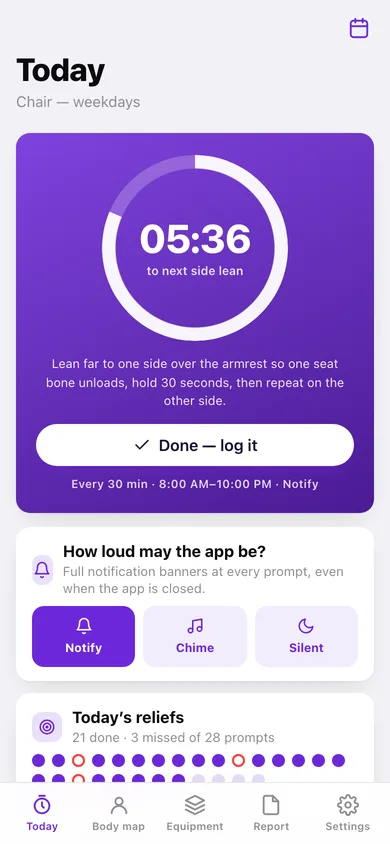
You are told to shift your weight every fifteen to thirty minutes, all day, for the rest of your life — and to check your skin head to toe every morning and night. For a wheelchair user with limited sensation it is the routine that keeps you out of the hospital, and it is nearly impossible to keep on willpower alone. Relief Map is the private coach that carries it for you. Set the schedule your therapist or seating clinic gave you and Relief Map runs a calm countdown through your active hours. When it is time, a reminder names the technique — forward lean, side lean, tilt, or wheelchair push-up — and one tap logs the relief. You decide how loud the app may be: full reminders, a gentle chime, or a silent on-screen ring for days when fifty notifications would make anyone delete an app. Miss a shift and the day view shows it honestly, because a record you can trust matters more than a perfect streak. Skin checks finally get a real tool. Instead of five generic body spots, Relief Map gives you a full-body map, front and back. Tap the sacrum, an ischial spot, a heel, an elbow — anywhere — and log what you see with notes and photos that stay out of your camera roll. Every spot keeps its own history, so you can put today's photo beside last week's and see whether that redness is fading or spreading while acting early still counts. Plain-language notes drawn from published Model Systems clinical factsheets describe what each stage generally looks like — education only, never a diagnosis; your care team always makes the call. Cushions and mattresses wear out silently, so Relief Map keeps an equipment log with its own check intervals. And when the wound clinic or seating specialist asks how the routine is going, a clean PDF report shows your relief record, skin checks, and equipment checks over any date range. No sensors to buy. No account to create. Nothing leaves your phone.
Features
Built to be useful, not noisy.
Relief Interval Coach
A countdown ring tuned to the prescribed interval (10-60 min) inside a daily active-hours window. Each prompt names a technique (forward lean, side lean, tilt, push-up) and one tap logs it; missed intervals are recorded honestly. Reminder loudness is a first-class setting: notifications, chime-only, or silent in-app ring.
Body-Map Skin Checks
Front and back full-body silhouettes with tappable pressure-point regions (sacrum, ischia, heels, elbows, shoulder blades, and more). Tap a spot to log a check with status, notes, and photos kept out of the camera roll. Educational stage descriptions sourced from Model Systems factsheets, clearly labeled as education, not diagnosis.
Photo Comparison
Every body spot keeps a dated photo timeline; a side-by-side comparison view puts any two photos of the same spot next to each other so change over days is visible at a glance.
Equipment & Cushion Log
Track cushions, mattresses, backrests, and shower chairs with per-item check intervals (air level, wear, bottoming out). Overdue checks surface on the Today screen.
Clinic Report
Generates a dated PDF over any range: relief compliance by day, skin-check log with per-spot notes, and equipment checks — the artifact wound clinics and seating specialists ask for.
Schedules & Caregiver Mode
Multiple named schedules for different contexts (chair weekday, bed turns at night, new-cushion trial) plus a caregiver summary screen showing today's reliefs, open skin concerns, and due equipment checks in one glance.
Why it exists
The problem
Loss of sensation means a pressure sore can develop unfelt in hours and end in months of bed rest or surgery. Clinicians prescribe weight shifts every 15-30 minutes plus twice-daily skin inspection, but compliance collapses without prompts — a controlled trial showed reminders significantly improve relief frequency an…
What's different
How Relief Map stands out
The only direct App Store competitor is the Reeve-funded Pressure Ulcer Prevention (PUP) app from ~2015 — five body areas, 3.0 stars, crashes on timer adjustment, effectively abandoned; wsTimer is a bare 2012-era timer. Sensomative and MisterGaspard require purchased seat-sensor hardware sold outside the US, and Permo…
You might also like
All apps →
Roundbell
Health And Fitness
Tabata, EMOM & Boxing Rounds

Footfall
Health And Fitness
Free Pedometer, No Ads

Yoga Coach
Health And Fitness
Free AI yoga trainer with real pose feedback

Resonate: Voice Trainer
Health And Fitness
Pitch and resonance, live

StrideLab: Run Form
Health And Fitness
Running form from a slo-mo

PaceGrid
Health And Fitness
Split your race, hit your time
FAQ
Questions about Relief Map
How much does Relief Map cost?▾
Relief Map is free. All features are included from day one — no subscription, no in-app purchases, no paid tiers. Everything you see in this listing works the moment you install it.
Where does Relief Map store my data?▾
Relief Map stores what you enter on your device. No account is required, and we never sell your data. Any anonymous usage data or optional notifications are explained in the Relief Map privacy policy.
What platforms does Relief Map support?▾
iOS, on iPhone and iPad. You can find the latest availability on this page.
How do I get support for Relief Map?▾
Use the Support link on this page, or email support@allthingsn.com. We answer every message and keep responses on the same thread.
Related guide
Best offline fitness tracker apps, 2026
More fitness & workouts apps with no subscription →
More in Health And Fitness

