
Web app · Health And Fitness
Relief Map
Run your prescribed weight-shift schedule and log every skin check
A countdown ring for the relief interval your clinic prescribed, an honest done/missed record of the day, a tappable 18-point body map with per-spot check history, equipment check intervals, and a report for the wound clinic. Free, no account, nothing to install.
Stored in your browser only. Nothing you do in the web version is sent to our servers. Clear your browser data and it's gone — so export a backup from the in-app menu if you want to keep it.
This app is a community proposal.
Try the full browser version now. We build the iPhone and Android app once 100 people upvote it.
We'll email you once, when it ships. Unsubscribe anytime.
In your browser
What you can do in Relief Map on the web
Relief interval coach
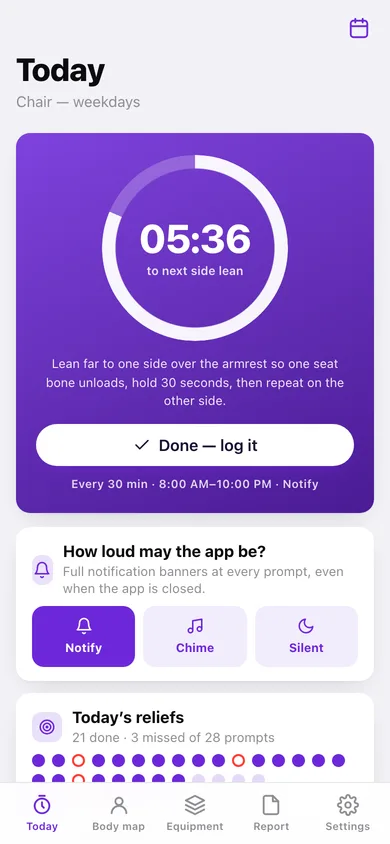
Set the interval and active hours your seating clinic gave you and the ring counts down to the next shift, naming the technique — forward lean, side lean, tilt or wheelchair push-up.
Reminder loudness as a first-class control
Notify, Chime or Silent, switchable from the home screen, because thirty prompts a day should inform rather than nag.
Honest done / missed record
Every prompt in the day becomes a dot — filled when you logged the shift, hollow when the window passed. A record you can trust beats a perfect streak.
18-point body map, front and back
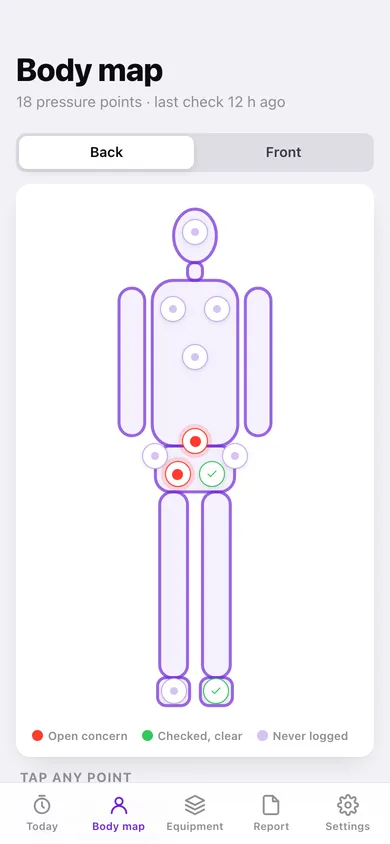
Tap the sacrum, an ischial tuberosity, a trochanter, a heel or an elbow to open that spot's own history and log a Clear / Redness / Watch / Reported check with notes.
Equipment check intervals
Cushion, mattress overlay, backrest and shower chair each carry their own check interval, last-checked date and pass/attention log.
Caregiver summary and clinic report
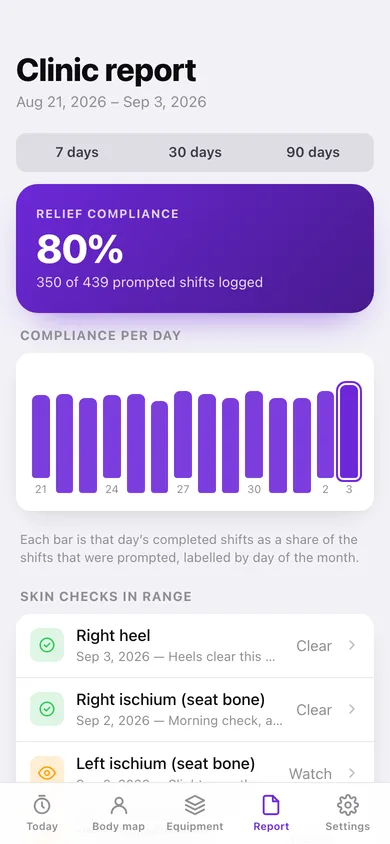
A shift-change screen a PCA can read in ten seconds, plus a 7/30/90-day compliance report with per-day bars, copy-to-clipboard text and a CSV.
Screens
Every screen, rebuilt for the browser
-
1
Today
Countdown ring to the next shift, reminder loudness, and today's done/missed dot strip.
-
2
Body map
Front and back silhouettes with all 18 pressure points, coloured by whether a spot is clear, concerning or never logged.
-
3
Clinic report
Relief compliance over 7, 30 or 90 days with per-day bars, skin checks and equipment checks in range.
-
4
Spot history
One body point's checks newest-first, plus the plain-language stage notes.
-
5
New skin check
Log status and notes for one spot, and resolve an earlier concern there.
-
6
Schedules
Every relief schedule you keep — chair weekdays, weekends, overnight bed turns.
-
7
Schedule editor
Interval, active-hours window, weekdays, technique and reminder loudness.
-
8
Equipment
Cushions and mattresses with their check intervals, due dates and pass/attention log.
-
9
Caregiver summary
Shift-change handover: today's reliefs, open skin concerns, equipment due.
-
10
Settings
Running schedule, default body-map side, report range, CSV export, sample data and erase.
Try it with sample data: Loads four schedules (weekday chair, weekend chair, overnight bed turns, a paused cushion trial), two weeks of logged reliefs with a few honest misses, seven skin checks including an open sacral concern, and four pieces of equipment with their check history. You can start fresh at any time.
Ready? It's free.
No account, no install, no subscription. Everything you do stays in this browser.
Your say
What should Relief Map do? Tell us before we build it.
Tell us what to build next.
Comments need a free Google sign-in, so every one is from a real person.
Sign in with Google to commentNo comments yet — be the first to say what this app should do next.
Questions
Is the web version of Relief Map free?+
Yes. Every screen is free to use: no subscription, no in-app purchases, no account.
Do I need an account?+
No. Open Relief Map and start using it right away. Sign in with Google only if you want to upvote an app, save it to your list, or leave a comment.
Where is my data stored?+
Only in this browser's local storage. Nothing you enter is sent to our servers, so we can't see it, back it up, or restore it. Clearing site data, a private window, or another device starts empty. Export a backup from the in-app menu to keep it.
Is there a Relief Map app for iPhone or Android?+
Not yet. Relief Map is a community proposal: the browser version is complete, and we build the iPhone and Android app once 100 people upvote it. Upvoters get one email when it ships.