
Utilities
Garagebook: car maintenance log
Your car's service binder, offline.
No account, no install. What you do stays in your browser.
This app is a community proposal.
Try the full browser version now. We build the iPhone and Android app once 100 people upvote it.
We'll email you once, when it ships. Unsubscribe anytime.
| Price | Free, no subscription |
|---|---|
| Account | None needed to try |
| Works offline | Yes |
| Data | On your device, never on our servers |
| Platforms | Browser |
| Status | Community proposal (built for phones at 100 upvotes) |
| Last updated | 2026-04-27 |
Accessibility: Larger Text · iPad layout · Browser version How we checked →
 Try it live
The full Garagebook, right here in your browser.
No account and no install. What you enter is saved in this browser only, never on our servers.
Open Garagebook →
Try it live
The full Garagebook, right here in your browser.
No account and no install. What you enter is saved in this browser only, never on our servers.
Open Garagebook →


About this app
What Garagebook does
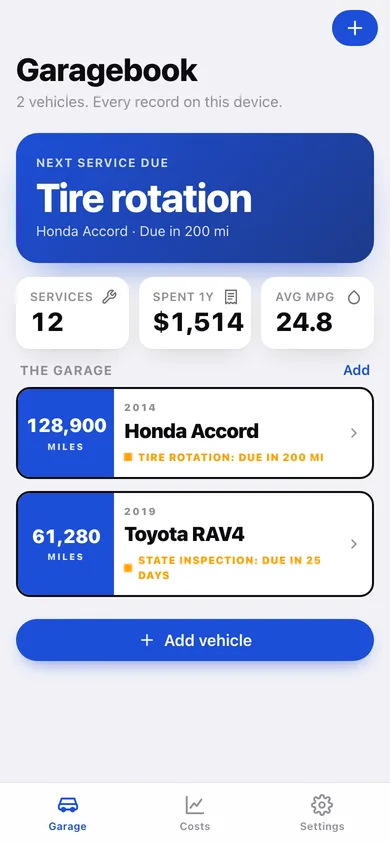
Garagebook is the offline service log for the 284 million vehicles on US roads — built for the owner of an aging car (the average US vehicle is now 12.8 years old) who just wants a clean record of what's been done and a reminder when the next oil change is due. The car-log category is broken: Drivvo buries the tiny font under huge ads and paywalls PDF export, AUTOsist charges fleet pricing ($59/mo minimum) absurd for a household, and Fuelly is a web-first social network that wants an account for your own mileage. What Garagebook does: — Per-vehicle service history. Log oil changes, brakes, tires, fluids, batteries, inspections — date, mileage, cost, shop, notes. Photo the receipt; VisionKit reads the total and odometer. — Bundled service intervals. Garagebook ships sensible defaults (oil every 5,000-7,500 mi, tire rotation every 6,000, brake fluid every 2 years) and reminds you by mileage or date. No VIN lookup, no network. — Fuel log. Fill-ups with gallons + cost → automatic MPG, cost-per-mile, and a trend chart. — The resale binder. One tap exports a clean PDF of the full service history — the document a buyer or mechanic actually trusts. Print it or AirDrop it. — Multiple vehicles. The whole household's cars, one app. — Reminders that work offline. Local notifications for upcoming service. — No account, no ads, no subscription, no cloud. Your maintenance records live on this phone. For the 26 million American DIY car owners and every household keeping a car past its warranty.
Features
Built to be useful, not noisy.
Garage
All vehicles with next-service-due badge
Log service
Type, date, mileage, cost, shop, notes; OCR receipt
Fuel log
Fill-ups → MPG + cost-per-mile trend (Swift Charts)
Reminders
Mileage/date interval reminders, local notifications
Resale binder
One-tap PDF of full service history via share sheet
Why it exists
The problem
Owners of aging cars want a simple per-vehicle service log with interval reminders and a shareable PDF history, but Drivvo is ad-heavy and paywalls export, AUTOsist is fleet-priced, and Fuelly requires a cloud account.
What's different
How Garagebook stands out
Garagebook is the only car-maintenance app that works entirely offline with no account, ships bundled service-interval reminders (no VIN API), reads receipts/odometers via VisionKit OCR, and exports a clean resale-binder PDF for free — Drivvo paywalls PDF export and buries the UI in ads, AUTOsist charges $59/mo fleet…
You might also like
All apps →
Moment: Run of Show
Utilities
Run the event. Everyone's in the loop.

Sofa
Utilities
The last remote you'll buy.

CoverKit: Paint & Tile
Utilities
Measure walls, buy exactly enough

CurbDay
Utilities
Beat street sweeping tickets

PackCycle
Utilities
Battery fleet & cycle tracker

TongueCheck
Utilities
Decode your CAT scale slip
FAQ
Questions about Garagebook
How much does Garagebook cost?▾
Garagebook is free. All features are included from day one — no subscription, no in-app purchases, no paid tiers. Everything you see in this listing works the moment you install it.
Where does Garagebook store my data?▾
On your device. Garagebook is built privacy-first: no account is required, no analytics SDKs, no third-party trackers. Nothing is uploaded to a server we control — the app works without one.
What platforms does Garagebook support?▾
iOS, on iPhone and iPad. You can find the latest availability on this page.
How do I get support for Garagebook?▾
Use the Support link on this page, or email support@allthingsn.com. We answer every message and keep responses on the same thread.
Related guide
Best iPhone apps with no subscription (one-time purchase & free), 2026
More collections & hobbies apps with no subscription →
Guides featuring Garagebook
More to read
More in Utilities
