
Web app · Utilities
Garagebook
Your car's service binder — every oil change, fill-up and reminder, in the browser
Log service by date, mileage, cost and shop; get bundled interval reminders (oil every 6,000 mi, brake fluid every 2 years); track MPG and cost per mile from your fill-ups; and export the resale binder. Free, no account, no install.
Stored in your browser only. Nothing you do in the web version is sent to our servers. Clear your browser data and it's gone — so export a backup from the in-app menu if you want to keep it.
This app is a community proposal.
Try the full browser version now. We build the iPhone and Android app once 100 people upvote it.
We'll email you once, when it ships. Unsubscribe anytime.
In your browser
What you can do in Garagebook on the web
A garage, not a spreadsheet
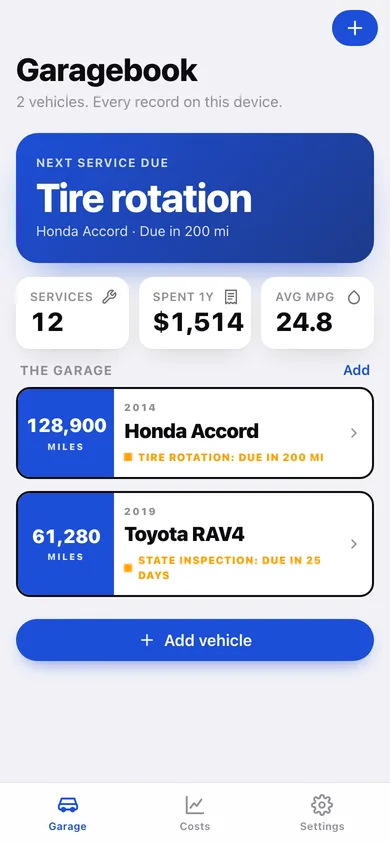
Every vehicle side by side with its odometer slab and the one thing that's overdue or due soon — the whole household's cars in one place.
Real service history
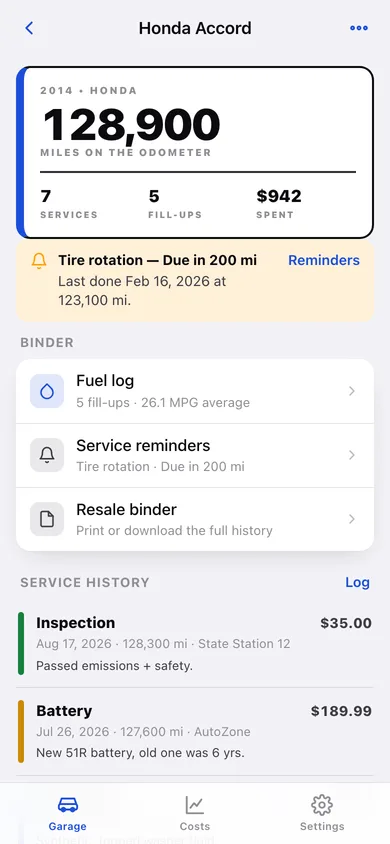
Oil, brakes, tires, fluids, battery, inspection or other — with date, odometer, cost, shop and notes, editable and deletable from the timeline.
Bundled interval reminders
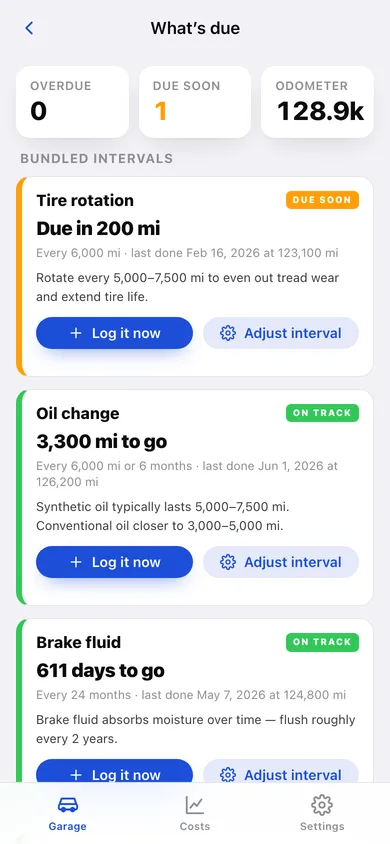
The six manufacturer-agnostic intervals from the iPhone app — oil 6,000 mi / 6 mo, tire rotation 6,000 mi, brake fluid 24 mo, air filter 20,000 mi, battery 12 mo, state inspection 12 mo — computed against your real mileage, and adjustable per interval.
Fuel log with MPG
Fill-ups become miles ÷ gallons between consecutive pumps: an MPG trend line, a cost-per-mile bar chart and a per-tank list.
Running costs, 12-month rolling
What the garage actually costs: month-by-month spend, a donut of service categories versus fuel, cost per mile and a per-vehicle breakdown.
The resale binder
A printable service-and-fuel binder for a buyer or mechanic, downloadable as text or CSV — no paywall on export.
Screens
Every screen, rebuilt for the browser
-
1
Garage
The next service due across the garage, 12-month spend and average MPG, then every vehicle with its odometer and due badge.
-
2
Vehicle binder
Odometer header, what's due, the service timeline and shortcuts to fuel, reminders and the resale binder.
-
3
Add or edit a vehicle
Year, make, model, odometer and a plate or nickname — no VIN lookup, no network.
-
4
Log service
Type, date, odometer, cost, shop and notes; logging a higher odometer moves the vehicle's reading forward.
-
5
Fuel log
Average MPG and cost per mile, an MPG trend per tank, and every fill-up with its own computed economy.
-
6
What's due
Each bundled interval with overdue / due soon / on track, the last service on file and an adjustable interval.
-
7
Resale binder
The printable service-and-fuel record with download and CSV export.
-
8
Running costs
Rolling 12-month spend, month-by-month bars, a service-versus-fuel donut and per-vehicle totals.
-
9
Settings
Due-soon windows, the garage list, backup export, sample data and erase.
Try it with sample data: Loads a two-car household — a 2014 Honda Accord at 128,900 mi with a tire rotation coming due, and a 2019 Toyota RAV4 — with twelve service records and ten fill-ups across the last eleven months. You can start fresh at any time.
Ready? It's free.
No account, no install, no subscription. Everything you do stays in this browser.
Your say
What should Garagebook do? Tell us before we build it.
Tell us what to build next.
Comments need a free Google sign-in, so every one is from a real person.
Sign in with Google to commentNo comments yet — be the first to say what this app should do next.
Questions
Is the web version of Garagebook free?+
Yes. Every screen is free to use: no subscription, no in-app purchases, no account.
Do I need an account?+
No. Open Garagebook and start using it right away. Sign in with Google only if you want to upvote an app, save it to your list, or leave a comment.
Where is my data stored?+
Only in this browser's local storage. Nothing you enter is sent to our servers, so we can't see it, back it up, or restore it. Clearing site data, a private window, or another device starts empty. Export a backup from the in-app menu to keep it.
Is there a Garagebook app for iPhone or Android?+
Not yet. Garagebook is a community proposal: the browser version is complete, and we build the iPhone and Android app once 100 people upvote it. Upvoters get one email when it ships.