
Utilities
BackupHours: home battery outage runtime planner
Outage runtime planner, fully offline
No account, no install. What you do stays in your browser.
This app is a community proposal.
Try the full browser version now. We build the iPhone and Android app once 100 people upvote it.
We'll email you once, when it ships. Unsubscribe anytime.
| Price | Free, no subscription |
|---|---|
| Account | None needed to try |
| Works offline | Yes |
| Data | On your device, never on our servers |
| Platforms | Browser |
| Status | Community proposal (built for phones at 100 upvotes) |
| Last updated | 2026-06-20 |
Accessibility: Larger Text · Light & Dark · iPad layout · Browser version How we checked →
 Try it live
The full BackupHours, right here in your browser.
No account and no install. What you enter is saved in this browser only, never on our servers.
Open BackupHours →


About this app
What BackupHours does
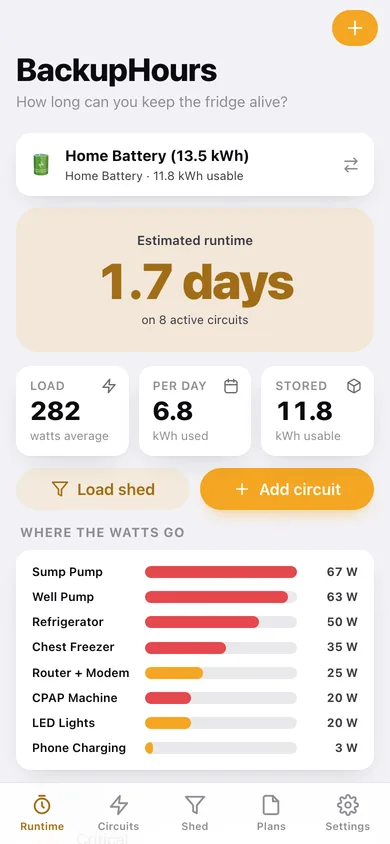
When the power goes out, the only question that matters is: how long until the fridge dies? BackupHours answers it in seconds. BackupHours is an offline runtime planner for anyone with a home battery, solar setup, EV with vehicle-to-home, or a fuel generator. Instead of vague marketing numbers like "backup for your home," you build a real list of YOUR appliances and circuits — fridge, chest freezer, well pump, sump pump, CPAP, router, space heater, medical devices — each with its wattage and how many hours a day it actually runs. BackupHours then calculates exactly how many hours (or days) your stored energy will carry that load, accounting for inverter efficiency and battery depth-of-discharge. The magic is load-shedding. Tag each circuit as Critical, Important, or Optional, then watch your runtime stretch as you shed the optional loads. See at a glance that running everything gives you 9 hours, but dropping the space heater and dryer buys you three full days on just the essentials. Build outage scenarios ahead of time — a 12-hour storm, a 3-day grid failure — so the plan is already made before you ever need it. Model any energy source: a 13.5 kWh home battery, a stackable solar-plus-storage system, a 77 kWh EV battery feeding the house through V2H, or a 4,000-watt generator with a known fuel burn rate. Generators get fuel-aware runtime so you know how many gallons stand between you and a dead fridge. Solar users can add a daily recharge estimate to model multi-day off-grid resilience. Because an outage is exactly when the internet is gone, BackupHours is built offline-first. No account, no login, no cloud, no subscription nagging you during an emergency. Everything you enter lives on this device. Open the app in a blackout and your whole plan is right there, instantly. BackupHours is for the people who plan ahead. Maybe you live where the grid is shaky, where wildfire shutoffs or hurricane season are a yearly reality, or where you just installed a shiny new battery and want to know what it can really do. Maybe you rely on a CPAP, a fridge full of insulin, a sump pump that keeps the basement dry, or a well pump that is the only thing standing between you and no running water. For you, "how many hours" is not a hobby question — it is a safety question, and a vague spec sheet will not cut it. The setup takes a few minutes once, and then it is done forever. Add your circuits, pick your priorities, save a scenario or two, and the plan lives quietly on your phone until the day you need it. No syncing, no re-downloading, no subscription that expires at the worst possible moment. Whether you just installed a battery, drive an EV that can power your home, or keep a generator in the garage for hurricane season, BackupHours turns specs on a box into a number you can actually act on.
Features
Built to be useful, not noisy.
Source-aware runtime engine
Pick battery, solar, EV V2H or generator and enter usable energy; the engine computes hours/days against your total load with inverter efficiency and depth-of-discharge applied.
Circuit & appliance list
Add each appliance or circuit with watts and daily run-hours, choosing from common presets (fridge, freezer, well pump, CPAP, router) or custom values.
Load-shed planner
Tag circuits Critical, Important or Optional and toggle tiers off to instantly see runtime stretch, finding the minimum viable load for a long outage.
Outage scenarios
Save named scenarios (12-hour storm, 3-day grid failure) with their own active circuits and source so the plan is ready before an emergency.
Why it exists
The problem
Battery and generator specs are marketed in vague kWh or 'whole-home' terms; owners can't tell how many hours their actual fridge, well pump and medical devices will run, or how to stretch that time by shedding loads.
What's different
How BackupHours stands out
Incumbents handle adjacent jobs but none do outage runtime math: Loadwise tracks the utility/rate schedule, GenLog tracks $/kWh costs, and ChargeBook logs charging sessions. Generic survival apps and battery-vendor companion apps either need the internet or only show a single canned 'backup hours' figure with no per-c…
You might also like
All apps →
Moment: Run of Show
Utilities
Run the event. Everyone's in the loop.

Sofa
Utilities
The last remote you'll buy.

CoverKit: Paint & Tile
Utilities
Measure walls, buy exactly enough

CurbDay
Utilities
Beat street sweeping tickets

PackCycle
Utilities
Battery fleet & cycle tracker

TongueCheck
Utilities
Decode your CAT scale slip
FAQ
Questions about BackupHours
How much does BackupHours cost?▾
BackupHours is free. All features are included from day one — no subscription, no in-app purchases, no paid tiers. Everything you see in this listing works the moment you install it.
Where does BackupHours store my data?▾
BackupHours stores what you enter on your device. No account is required, and we never sell your data. Any anonymous usage data or optional notifications are explained in the BackupHours privacy policy.
What platforms does BackupHours support?▾
iOS, on iPhone and iPad. You can find the latest availability on this page.
How do I get support for BackupHours?▾
Use the Support link on this page, or email support@allthingsn.com. We answer every message and keep responses on the same thread.
Related guide
Best iPhone apps with no subscription (one-time purchase & free), 2026
More notes & productivity apps with no subscription →
More in Utilities

