
Web app · Utilities
BackupHours
How many hours will your battery really run the fridge?
Build your real circuit list with wattages and daily run-hours, pick a battery, solar, EV V2H or generator, and BackupHours turns the spec sheet into hours — then shows how far load-shedding stretches them. Free, offline, no account.
Stored in your browser only. Nothing you do in the web version is sent to our servers. Clear your browser data and it's gone — so export a backup from the in-app menu if you want to keep it.
This app is a community proposal.
Try the full browser version now. We build the iPhone and Android app once 100 people upvote it.
We'll email you once, when it ships. Unsubscribe anytime.
In your browser
What you can do in BackupHours on the web
Runtime that uses the honest numbers
Depth-of-discharge and inverter efficiency come off the top, and a generator's runtime comes from gallons on hand divided by its burn rate.
Four source types
Home battery, solar-plus-storage with a daily recharge, an EV feeding the house through V2H, or a fuel generator — each with its own inputs and its own math.
Fourteen circuit presets
Fridge, chest freezer, sump pump, well pump, CPAP, furnace blower, router, LED lights, phone charging, microwave, space heater, dryer, TV and coffee maker — with real watts and duty cycles.
Load-shed planner
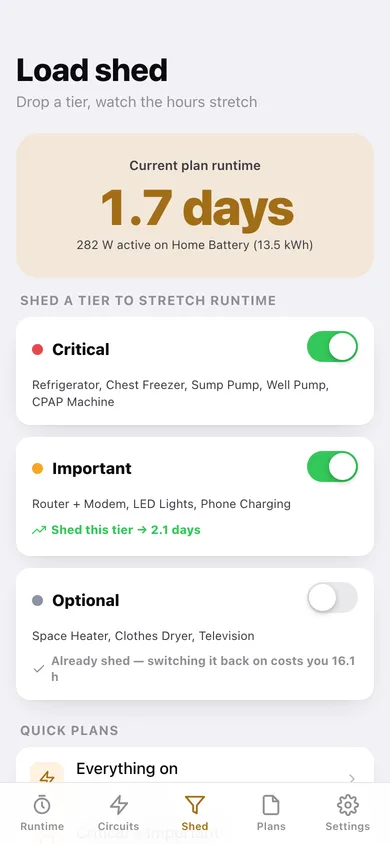
Tag every circuit Critical, Important or Optional and see exactly what each tier costs you: shed the heater and dryer and watch nine hours become three days.
Saved outage scenarios
A 12-hour storm, a 3-day grid failure, a wildfire shutoff — each with its own kept tiers and source, flagged Covered or Short against the outage length you are planning for.
Export the plan
Download the circuit list as CSV or a full JSON backup — the printable plan to stick on the panel door.
Screens
Every screen, rebuilt for the browser
-
1
Runtime
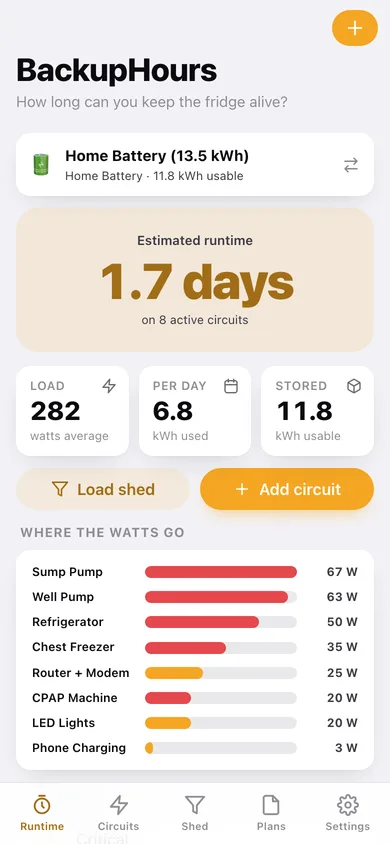
Estimated runtime in one huge number, the active source, load and stored energy, a where-the-watts-go bar chart and a by-priority breakdown.
-
2
Load shed
Current runtime, a card per tier showing what shedding it buys you, and three one-tap plans from Everything on to Critical only.
-
3
Circuits
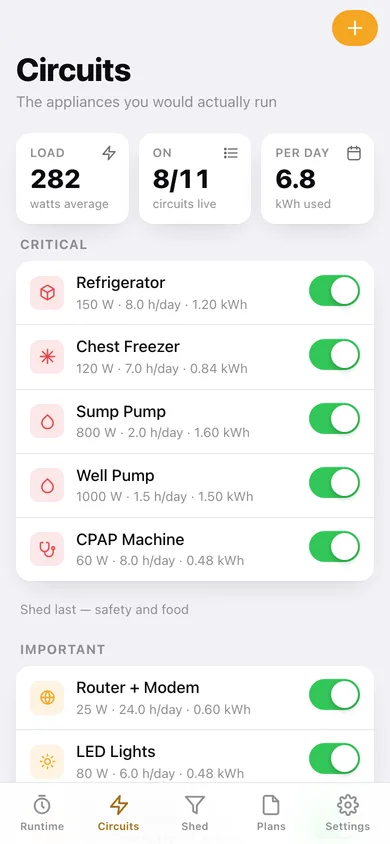
Every appliance grouped by priority with watts, hours per day and kWh per day, each with a switch that changes the runtime instantly.
-
4
New circuit
Quick-add from fourteen household presets, then set wattage, hours per day and priority and watch the daily energy update.
-
5
Outage plans
Saved scenarios with their runtime, the outage length they plan for, and a Covered or Short flag.
-
6
Scenario
One outage plan: live runtime against the planned outage length, the tiers it keeps powered, its source and notes.
-
7
Energy sources
Every battery, array, EV and generator with its usable energy and what it would deliver against today's load.
-
8
Energy source
Capacity, depth-of-discharge and inverter efficiency — or generator output, fuel on hand and burn rate — with the usable energy computed as you slide.
-
9
Settings
Planning defaults, CSV and JSON export, the formulas written out, sample household and erase.
Try it with sample data: Loads a believable household: four energy sources (13.5 kWh battery, solar + storage, a 77 kWh EV on V2H and a 4 kW generator), eleven circuits from fridge to clothes dryer, and three saved outage plans. You can start fresh at any time.
Ready? It's free.
No account, no install, no subscription. Everything you do stays in this browser.
Your say
What should BackupHours do? Tell us before we build it.
Tell us what to build next.
Comments need a free Google sign-in, so every one is from a real person.
Sign in with Google to commentNo comments yet — be the first to say what this app should do next.
Questions
Is the web version of BackupHours free?+
Yes. Every screen is free to use: no subscription, no in-app purchases, no account.
Do I need an account?+
No. Open BackupHours and start using it right away. Sign in with Google only if you want to upvote an app, save it to your list, or leave a comment.
Where is my data stored?+
Only in this browser's local storage. Nothing you enter is sent to our servers, so we can't see it, back it up, or restore it. Clearing site data, a private window, or another device starts empty. Export a backup from the in-app menu to keep it.
Is there a BackupHours app for iPhone or Android?+
Not yet. BackupHours is a community proposal: the browser version is complete, and we build the iPhone and Android app once 100 people upvote it. Upvoters get one email when it ships.