
Education
Afterschool: family academy timetable hub
Academy hub for busy families
No account, no install. What you do stays in your browser.
This app is a community proposal.
Try the full browser version now. We build the iPhone and Android app once 100 people upvote it.
We'll email you once, when it ships. Unsubscribe anytime.
| Price | Free, no subscription |
|---|---|
| Account | None needed to try |
| Works offline | Yes |
| Data | On your device, never on our servers |
| Platforms | Browser |
| Status | Community proposal (built for phones at 100 upvotes) |
| Last updated | 2026-06-10 |
Accessibility: Larger Text · Light & Dark · iPad layout · Browser version How we checked →
 Try it live
The full Afterschool, right here in your browser.
No account and no install. What you enter is saved in this browser only, never on our servers.
Open Afterschool →


About this app
What Afterschool does
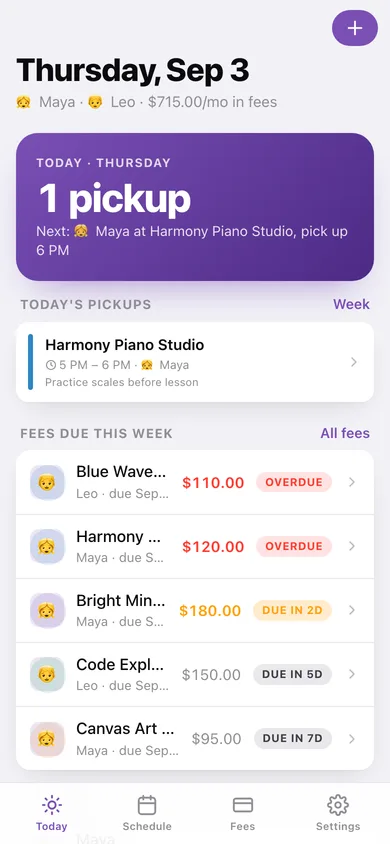
Afterschool is the family command centre for parents navigating hagwons, tuition centres, and enrichment academies across multiple children. Add each child, then build their weekly timetable — maths on Monday, piano on Thursday — and Afterschool draws a clean grid so pick-up conflicts are obvious before they happen. For every academy you log the monthly fee, the due date, and the teacher's contact note. When payment day approaches, Afterschool sends a reminder. Tap through to see the full fee history: what was paid, when, and how much. Today's home screen shows exactly who needs to be where in the next few hours and which fees are coming due this week — one glance instead of three WhatsApp groups and a spreadsheet.
Features
Built to be useful, not noisy.
Weekly class grid
A per-child or family-wide timetable grid (weekday x time slots) showing every ClassSlot with academy name and pick-up time.
Fee tracker with reminders
Log each academy's monthly fee amount and due day; receive a local notification before the deadline; mark as paid to record the payment date.
Today home screen
At-a-glance daily view listing today's pickups in chronological order and any fees due within 7 days — the first screen every parent sees.
Academy detail with fee history
Per-academy page showing teacher contact note, class schedule, and a scrollable list of all past FeePayment records.
Why it exists
The problem
Families with multiple children in multiple academies carry the cognitive load of overlapping weekly timetables, varying monthly fee due dates per academy, and scattered teacher contact details across chat apps and paper — leading to missed pickups, late fees, and daily anxiety that no existing consumer app solves for…
What's different
How Afterschool stands out
Afterschool is a parent-side, fully offline family academy manager — unlike tutor-facing platforms (ClassMitra, Tuition Tracker) that serve the institute, and unlike generic school apps (ClassMobi, CampusCare) tied to a single institution's portal. It combines a per-child weekly class grid, per-academy fee tracker wit…
You might also like
All apps →
Readfox
Education
Any book. Listens as they read.

Sayline
Education
Learn any speech or script by heart.

SpellHive
Education
Spelling Bee Prep — Spell It Out Loud

Podium: Speech Coach
Education
Live filler-word coach

IEP Vault
Education
Your IEP paper trail, offline

Minutes Owed
Education
Scheduled vs delivered minutes
FAQ
Questions about Afterschool
How much does Afterschool cost?▾
Afterschool is free. All features are included from day one — no subscription, no in-app purchases, no paid tiers. Everything you see in this listing works the moment you install it.
Where does Afterschool store my data?▾
Afterschool stores what you enter on your device. No account is required, and we never sell your data. Any anonymous usage data or optional notifications are explained in the Afterschool privacy policy.
What platforms does Afterschool support?▾
iOS, on iPhone and iPad. You can find the latest availability on this page.
How do I get support for Afterschool?▾
Use the Support link on this page, or email support@allthingsn.com. We answer every message and keep responses on the same thread.
Related guide
Best iPhone apps with no subscription (one-time purchase & free), 2026
More baby, family & home apps with no subscription →
More in Education

