
Web app · Education
Afterschool
Every hagwon, tuition centre and academy for every child — one family grid in the browser
Add each child, build their weekly class grid so pickup clashes are obvious, log every academy's monthly fee and due day with full payment history and teacher contact notes, and open to a Today view of who needs to be where and which fees are due this week. Free, no install.
Stored in your browser only. Nothing you do in the web version is sent to our servers. Clear your browser data and it's gone — so export a backup from the in-app menu if you want to keep it.
This app is a community proposal.
Try the full browser version now. We build the iPhone and Android app once 100 people upvote it.
We'll email you once, when it ships. Unsubscribe anytime.
In your browser
What you can do in Afterschool on the web
Today view
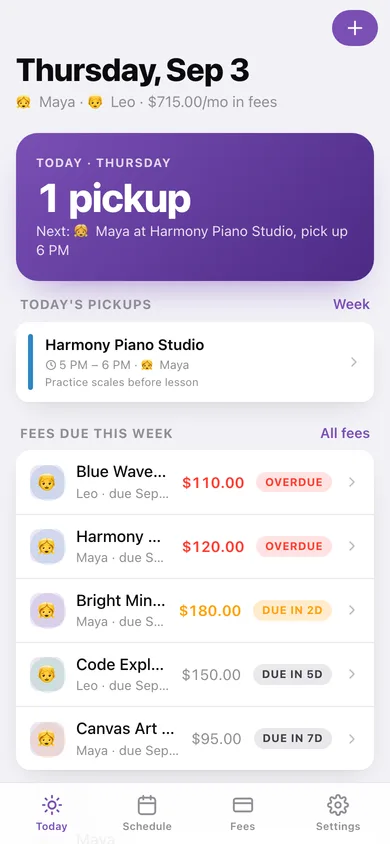
The first screen every parent sees: today's pickups in order across all children, the next pickup time, and every fee due inside your window or overdue.
Per-child weekly class grid
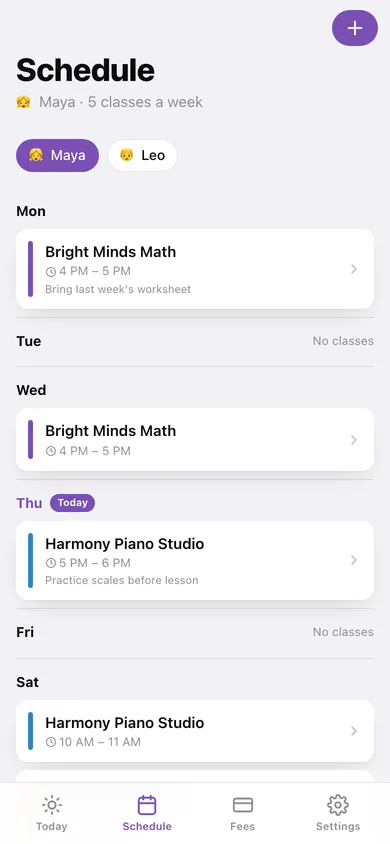
Monday to Sunday rows per child with colour-coded academy cards, start–end times and notes; switch children with one tap and add class times in :00 / :30 steps.
Fee tracker with due days
Monthly fee and due day per academy, next-due date, Paid / Due in Nd / Overdue badges, paid-vs-remaining totals for the month and a per-child monthly total.
Academy detail with payment history
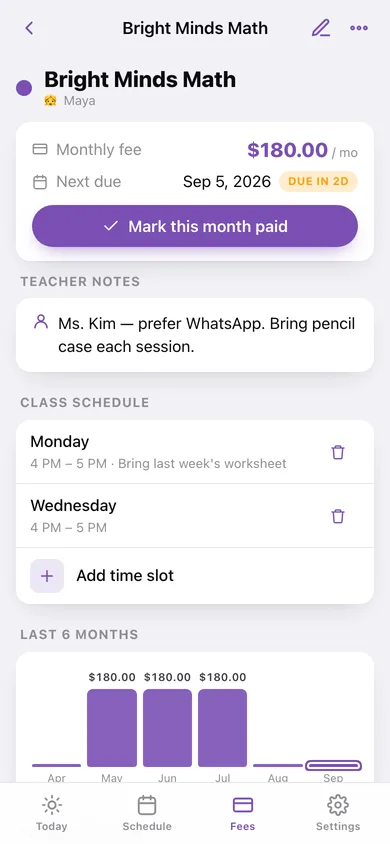
Teacher contact note, class schedule, a six-month payment chart, the full list of what was paid and when, and one-tap Mark this month paid.
Multiple children, unlimited academies
Each child gets an emoji, colour and their own academies; removing a child cleans up their academies, classes and payments.
Currency and CSV export
Pick your currency (KRW, INR, SGD, USD and more) and export the schedule or the fee history as CSV.
Screens
Every screen, rebuilt for the browser
-
1
Today
Today's pickups, fees due this week or overdue, and each child with their academy count and monthly total.
-
2
Schedule
Child picker and the Monday–Sunday grid with every class card.
-
3
Fees
Paid / still-to-pay this month and every academy grouped by child with its fee and status badge.
-
4
Academy
Fee and next due, teacher notes, class schedule, six-month chart and payment history with record / delete.
-
5
Add / edit academy
Name, monthly fee, due day, teacher note and colour label.
-
6
Child
Academies, weekly classes and totals for one child, with edit and remove.
-
7
Settings
Currency, fee window, CSV exports, backup, sample data and erase.
Try it with sample data: Loads Maya (Bright Minds Math, Harmony Piano Studio, Canvas Art Centre) and Leo (Code Explorers, Blue Wave Swimming, Knight's Chess Club) with eleven weekly class slots, teacher notes and three months of tuition payments. You can start fresh at any time.
Ready? It's free.
No account, no install, no subscription. Everything you do stays in this browser.
Your say
What should Afterschool do? Tell us before we build it.
Tell us what to build next.
Comments need a free Google sign-in, so every one is from a real person.
Sign in with Google to commentNo comments yet — be the first to say what this app should do next.
Questions
Is the web version of Afterschool free?+
Yes. Every screen is free to use: no subscription, no in-app purchases, no account.
Do I need an account?+
No. Open Afterschool and start using it right away. Sign in with Google only if you want to upvote an app, save it to your list, or leave a comment.
Where is my data stored?+
Only in this browser's local storage. Nothing you enter is sent to our servers, so we can't see it, back it up, or restore it. Clearing site data, a private window, or another device starts empty. Export a backup from the in-app menu to keep it.
Is there a Afterschool app for iPhone or Android?+
Not yet. Afterschool is a community proposal: the browser version is complete, and we build the iPhone and Android app once 100 people upvote it. Upvoters get one email when it ships.