
Sports
Wakelog: boating logbook
Logbook for every trip you cast off.
No account, no install. What you do stays in your browser.
This app is a community proposal.
Try the full browser version now. We build the iPhone and Android app once 100 people upvote it.
We'll email you once, when it ships. Unsubscribe anytime.
| Price | Free, no subscription |
|---|---|
| Account | None needed to try |
| Works offline | Yes |
| Data | On your device, never on our servers |
| Platforms | Browser |
| Status | Community proposal (built for phones at 100 upvotes) |
| Last updated | 2026-04-23 |
Accessibility: Larger Text · iPad layout · Browser version How we checked →
 Try it live
The full Wakelog, right here in your browser.
No account and no install. What you enter is saved in this browser only, never on our servers.
Open Wakelog →
Try it live
The full Wakelog, right here in your browser.
No account and no install. What you enter is saved in this browser only, never on our servers.
Open Wakelog →


About this app
What Wakelog does
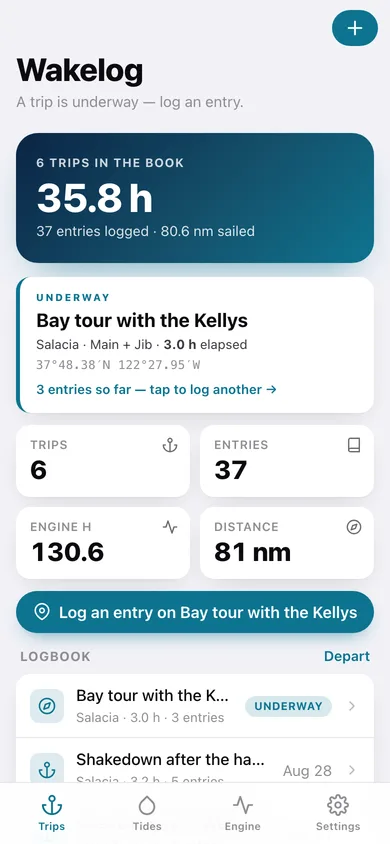
Wakelog is the modern offline ship's log for the 15.4 million US recreational boats. Sailors, powerboaters, and cruisers keep a logbook because they have to and because insurance and charter handovers ask for one. The existing apps are sub-1K-install niche tools with dated UIs, freemium gates after three trips, or feature-light track recorders. What ships in v1: — Start a trip. Tap depart. Wakelog auto-stamps the entry: position (CoreLocation), heading (CoreMotion), heel angle if sailing (accelerometer), local time. Engine-hour counter starts. — Hourly auto-entries. Underway, the app logs an entry every hour with position, heading, heel, and a tap-to-pick Beaufort sea state. — Crew + sails picker. Tap which crew is aboard, which sail combo is up. The list is yours to edit. — Incident button. Reef in. Tack. Crew overboard drill. Engine start. Custom tags too. — Engine hours. Rolling counter across all trips. Tap to record an oil-change milestone. — PDF logbook export. One tap, a clean PDF of your whole season, ready for insurance, charter handover, or your own shelf. — Bundled tide constants. NOAA harmonics for major US coastal stations bundled — predict next high/low at your location, offline. — No account, no analytics, no third-party SDKs, no subscription. Free. Optional iCloud sync via your own Apple ID (Apple-native, never our server). For the 2M+ US sailors and the millions of powerboaters who have been waiting for a logbook app worth using.
Features
Built to be useful, not noisy.
Start trip
Auto-stamp depart with position + heading + heel
Hourly entry
Background log of position/heading/sea state every hour underway
Crew + sails
Pick crew aboard and sail combo; edit during trip
Engine hours
Rolling counter + oil-change milestones
Export PDF
Per-season PDF logbook via share sheet
Why it exists
The problem
Recreational sailors keep paper logbooks because every digital option is sub-1K-install indie or aging — Skipper paywalls after 3 trips, SailTies is a track recorder, Logbook Suite has a 2012 UI. None auto-stamp position + heel + sea state.
What's different
How Wakelog stands out
Wakelog is the only iOS ship's log that auto-stamps an entry every hour underway using CoreLocation + CoreMotion (heading, heel angle), bundles NOAA tide harmonics for US stations, and exports a single insurance/charter-grade PDF — Skipper paywalls after 3 free trips, SailTies is a GPS tracker without a structured log…
You might also like
All apps →


FAQ
Questions about Wakelog
How much does Wakelog cost?▾
Wakelog is free. All features are included from day one — no subscription, no in-app purchases, no paid tiers. Everything you see in this listing works the moment you install it.
Where does Wakelog store my data?▾
On your device. Wakelog is built privacy-first: no account is required, no analytics SDKs, no third-party trackers. Nothing is uploaded to a server we control — the app works without one.
What platforms does Wakelog support?▾
iOS, on iPhone and iPad. You can find the latest availability on this page.
How do I get support for Wakelog?▾
Use the Support link on this page, or email support@allthingsn.com. We answer every message and keep responses on the same thread.
Related guide
Best offline fitness tracker apps, 2026
More fitness & workouts apps with no subscription →
More in Sports

