
Web app · Sports
Wakelog
The ship's log that stamps every fix — now in any browser
Depart a trip, log hourly entries with position, heading, heel, Beaufort sea state and wind, keep crew and sail combo, watch the rolling engine-hour counter, and read offline NOAA tide predictions. Free, no install, no trip limit.
Stored in your browser only. Nothing you do in the web version is sent to our servers. Clear your browser data and it's gone — so export a backup from the in-app menu if you want to keep it.
This app is a community proposal.
Try the full browser version now. We build the iPhone and Android app once 100 people upvote it.
We'll email you once, when it ships. Unsubscribe anytime.
In your browser
What you can do in Wakelog on the web
Depart, log, close the trip
Tap Depart to stamp the fix and start the engine-hour counter, drop as many log entries as you like while underway, then end the trip to close the counter and record the arrival fix.
A real logbook entry
Heading on a compass rose, heel to port or starboard, the full Beaufort 0–12 sea-state scale with its own sea description, wind direction and speed in knots, the fix in degrees and decimal minutes, and remarks.
Crew and sail combo
Add who came aboard as skipper, mate, crew or guest, and switch between all eight sail combos — main + jib, genoa, storm sails, spinnaker, motor, motor-sailing — per trip.
Engine hours and service log
A rolling counter across every trip, hours since the last service against your own interval, and milestones for oil changes, impellers, filters and yard work.
Offline tides for 21 US stations
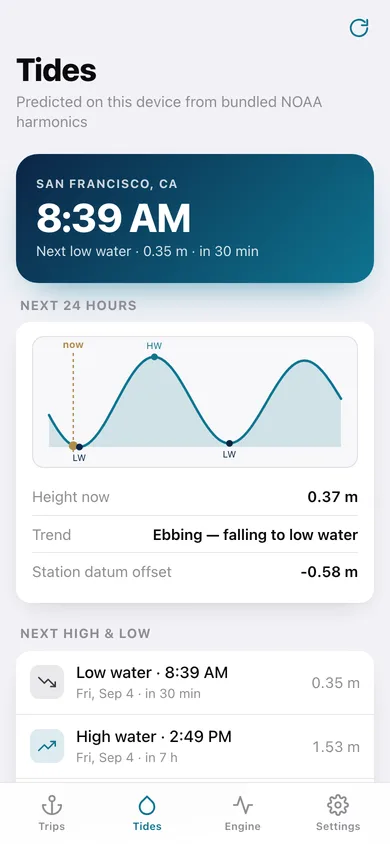
The same bundled NOAA M2/S2/N2 harmonics as the iPhone app: a 24-hour tide curve, the next four high and low waters, and heights in metres or feet — computed in the tab, never fetched.
Logbook export
Write the whole season or a single trip out as a plain-text logbook with a master's signature line, or every entry as a CSV, ready for a charter handover or an insurance email.
Screens
Every screen, rebuilt for the browser
-
1
Logbook
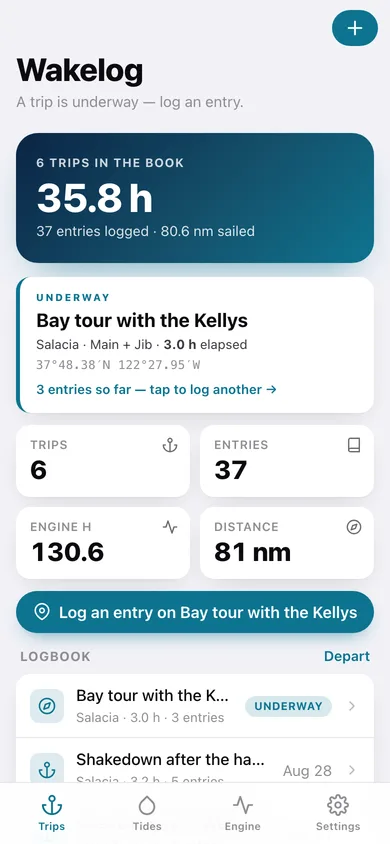
Hours underway, trips, entries and distance, the active trip card, and every trip in the book.
-
2
Depart
Name the trip and vessel, pick a sail combo, and stamp the departure fix.
-
3
Trip detail
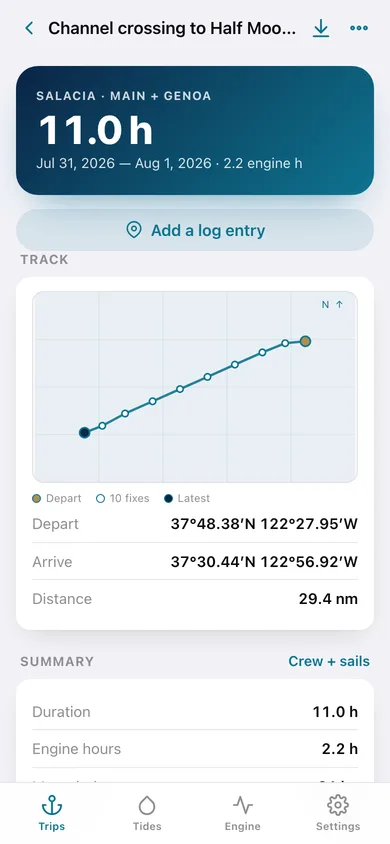
Track plot, summary with max wind and heel, crew, and the full serif timeline of entries.
-
4
Log now
Compass-rose heading, heel indicator, Beaufort picker, wind, fix and remarks.
-
5
Crew + sails
Who is aboard and what is up — edit crew roles and the trip's sail combo.
-
6
Tides
24-hour tide curve, next four high and low waters, and all 21 bundled NOAA stations.
-
7
Engine hours
Rolling total, hours since the last service, hours per trip, and the service log.
-
8
Export logbook
Season or single-trip logbook as text or CSV, with the signature line.
-
9
Settings
Default sail combo, service interval, tide units and home station, backup and erase.
Try it with sample data: Loads a five-week season aboard Salacia — a Half Moon Bay crossing, the delivery home, a day sail to Angel Island, a Wednesday beer-can race, a post-haulout shakedown and one trip still underway — with 37 log entries, crew lists and three engine-service milestones. You can start fresh at any time.
Ready? It's free.
No account, no install, no subscription. Everything you do stays in this browser.
Your say
What should Wakelog do? Tell us before we build it.
Tell us what to build next.
Comments need a free Google sign-in, so every one is from a real person.
Sign in with Google to commentNo comments yet — be the first to say what this app should do next.
Questions
Is the web version of Wakelog free?+
Yes. Every screen is free to use: no subscription, no in-app purchases, no account.
Do I need an account?+
No. Open Wakelog and start using it right away. Sign in with Google only if you want to upvote an app, save it to your list, or leave a comment.
Where is my data stored?+
Only in this browser's local storage. Nothing you enter is sent to our servers, so we can't see it, back it up, or restore it. Clearing site data, a private window, or another device starts empty. Export a backup from the in-app menu to keep it.
Is there a Wakelog app for iPhone or Android?+
Not yet. Wakelog is a community proposal: the browser version is complete, and we build the iPhone and Android app once 100 people upvote it. Upvoters get one email when it ships.