
Sports
Harvest Log: hunting journal
The hunting notebook for the stand.
No account, no install. What you do stays in your browser.
This app is a community proposal.
Try the full browser version now. We build the iPhone and Android app once 100 people upvote it.
We'll email you once, when it ships. Unsubscribe anytime.
| Price | Free, no subscription |
|---|---|
| Account | None needed to try |
| Works offline | Yes |
| Data | On your device, never on our servers |
| Platforms | Browser |
| Status | Community proposal (built for phones at 100 upvotes) |
| Last updated | 2026-04-11 |
Accessibility: Larger Text · iPad layout · Browser version How we checked →
 Try it live
The full Harvest Log, right here in your browser.
No account and no install. What you enter is saved in this browser only, never on our servers.
Open Harvest Log →
Try it live
The full Harvest Log, right here in your browser.
No account and no install. What you enter is saved in this browser only, never on our servers.
Open Harvest Log →


About this app
What Harvest Log does
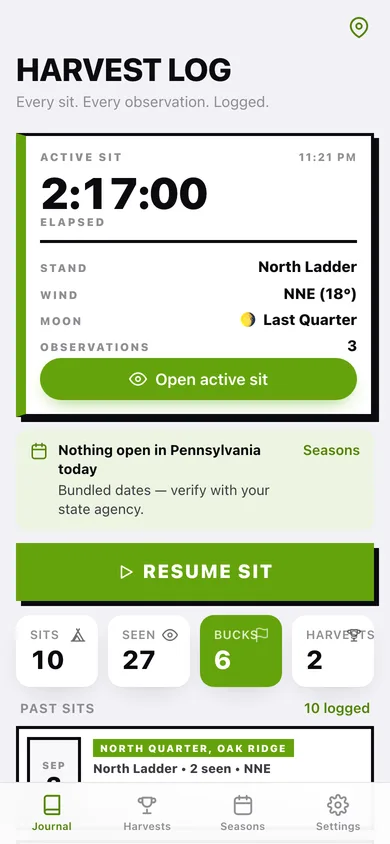
Harvest Log is the offline hunting journal for the 15.9 million US hunters whose paper notebooks live in their truck — and who've migrated away from HuntStand ("UI royally sucks"), refuse to pay the OnX Hunt subscription, and don't want TrophyTracks's AI prediction features cluttering the screen. What Harvest Log does: — One-tap sit start. Open the app at the stand, tap Start Sit. The app auto-stamps GPS pin (CoreLocation), wind direction (CoreMotion compass + your saved property heading), temperature trend, moon phase. All computed on-device. — Quick observations. Tap a button for buck sighting, doe sighting, fawn, deer at distance, owl, coyote, other. Each gets a timestamp and a one-line note. Voice memo via AVFoundation if your hands are cold. — Harvest entry. Date, species, sex, weight, photo. Tag-burn checklist with your state's bag-limit reminder (bundled JSON for all 50 states). — Property map. Save your stands, food plots, and access trails as named pins. No external map tiles — just the spatial picture you need. — Season tracker. Bundled state season dates: archery, firearm, muzzleloader, special antlerless. The app reminds you what's open today. — Stays on this phone. No account, no cloud, no analytics, no social feed. Your spots are yours. — Free, forever. No subscription, no "premium" tier, no "unlock with friends." For the deer hunter who just wants the paper notebook digitized — auto-stamped, searchable, and never lost when the next app gets acquired.
Features
Built to be useful, not noisy.
Start a sit
One-tap; auto-stamps GPS, wind, temp, moon
Observation tap
Quick buttons for buck/doe/fawn/other + voice memo
Harvest entry
Species, sex, weight, photo; state tag-burn checklist
Property pins
Save stands, food plots, access trails (CoreLocation only)
Season tracker
Bundled 50-state season dates; today's openings
Why it exists
The problem
Hunters need a fast offline field journal at the stand but the dominant apps are mapping-first with journaling bolted on, hated UIs that 'royally suck,' and users have migrated multiple times losing decades of saved waypoints and notes.
What's different
How Harvest Log stands out
Harvest Log is the only iOS hunting journal that auto-stamps each sit with on-device CoreLocation + CoreMotion (no map tiles needed) and ships bundled state-by-state season dates + bag limits — HuntStand is map-first with a hated UI, OnX Hunt is $30-100/yr subscription, TrophyTracks bolts AI predictions onto a journal…
You might also like
All apps →


FAQ
Questions about Harvest Log
How much does Harvest Log cost?▾
Harvest Log is free. All features are included from day one — no subscription, no in-app purchases, no paid tiers. Everything you see in this listing works the moment you install it.
Where does Harvest Log store my data?▾
On your device. Harvest Log is built privacy-first: no account is required, no analytics SDKs, no third-party trackers. Nothing is uploaded to a server we control — the app works without one.
What platforms does Harvest Log support?▾
iOS, on iPhone and iPad. You can find the latest availability on this page.
How do I get support for Harvest Log?▾
Use the Support link on this page, or email support@allthingsn.com. We answer every message and keep responses on the same thread.
Related guide
Best offline fitness tracker apps, 2026
More fitness & workouts apps with no subscription →
More in Sports

