
Web app · Business
VisitReady
Your whole licensing binder, counted down and inspection-ready — in the browser
Track every expiring CPR card, training cycle, extinguisher service and TB test with a days-remaining countdown, log fire, disaster and lockdown drills against their cadence, keep per-child record files gap-free, walk a 20-item self-audit and hand over a dated inspector packet. Free, no install.
Stored in your browser only. Nothing you do in the web version is sent to our servers. Clear your browser data and it's gone — so export a backup from the in-app menu if you want to keep it.
This app is a community proposal.
Try the full browser version now. We build the iPhone and Android app once 100 people upvote it.
We'll email you once, when it ships. Unsubscribe anytime.
In your browser
What you can do in VisitReady on the web
Expiry countdown binder
Every certification, training, service, record and insurance policy with issue and expiry dates, a giant days-remaining countdown, reminder lead time, renewal notes and a Mark renewed flow that archives the old expiry.
Drill logbook with cadences
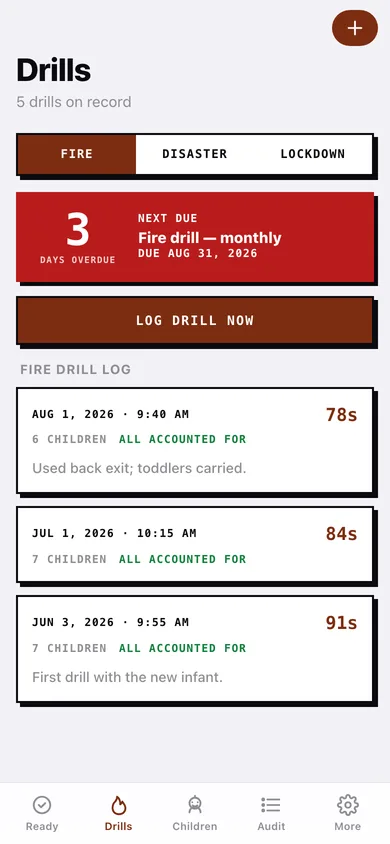
Fire, disaster and lockdown drills logged with date-time stamp, evacuation seconds, headcount and notes; each type carries an interval so the app shows exactly when the next one is due and flags overdue drills in red.
Per-child record files
Immunization current-through date, emergency contact form, enrollment form and medical consent per child — the IMM/EMG/ENR/MED strip shows gaps before the inspector finds them.
Citation self-audit
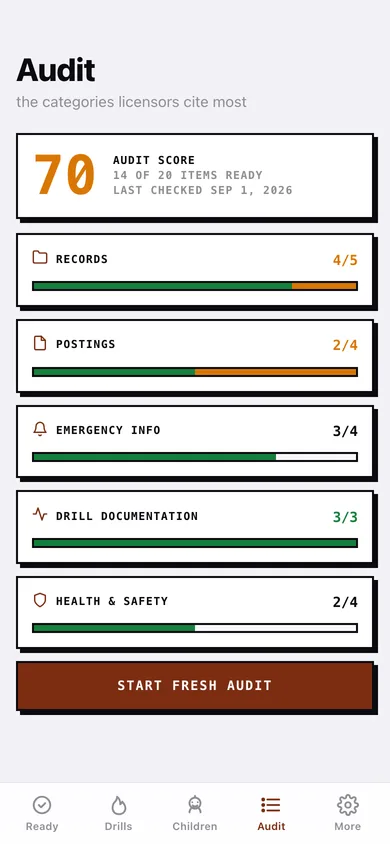
The 20 prompts organised by Records, Postings, Emergency Info, Drill Documentation and Health & Safety; tap to cycle ready → needs attention → N/A, add a note, and see a per-category bar plus an audit score.
Readiness score
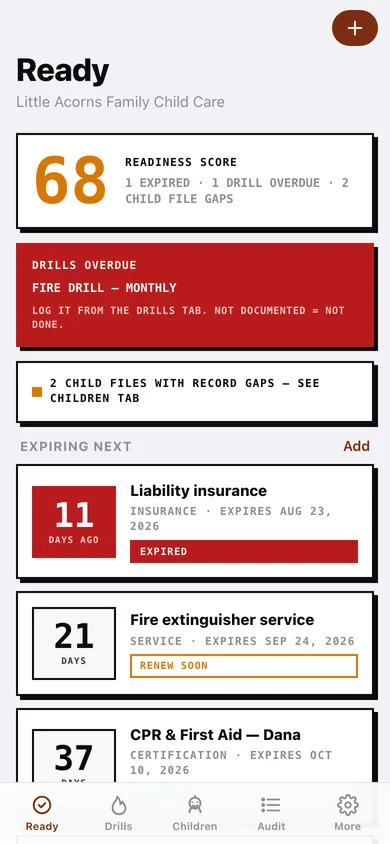
The same weighted composite as the iPhone app — 35% expirations, 25% drill cadence, 25% audit, 15% child files — with the caption telling you what is dragging it down.
Inspector packet and cadence templates
Generate a dated, printable packet of certifications, drill history, child record status and audit summary; apply Common Baseline, California, Wisconsin, Texas or New York starter cadences.
Screens
Every screen, rebuilt for the browser
-
1
Ready
Readiness score, overdue drills, child-file gaps and every tracked item in expiry order with its countdown.
-
2
Tracked item
Giant countdown, dates, renewal notes and history, Mark renewed and remove.
-
3
Track an item
Name, category, issue and expiry dates, reminder lead time and renewal notes with validation.
-
4
Drills
Fire / disaster / lockdown logbook with next-due countdown and one-tap logging.
-
5
Children
Enrolled children with the IMM / EMG / ENR / MED record strip.
-
6
Child file
Gaps, immunization countdown, records on file, allergies and enrollment.
-
7
Child file editor
Name, enrollment, immunization date and the three record toggles; unenroll keeps history.
-
8
Audit
Audit score and the five most-cited categories with ready / needs-attention bars.
-
9
Audit category
Tap each prompt to cycle its status and attach a note.
-
10
Inspector packet
Choose sections and drill range, preview, and download a dated printable packet.
-
11
Cadence templates
Five starter cadences that replace drill intervals and add suggested tracked items.
-
12
More
Program profile, templates, packet, reminder status, backup, sample data and erase.
Try it with sample data: Loads Little Acorns Family Child Care: five tracked items (one expired, two renewing soon), Wisconsin drill cadences with five logged drills and an overdue fire drill, five child files with two record gaps, and a 20-item audit scored in the mid-70s. You can start fresh at any time.
Ready? It's free.
No account, no install, no subscription. Everything you do stays in this browser.
Your say
What should VisitReady do? Tell us before we build it.
Tell us what to build next.
Comments need a free Google sign-in, so every one is from a real person.
Sign in with Google to commentNo comments yet — be the first to say what this app should do next.
Questions
Is the web version of VisitReady free?+
Yes. Every screen is free to use: no subscription, no in-app purchases, no account.
Do I need an account?+
No. Open VisitReady and start using it right away. Sign in with Google only if you want to upvote an app, save it to your list, or leave a comment.
Where is my data stored?+
Only in this browser's local storage. Nothing you enter is sent to our servers, so we can't see it, back it up, or restore it. Clearing site data, a private window, or another device starts empty. Export a backup from the in-app menu to keep it.
Is there a VisitReady app for iPhone or Android?+
Not yet. VisitReady is a community proposal: the browser version is complete, and we build the iPhone and Android app once 100 people upvote it. Upvoters get one email when it ships.