
Web app · Food And Drink
Steep
Brew every leaf the way it deserves — temperature, ratio and infusion ladder in one tab
Keep the exact parameters for every tea you own, start a gongfu countdown that extends each successive steep, and write the tasting note while the cup is still warm. Free, no install, nothing leaves your browser.
Stored in your browser only. Nothing you do in the web version is sent to our servers. Clear your browser data and it's gone — so export a backup from the in-app menu if you want to keep it.
This app is a community proposal.
Try the full browser version now. We build the iPhone and Android app once 100 people upvote it.
We'll email you once, when it ships. Unsubscribe anytime.
In your browser
What you can do in Steep on the web
Per-tea brew parameters
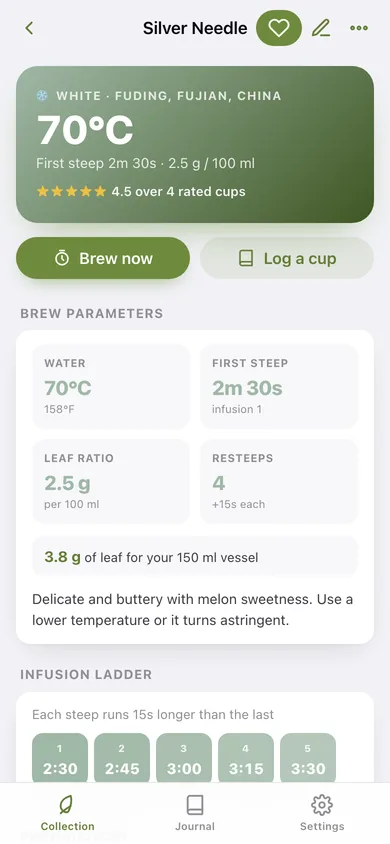
Water temperature, first-steep time, leaf grams per 100 ml, maximum resteeps and the gongfu extension — stored per tea and shown in °C or °F.
Gongfu countdown with an infusion counter
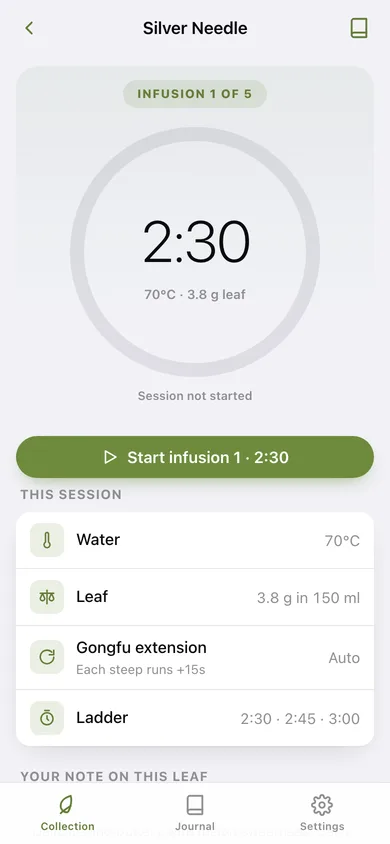
A 260 px timer ring that counts each infusion, adds the tea's extension to every successive steep, chimes at the pour and shows a 'Pour now' rest screen between infusions.
The infusion ladder
Every steep this leaf has in it, laid out as coloured rungs — 45s, 55s, 1:05 — so you can see the whole session before you start.
Tasting journal
Star rating, free-text notes, infusion number and the parameters used, grouped by day and filterable to one tea.
Six tea types with classic defaults
Green 75 °C, black 95 °C, oolong 85 °C, white 70 °C, pu-erh 98 °C, herbal 98 °C — picking a type fills in temperature and first-steep time.
Weigh the leaf for your pot
Set your vessel size once and Steep converts the ratio into the grams to weigh for every tea.
Screens
Every screen, rebuilt for the browser
-
1
Collection
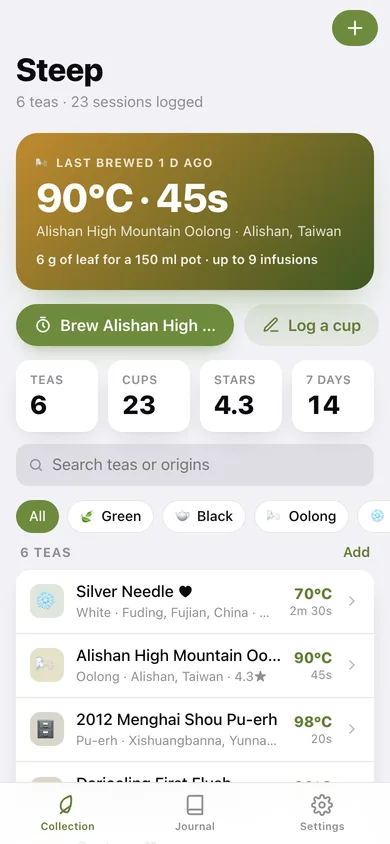
Last-brewed hero with its parameters, collection stats, type filters and every tea you own.
-
2
Tea
Brew parameters, the leaf scoop for your vessel, the infusion ladder and this tea's full brew history.
-
3
Brew timer
The countdown ring with the infusion counter, auto-extending steeps and a pour-now rest between infusions.
-
4
Edit tea
Name, type, origin, temperature, steep time, leaf ratio, resteeps and gongfu extension.
-
5
Log a brew
Star rating, tasting notes, infusion number and date for one cup.
-
6
Journal
Sessions per week, how you rate, what you actually drink, a 12-week cup heatmap and every logged infusion.
-
7
Settings
°C/°F, vessel size, auto-extend gongfu, chime, the reference temperature table, CSV export and erase.
Try it with sample data: Loads six teas — Silver Needle, Alishan oolong, 2012 Menghai shou pu-erh, Darjeeling first flush, Gyokuro and Egyptian chamomile — with 21 rated tasting notes spread across the last three weeks. You can start fresh at any time.
Ready? It's free.
No account, no install, no subscription. Everything you do stays in this browser.
Your say
What should Steep do? Tell us before we build it.
Tell us what to build next.
Comments need a free Google sign-in, so every one is from a real person.
Sign in with Google to commentNo comments yet — be the first to say what this app should do next.
Questions
Is the web version of Steep free?+
Yes. Every screen is free to use: no subscription, no in-app purchases, no account.
Do I need an account?+
No. Open Steep and start using it right away. Sign in with Google only if you want to upvote an app, save it to your list, or leave a comment.
Where is my data stored?+
Only in this browser's local storage. Nothing you enter is sent to our servers, so we can't see it, back it up, or restore it. Clearing site data, a private window, or another device starts empty. Export a backup from the in-app menu to keep it.
Is there a Steep app for iPhone or Android?+
Not yet. Steep is a community proposal: the browser version is complete, and we build the iPhone and Android app once 100 people upvote it. Upvoters get one email when it ships.