
Food And Drink
Steep: thoughtful brewing companion
Tea timer, journal & collection
No account, no install. What you do stays in your browser.
This app is a community proposal.
Try the full browser version now. We build the iPhone and Android app once 100 people upvote it.
We'll email you once, when it ships. Unsubscribe anytime.
| Price | Free, no subscription |
|---|---|
| Account | None needed to try |
| Works offline | Yes |
| Data | On your device, never on our servers |
| Platforms | Browser |
| Status | Community proposal (built for phones at 100 upvotes) |
| Last updated | 2026-06-08 |
Accessibility: Larger Text · Light & Dark · iPad layout · Browser version How we checked →
 Try it live
The full Steep, right here in your browser.
No account and no install. What you enter is saved in this browser only, never on our servers.
Open Steep →


About this app
What Steep does
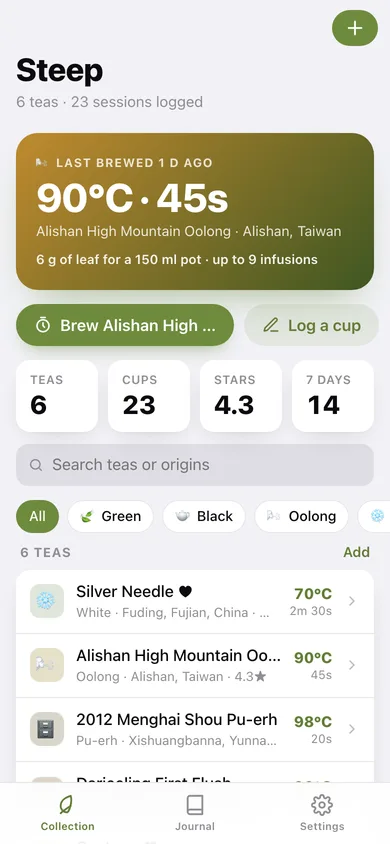
Steep is the thoughtful brewing companion for serious tea lovers. Whether you're working through a tin of Silver Needle, a cake of aged shou pu-erh, or a canister of first-flush Darjeeling, Steep stores the exact parameters — water temperature, leaf-to-water ratio, steep time — and puts a beautiful countdown timer one tap away. For gongfu sessions, an infusion counter tracks each successive steep and can automatically extend the time so you wring every dimension of flavour from the leaves. After the session, jot a quick tasting note and star rating while the cup is still warm. Your collection grows into a personal tea library: browse by type, origin, or rating, and revisit the full brew history for any tea. Everything lives on-device, offline, forever — no account, no subscription required for the essentials.
Features
Built to be useful, not noisy.
Brew Timer
A full-screen, ambient countdown timer showing temperature, infusion number, and remaining seconds. Haptic pulses signal the halfway point and final ten seconds. Between infusions, a rest screen prompts the next pour.
Tea Collection
A searchable, filterable library of saved teas — each with type (green, black, oolong, white, pu-erh, herbal), origin, temp in °C, steep time in seconds, leaf-to-water ratio in grams per 100 ml, and maximum resteep count.
Gongfu Infusion Mode
Tracks infusion number across a single session. In auto mode, each successive steep time is extended by a configurable increment (e.g. +10 s) to compensate for the opening leaf, mirroring traditional gongfu practice.
Tasting Journal
After each brew, log a star rating and free-text tasting notes tied to the tea and infusion number. The journal view shows a chronological feed of all brew logs, filterable by tea or date range.
Why it exists
The problem
Tea enthusiasts keep parameters in their head, on scraps of paper, or in generic note apps, making it easy to brew a favourite tea badly and impossible to remember why yesterday's cup of the same leaf tasted better. No dedicated offline iOS app covers gongfu multi-infusion timing, personal brew logs, and a growing col…
What's different
How Steep stands out
Steep combines per-tea brew presets (temp, ratio, time, resteep count) with a gongfu-aware infusion counter, a tasting journal, and a full tea collection — all offline and without a subscription. Existing timers are single-purpose; notes apps have no tea context; Steep is the first iOS app to unite all three in a beau…
You might also like
All apps →
PantryRx
Food And Drink
Meal plans from what's already in your kitchen.

TurnIn
Food And Drink
Backward turn-in clock for competition BBQ

Saleproof
Food And Drink
Is that sale actually a deal?

CropJar
Food And Drink
Every jar, dated & counted

Churras
Food And Drink
Churrasco na conta certa

Bobatab
Food And Drink
Your boba journal & bubble budget
FAQ
Questions about Steep
How much does Steep cost?▾
Steep is free. All features are included from day one — no subscription, no in-app purchases, no paid tiers. Everything you see in this listing works the moment you install it.
Where does Steep store my data?▾
Steep stores what you enter on your device. No account is required, and we never sell your data. Any anonymous usage data or optional notifications are explained in the Steep privacy policy.
What platforms does Steep support?▾
iOS, on iPhone and iPad. You can find the latest availability on this page.
How do I get support for Steep?▾
Use the Support link on this page, or email support@allthingsn.com. We answer every message and keep responses on the same thread.
Related guide
Best offline recipe & cooking apps, 2026
More recipes & food apps with no subscription →
More in Food And Drink

