
Web app · Business
SprayLog
Spray records you can defend at an audit — customer sites, product cabinet, tank math
Log every commercial pesticide application with the federal fields plus wind, temperature and sky; store each product once with its EPA reg number, signal word and REI; let the tank-mix calculator do the tailgate math; and watch the 30-day customer-copy deadlines. Free, offline, no install.
Stored in your browser only. Nothing you do in the web version is sent to our servers. Clear your browser data and it's gone — so export a backup from the in-app menu if you want to keep it.
This app is a community proposal.
Try the full browser version now. We build the iPhone and Android app once 100 people upvote it.
We'll email you once, when it ships. Unsubscribe anytime.
In your browser
What you can do in SprayLog on the web
Compliance dashboard
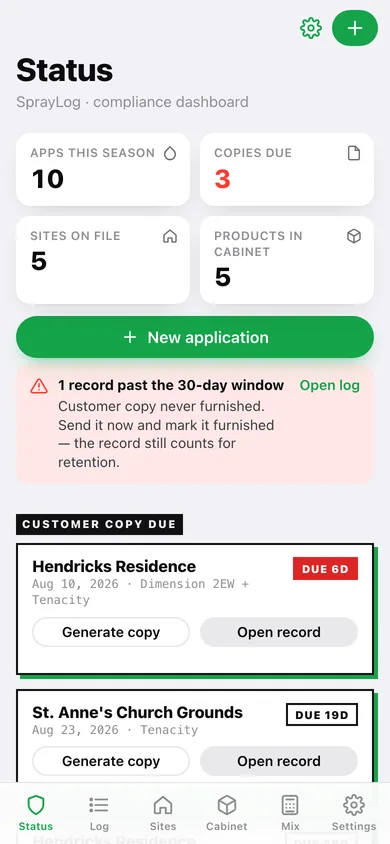
Season count, customer copies due (with days left and past-window alerts), your license card with expiry countdown, and the 2-year retention window under 7 CFR Part 110.
Application log built for service routes
Site, date/time, applicator and license, target pest, area treated (sq ft, trees or linear ft), equipment, carrier gallons, mix lines and one-screen conditions — with carry-over from the site's last visit.
Product cabinet
EPA registration number, active ingredient, formulation, CAUTION/WARNING/DANGER signal word, restricted-use flag, re-entry interval and default rate, stored once so records auto-fill.
Tank-mix calculator with presets
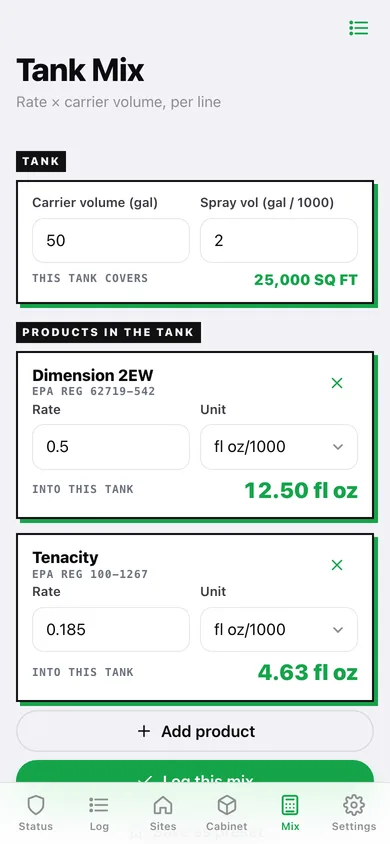
Enter carrier volume and spray volume per 1000 sq ft; SprayLog computes the product amount per line (per-1000 and per-gallon rates), shows tank coverage, saves presets and logs the mix as an application.
Customer copy in seconds
A printable one-page pesticide application record per visit — download, copy, print or share it, then mark it furnished to clear the 30-day deadline.
Date-range audit export
Every record between two dates (optionally one site) as a CSV with one row per product line — the whole retention window in one file for the state inspector.
Screens
Every screen, rebuilt for the browser
-
1
Status
Season stats, customer copies due, license card, retention window and season-by-product chart.
-
2
Log
Every application grouped by day, searchable by site, product or pest.
-
3
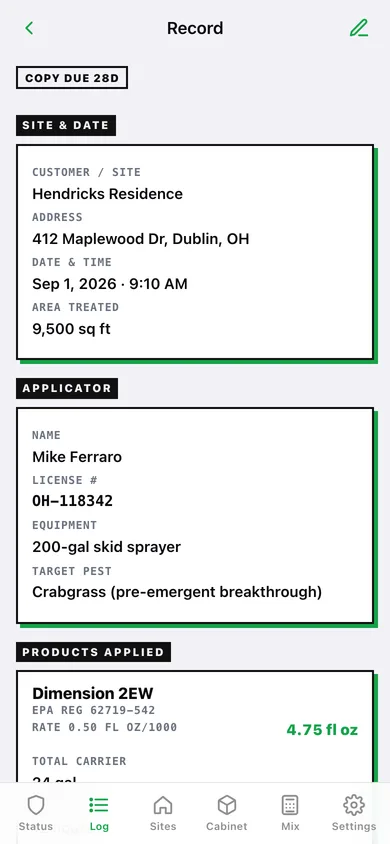
Record
The full record laid out like the printed compliance form, with customer copy, duplicate, edit and delete.
-
4
New application
Site & date, applicator, area & tank, mix lines with live product amounts, conditions and notes.
-
5
Customer copy
Printable one-page record with download, copy, print, share and mark-furnished.
-
6
Sites
Reusable customer properties with type, treated area and last visit.
-
7
Site detail
Contact, address, access notes and the property's application history.
-
8
Site editor
Name, contact, address, site type, treated area and access notes.
-
9
Cabinet
Every product you carry with EPA reg number, signal word, RUP flag, REI and default rate.
-
10
Product editor
Label identity, safety facts and default rate for one product.
-
11
Tank Mix
Carrier and spray volume, coverage, per-line product amounts, save preset or log the mix.
-
12
Presets
Saved tank mixes to load into the calculator.
-
13
Export
Customer copies for recent visits and the date-range audit CSV.
-
14
Settings
Applicator profile (name, business, license, categories, expiry, equipment), record counts, backup, sample data and erase.
Try it with sample data: Loads an Ohio lawn-and-tree operator's profile, 5 customer sites, a 5-product cabinet, 3 mix presets and 10 applications over the last 6 weeks — some with customer copies furnished, some still due and one past the window. You can start fresh at any time.
Ready? It's free.
No account, no install, no subscription. Everything you do stays in this browser.
Your say
What should SprayLog do? Tell us before we build it.
Tell us what to build next.
Comments need a free Google sign-in, so every one is from a real person.
Sign in with Google to commentNo comments yet — be the first to say what this app should do next.
Questions
Is the web version of SprayLog free?+
Yes. Every screen is free to use: no subscription, no in-app purchases, no account.
Do I need an account?+
No. Open SprayLog and start using it right away. Sign in with Google only if you want to upvote an app, save it to your list, or leave a comment.
Where is my data stored?+
Only in this browser's local storage. Nothing you enter is sent to our servers, so we can't see it, back it up, or restore it. Clearing site data, a private window, or another device starts empty. Export a backup from the in-app menu to keep it.
Is there a SprayLog app for iPhone or Android?+
Not yet. SprayLog is a community proposal: the browser version is complete, and we build the iPhone and Android app once 100 people upvote it. Upvoters get one email when it ships.