
Web app · Finance
SIPbook
Every SIP you run, in one private ledger — in your browser
Log each SIP with its scheme, AMC, folio, platform, monthly amount and debit day, then see your total monthly commitment, a debit-date outflow calendar, goal mapping and a step-up planner projecting 1, 3 and 5 years out. Free, no PAN, no login, no install.
Stored in your browser only. Nothing you do in the web version is sent to our servers. Clear your browser data and it's gone — so export a backup from the in-app menu if you want to keep it.
This app is a community proposal.
Try the full browser version now. We build the iPhone and Android app once 100 people upvote it.
We'll email you once, when it ships. Unsubscribe anytime.
In your browser
What you can do in SIPbook on the web
One ledger across every platform
Groww, Kuvera, ET Money, Zerodha Coin, Paytm Money, INDmoney, MF Central, your bank RM or direct with the AMC — 16 fund houses and 10 platforms, all in one list with active, paused and closed status.
Monthly commitment at a glance
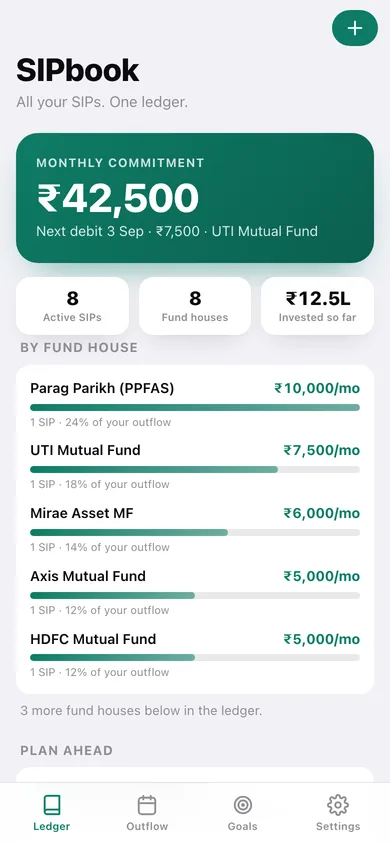
The home screen totals what leaves your account every month across active SIPs, names your next debit, and breaks the outflow down by fund house with a share-of-outflow bar for each.
Outflow calendar with day totals
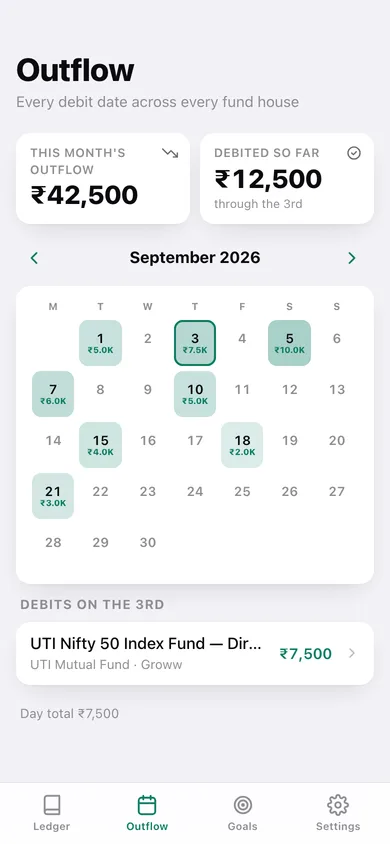
A month grid marks every debit day with its rupee total, shades heavier days darker, flags today, and lists exactly which schemes debit when you tap a day — so salary-week clusters stop surprising you.
Goal mapping with real progress
Create goals with a target amount and date, attach or detach the SIPs funding each one, and see combined monthly contribution, invested to date, months remaining and the simple per-month figure still needed.
Step-up planner and projection chart
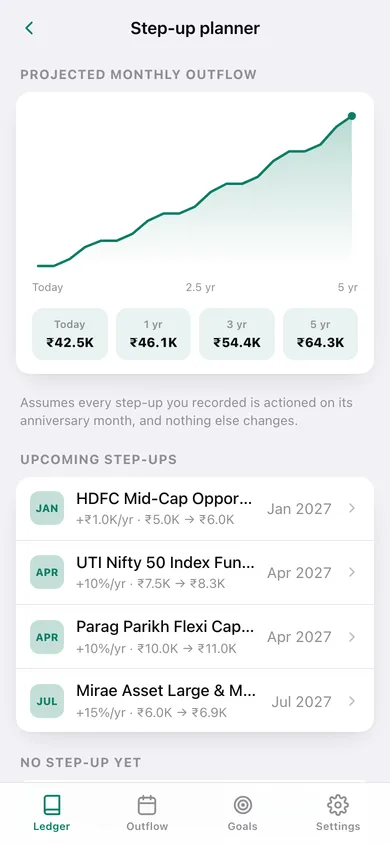
Record an annual step-up per SIP — a percentage that compounds or a fixed rupee raise — with an anniversary month, then watch a quarterly projection of your total monthly outflow over five years with 1, 3 and 5-year horizons.
Yours, and only yours
No PAN, no OTP, no account, no fund recommendations. Everything is saved in this browser, and you can export a JSON backup or a ledger CSV for your CA at any time.
Screens
Every screen, rebuilt for the browser
-
1
Ledger
Monthly commitment, next debit, invested so far, per-fund-house breakdown and every SIP grouped by active, paused and closed.
-
2
SIP detail
Scheme, fund house, folio, platform, debit day, installments completed, approximate amount in, and the annual step-up with pause, resume and close actions.
-
3
Log a SIP
Scheme name, AMC, folio, platform, monthly amount, debit day, start date, status, funding goal and notes, with validation.
-
4
Outflow calendar
Month grid of every debit day with rupee totals, month outflow, debited-so-far, and the schemes landing on the day you tap.
-
5
Goals
Every goal with its progress bar, invested amount, monthly contribution and the SIPs not yet mapped to anything.
-
6
Goal detail
Progress toward the target, funding maths, attached SIPs you can detach, and unattached SIPs you can attach in a tap.
-
7
New goal
Goal name, icon, target amount and target date.
-
8
Step-up planner
Quarterly projection of total monthly outflow over five years, 1/3/5-year horizons, upcoming step-up due dates and the SIPs with no step-up set.
-
9
Settings
Closed-SIP visibility, compact rupee amounts, default debit day, Monday-first calendar, default step-up, JSON backup, ledger CSV, sample data and erase.
Try it with sample data: Loads a realistic ledger of ten SIPs across nine fund houses and seven platforms — eight active, one paused, one closed, with percentage and fixed step-ups — mapped to three goals: a flat down payment, a child's education and a retirement corpus. You can start fresh at any time.
Ready? It's free.
No account, no install, no subscription. Everything you do stays in this browser.
Your say
What should SIPbook do? Tell us before we build it.
Tell us what to build next.
Comments need a free Google sign-in, so every one is from a real person.
Sign in with Google to commentNo comments yet — be the first to say what this app should do next.
Questions
Is the web version of SIPbook free?+
Yes. Every screen is free to use: no subscription, no in-app purchases, no account.
Do I need an account?+
No. Open SIPbook and start using it right away. Sign in with Google only if you want to upvote an app, save it to your list, or leave a comment.
Where is my data stored?+
Only in this browser's local storage. Nothing you enter is sent to our servers, so we can't see it, back it up, or restore it. Clearing site data, a private window, or another device starts empty. Export a backup from the in-app menu to keep it.
Is there a SIPbook app for iPhone or Android?+
Not yet. SIPbook is a community proposal: the browser version is complete, and we build the iPhone and Android app once 100 people upvote it. Upvoters get one email when it ships.