
Web app · Finance
SinkJar
Tell it the bill and the date — it tells you what to put aside each payday
Unlimited sinking-fund jars for Christmas, registration, insurance, the vet and the brake job. Calendar-aware per-paycheck targets, a deposit ledger, and a saved-vs-target trajectory chart. Free, no install, no bank link.
Stored in your browser only. Nothing you do in the web version is sent to our servers. Clear your browser data and it's gone — so export a backup from the in-app menu if you want to keep it.
This app is a community proposal.
Try the full browser version now. We build the iPhone and Android app once 100 people upvote it.
We'll email you once, when it ships. Unsubscribe anytime.
In your browser
What you can do in SinkJar on the web
Calendar-aware per-paycheck target
“$1,200 by December 1” becomes “$52 every two weeks” — rounded up to the cent so you never land short, and recomputed after every deposit.
Unlimited jars with progress rings
A tile for every lumpy bill with its own emoji, target, date and payday cadence — weekly, every two weeks, or monthly. No ten-envelope cap.
Manual deposits, no bank link
Log what you actually moved in your own bank with quick +$20/$50/$100/$200 taps, a note and a date. No Plaid, no credentials, no consent screens.
Trajectory chart
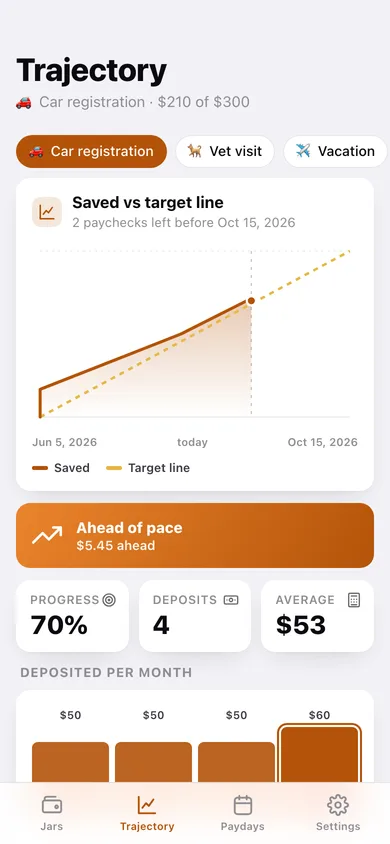
Your cumulative saving line against the straight line to target, plus an ahead-of-pace or behind-pace figure in dollars for the jar you pick.
Payday plan
Every payday, see which jar needs the biggest slice, the total to set aside, and the next payday date for each jar rolled forward by its cadence.
CSV and JSON export
One file with every jar and every deposit for Numbers or Excel, or a full JSON backup — everything stays in this browser otherwise.
Screens
Every screen, rebuilt for the browser
-
1
Jars
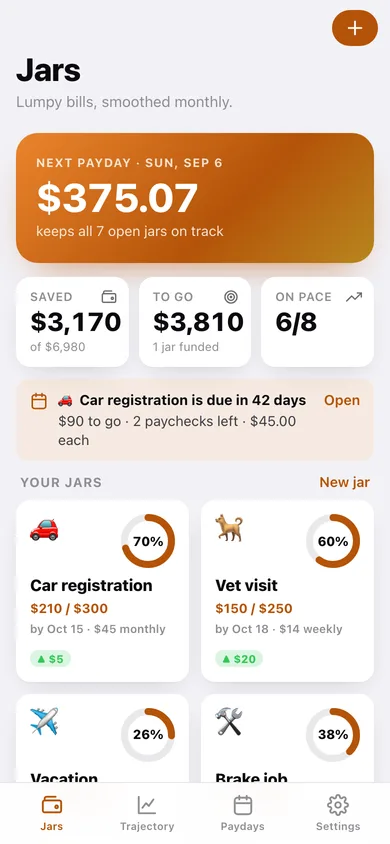
What to set aside this payday, totals across every jar, and the jar grid with progress rings.
-
2
Jar detail
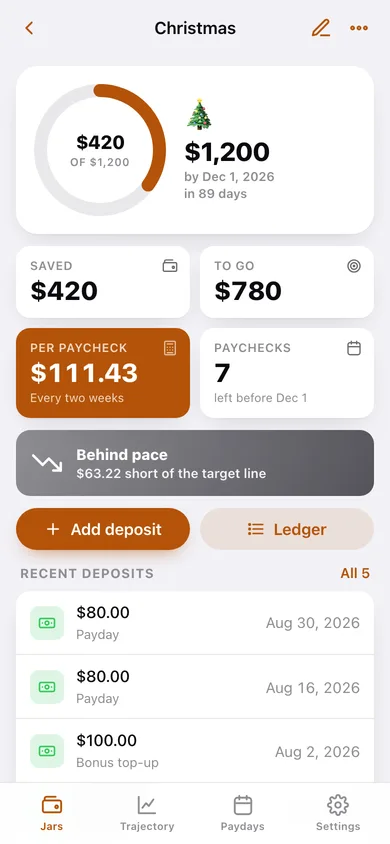
Big progress ring, saved and still-to-go, the per-paycheck figure, ahead/behind pace and recent deposits.
-
3
New or edit jar
Name, target amount, needed-by date, emoji, payday cadence and next payday — with the per-paycheck math previewed live.
-
4
Ledger
Every deposit in one jar grouped by month, with per-month totals, edit, delete and CSV download.
-
5
Trajectory
Saved line vs the target line for any jar, the ahead/behind figure, and deposits per month.
-
6
Paydays
This payday's priority jar, the total to set aside, the payday plan and every deadline in order.
-
7
Settings
Default payday cadence and rounding, CSV and JSON export, sample jars, and erase.
Try it with sample data: Loads eight jars — Christmas, car registration, vet visit, vacation, brake job, home insurance, summer camp and dentist — with about four months of deposit history behind them. You can start fresh at any time.
Ready? It's free.
No account, no install, no subscription. Everything you do stays in this browser.
Your say
What should SinkJar do? Tell us before we build it.
Tell us what to build next.
Comments need a free Google sign-in, so every one is from a real person.
Sign in with Google to commentNo comments yet — be the first to say what this app should do next.
Questions
Is the web version of SinkJar free?+
Yes. Every screen is free to use: no subscription, no in-app purchases, no account.
Do I need an account?+
No. Open SinkJar and start using it right away. Sign in with Google only if you want to upvote an app, save it to your list, or leave a comment.
Where is my data stored?+
Only in this browser's local storage. Nothing you enter is sent to our servers, so we can't see it, back it up, or restore it. Clearing site data, a private window, or another device starts empty. Export a backup from the in-app menu to keep it.
Is there a SinkJar app for iPhone or Android?+
Not yet. SinkJar is a community proposal: the browser version is complete, and we build the iPhone and Android app once 100 people upvote it. Upvoters get one email when it ships.