
Web app · Education
Revise
Turn a whole exam syllabus into a plan you can actually finish
Break NEET, JEE, UPSC, GATE or your boards into subjects, chapters and topics and see true completion instead of a vague sense of being behind. Mark a topic learnt and spaced repetition brings it back at 1, 4 and 10 days. Free, no account, no install.
Stored in your browser only. Nothing you do in the web version is sent to our servers. Clear your browser data and it's gone — so export a backup from the in-app menu if you want to keep it.
This app is a community proposal.
Try the full browser version now. We build the iPhone and Android app once 100 people upvote it.
We'll email you once, when it ships. Unsubscribe anytime.
In your browser
What you can do in Revise on the web
A syllabus tree that measures itself
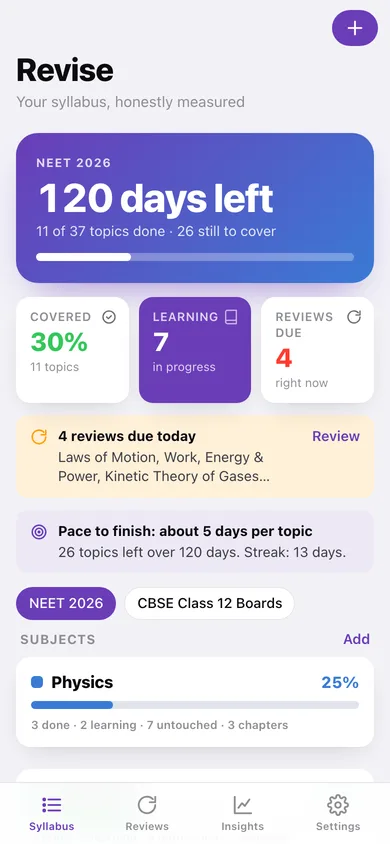
Exam → subject → chapter → topic, with each topic set to not started, learning or done. Every level rolls its progress up, so 42% means 42% of the topics you listed.
Spaced repetition, not guesswork
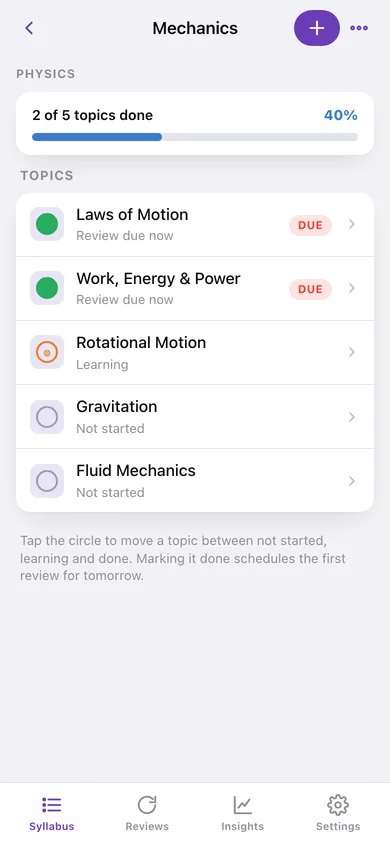
Marking a topic learnt schedules the first review for tomorrow. Rate each recall low, medium or high and the next one lands 1, 4 or 10 days out — intervals you can change.
Exam countdown with the workload left
Days to the exam next to the topics still uncovered, and the pace — topics per day — you need to hold to finish in time.
Study log with confidence
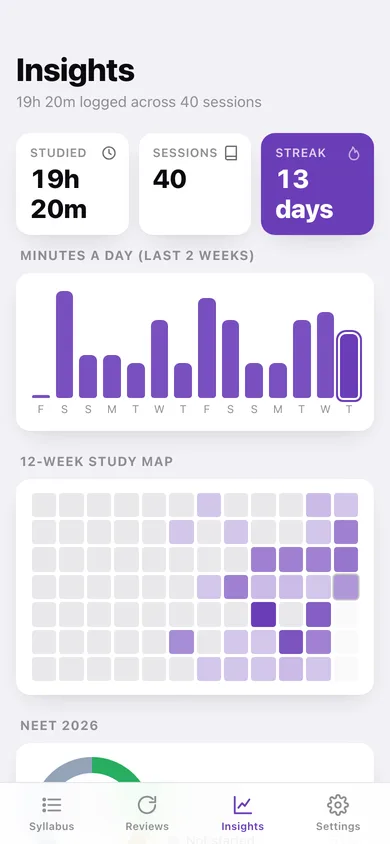
Log minutes and how well you know it after each sitting. Total time, sessions, a daily-minutes chart and a 12-week study map come out of it.
Weak-topic finder
Topics you have finished but keep rating shaky surface with their average confidence, so revision goes where it hurts instead of where it is comfortable.
More than one exam at a time
An entrance test and your boards can sit side by side, each with its own date, syllabus and countdown — everything unlocked.
Screens
Every screen, rebuilt for the browser
-
1
Syllabus
The countdown, overall completion, reviews due and every subject's progress.
-
2
Exam
One exam's completion, date, workload left and subject breakdown.
-
3
Edit exam
Name and exam date — the countdown and daily pace come from here.
-
4
Subject
A subject's chapters with per-chapter progress bars.
-
5
Chapter
Every topic in the chapter with a tappable status circle and review state.
-
6
Topic
Status, learnt date, next review, notes, and the full study history.
-
7
Reviews
Topics due for recall right now plus what is coming in the next seven days.
-
8
Insights
Minutes a day, a 12-week study map, per-exam donuts and your weak topics.
-
9
Settings
Custom review intervals, your exams, export, sample syllabus and erase.
Try it with sample data: Loads a full NEET 2026 tree — Physics, Chemistry and Biology across nine chapters and thirty-plus topics at every stage of completion — plus a CBSE Class 12 boards syllabus, six weeks of study sessions with confidence ratings, and a live review queue. You can start fresh at any time.
Ready? It's free.
No account, no install, no subscription. Everything you do stays in this browser.
Your say
What should Revise do? Tell us before we build it.
Tell us what to build next.
Comments need a free Google sign-in, so every one is from a real person.
Sign in with Google to commentNo comments yet — be the first to say what this app should do next.
Questions
Is the web version of Revise free?+
Yes. Every screen is free to use: no subscription, no in-app purchases, no account.
Do I need an account?+
No. Open Revise and start using it right away. Sign in with Google only if you want to upvote an app, save it to your list, or leave a comment.
Where is my data stored?+
Only in this browser's local storage. Nothing you enter is sent to our servers, so we can't see it, back it up, or restore it. Clearing site data, a private window, or another device starts empty. Export a backup from the in-app menu to keep it.
Is there a Revise app for iPhone or Android?+
Not yet. Revise is a community proposal: the browser version is complete, and we build the iPhone and Android app once 100 people upvote it. Upvoters get one email when it ships.