
Web app · Business
Rentroll
Your rent notebook, done right — mark paid, spot arrears, keep a 12-month register per unit
Add each room, floor or shop once with tenant, rent, deposit and move-in date. Each month, mark paid, partial or due, add electricity or water extras, and Rentroll computes what was collected, what is due and who is carrying arrears from earlier months. Free, offline, no account.
Stored in your browser only. Nothing you do in the web version is sent to our servers. Clear your browser data and it's gone — so export a backup from the in-app menu if you want to keep it.
This app is a community proposal.
Try the full browser version now. We build the iPhone and Android app once 100 people upvote it.
We'll email you once, when it ships. Unsubscribe anytime.
In your browser
What you can do in Rentroll on the web
Unit ledger
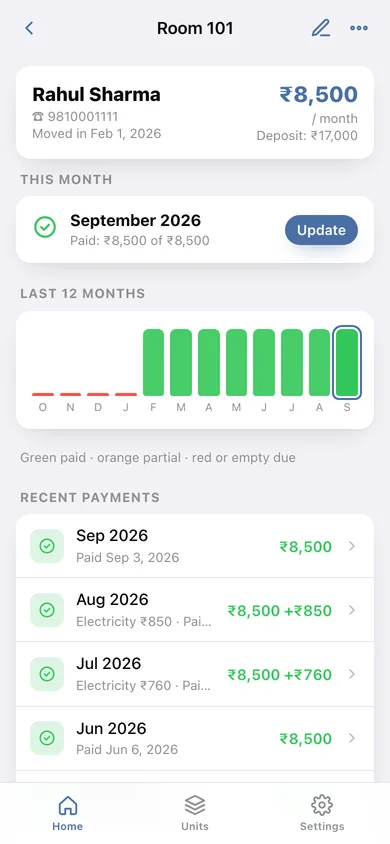
Tenant name, phone, monthly rent, security deposit held, move-in date and an active/vacant flag for every room or shop.
This-month grid with one-tap Mark Paid
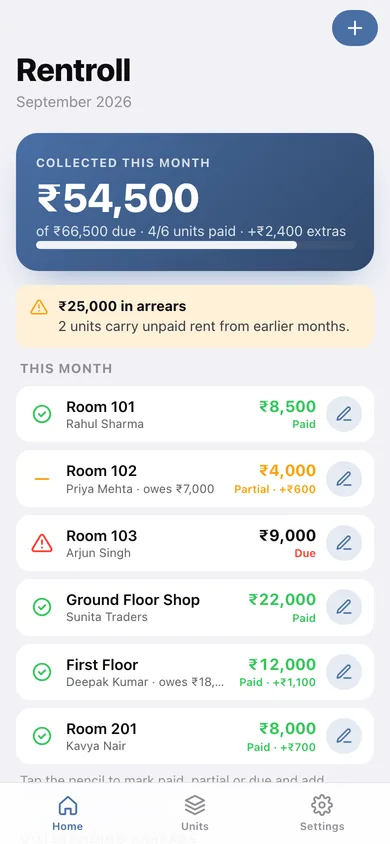
Every active unit's status for the open month — paid, partial or due — with the amount received, the date, and an extras line for electricity or water.
Running arrears, automatically
Shortfalls from partial months plus any past month with no record since move-in, summed per unit and across the building; the home screen flags who still owes.
Collected vs due dashboard
This month's collected amount against total due, paid-unit count, extras collected and the arrears total at a glance.
Year view
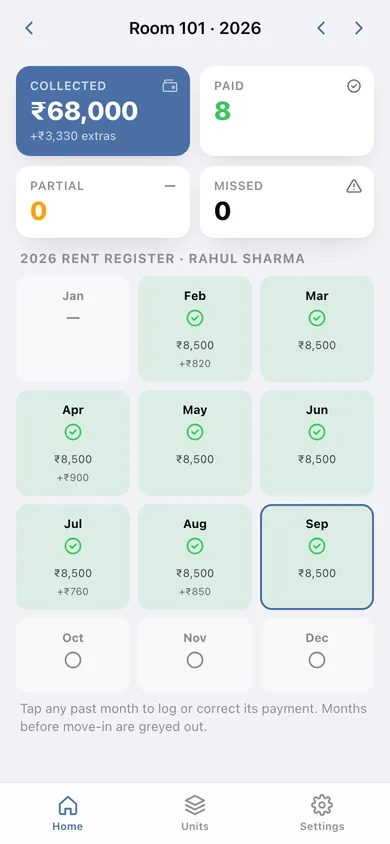
A 12-month rent register per unit showing paid, partial and missed months with amounts; tap any past month to log or correct it.
Your currency, your export
Indian-style ₹ grouping by default (switchable), plus a CSV of every unit-month and a JSON backup.
Screens
Every screen, rebuilt for the browser
-
1
Home
Collected vs due for the month, arrears banner, the this-month grid and outstanding arrears.
-
2
Units
Active and vacant units with tenant, rent and any arrears.
-
3
Unit
Tenant card, this-month status with Mark Paid, 12-month bars and recent payments.
-
4
Add unit
Unit name, occupancy, tenant, phone, rent, deposit and move-in date.
-
5
Year view
12-month register with collected, paid, partial and missed counts.
-
6
Settings
Currency symbol, how arrears are counted, CSV and JSON export, sample data, erase.
Try it with sample data: Loads six occupied units and one vacant room with up to eight months of rent history — a model tenant, a partial payer, a due tenant, a shop with electricity extras and a tenant with two missed months. You can start fresh at any time.
Ready? It's free.
No account, no install, no subscription. Everything you do stays in this browser.
Your say
What should Rentroll do? Tell us before we build it.
Tell us what to build next.
Comments need a free Google sign-in, so every one is from a real person.
Sign in with Google to commentNo comments yet — be the first to say what this app should do next.
Questions
Is the web version of Rentroll free?+
Yes. Every screen is free to use: no subscription, no in-app purchases, no account.
Do I need an account?+
No. Open Rentroll and start using it right away. Sign in with Google only if you want to upvote an app, save it to your list, or leave a comment.
Where is my data stored?+
Only in this browser's local storage. Nothing you enter is sent to our servers, so we can't see it, back it up, or restore it. Clearing site data, a private window, or another device starts empty. Export a backup from the in-app menu to keep it.
Is there a Rentroll app for iPhone or Android?+
Not yet. Rentroll is a community proposal: the browser version is complete, and we build the iPhone and Android app once 100 people upvote it. Upvoters get one email when it ships.