
Web app · Education
Reckon
Type any equation, get the answer and the honest steps — offline
The same recursive-descent engine as the iPhone app: + − × ÷ % parentheses, exponents, decimals, roots, trig, logs, π, e and factorials with correct precedence, plus linear and quadratic solving, a step-by-step reduction that shows real arithmetic, and a history of every solve. Free, no install.
Stored in your browser only. Nothing you do in the web version is sent to our servers. Clear your browser data and it's gone — so export a backup from the in-app menu if you want to keep it.
This app is a community proposal.
Try the full browser version now. We build the iPhone and Android app once 100 people upvote it.
We'll email you once, when it ships. Unsubscribe anytime.
In your browser
What you can do in Reckon on the web
The real expression engine
A recursive-descent parser with correct operator precedence and associativity — parentheses, exponents, modulo, percentages, decimals and implicit multiplication, all evaluated the same way as on the phone.
Solve for x
Put an equals sign in and Reckon detects the variable and returns the linear root or both quadratic roots — or tells you there are no real roots.
Show steps, honestly
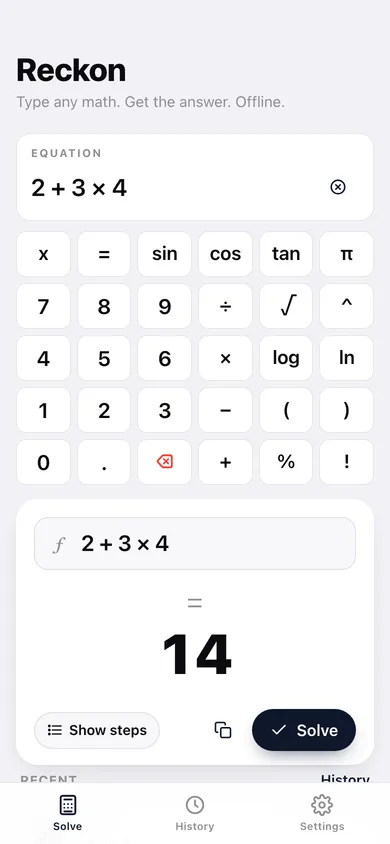
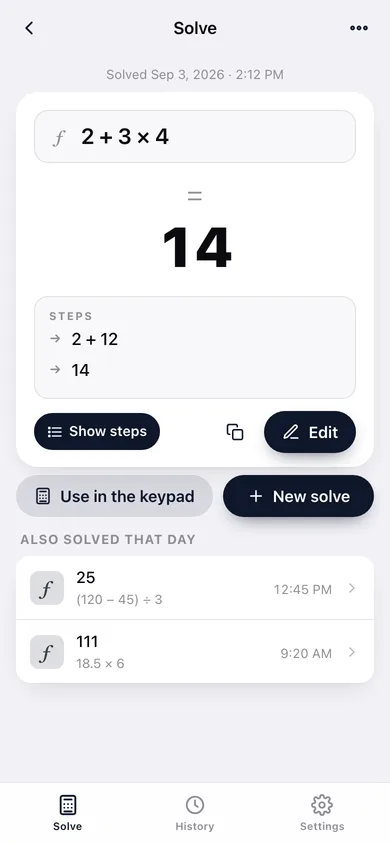
Toggle the steps and watch 2 + 3 × 4 reduce to 2 + 12 to 14, one operator at a time. Real arithmetic, not a fake AI tutor voice.
A keypad built for maths
A six-column pad with √, ^, π, e, n!, parentheses and the function names, so you never hunt through a phone keyboard for a symbol.
Every solve is kept
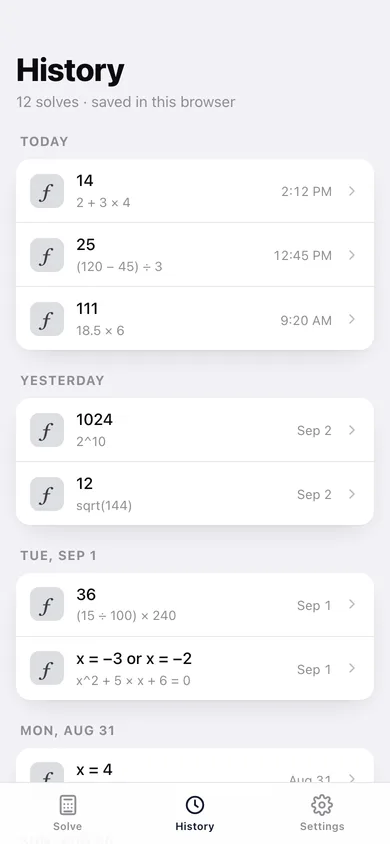
History logs the equation, the answer and the time. Tap any row to reopen it, re-edit the expression and solve again.
Set your own precision
Choose how many decimal places answers round to; trailing zeros are trimmed and the setting applies everywhere at once.
Screens
Every screen, rebuilt for the browser
-
1
Solve
The equation field, the six-column keypad and the answer as you type.
-
2
Result
One solve with its answer, the step-by-step reduction and the option to edit and re-solve.
-
3
History
Every equation you have solved, newest first, ready to reopen.
-
4
Settings
Decimal precision, step display, export, sample data and erase.
Try it with sample data: Adds a couple of weeks of solves — order-of-operations problems, percentages, roots and trig, and a linear and a quadratic equation — so history and the steps view have something to show. You can start fresh at any time.
Ready? It's free.
No account, no install, no subscription. Everything you do stays in this browser.
Your say
What should Reckon do? Tell us before we build it.
Tell us what to build next.
Comments need a free Google sign-in, so every one is from a real person.
Sign in with Google to commentNo comments yet — be the first to say what this app should do next.
Questions
Is the web version of Reckon free?+
Yes. Every screen is free to use: no subscription, no in-app purchases, no account.
Do I need an account?+
No. Open Reckon and start using it right away. Sign in with Google only if you want to upvote an app, save it to your list, or leave a comment.
Where is my data stored?+
Only in this browser's local storage. Nothing you enter is sent to our servers, so we can't see it, back it up, or restore it. Clearing site data, a private window, or another device starts empty. Export a backup from the in-app menu to keep it.
Is there a Reckon app for iPhone or Android?+
Not yet. Reckon is a community proposal: the browser version is complete, and we build the iPhone and Android app once 100 people upvote it. Upvoters get one email when it ships.