
Web app · Education
Podium: Speech Coach
A speech coach that catches your “um” the instant you say it — in your browser
Run a live session with your browser’s speech recognition (or play the scripted sample talk): Podium counts fillers and tracks words-per-minute as you speak, cues you when you race, then hands you a scorecard with a letter grade, crutch word, longest run and pause ratio. Trends show the habit fading. Free, no install.
Stored in your browser only. Nothing you do in the web version is sent to our servers. Clear your browser data and it's gone — so export a backup from the in-app menu if you want to keep it.
This app is a community proposal.
Try the full browser version now. We build the iPhone and Android app once 100 people upvote it.
We'll email you once, when it ships. Unsubscribe anytime.
In your browser
What you can do in Podium: Speech Coach on the web
Live filler and pace catching
Every word is matched against your filler list as it arrives; a pace gauge turns amber when you drift and red when you race past your target.
Scorecard with a letter grade
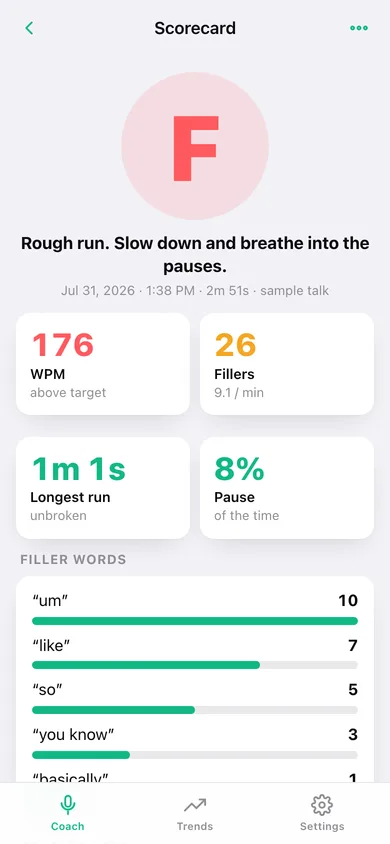
WPM, fillers per minute, longest unbroken run, pause ratio, a filler-word breakdown and a coach’s note written for that talk.
Trends across every session
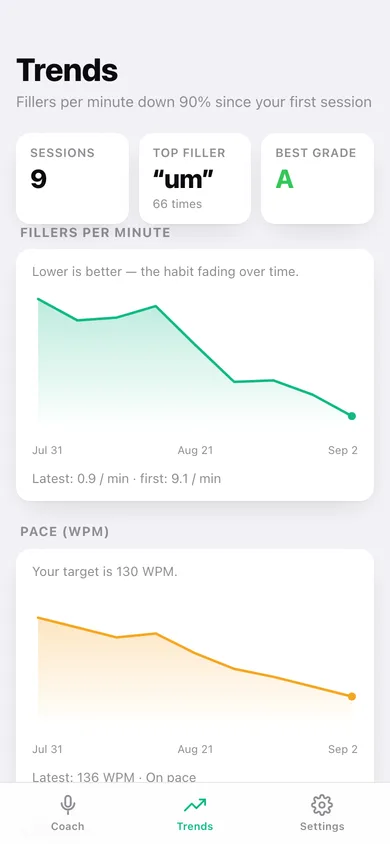
Fillers-per-minute and pace line charts, your all-time top crutch word and best grade, plus every past scorecard.
Your own filler list
Add “basically”, “you know” or any personal tic; multi-word phrases are matched too. Reset to the nine defaults any time.
Pace target you choose
Set 90–200 WPM; the grade, the gauge band and the racing cue all follow it.
Scripted sample talk
A 20-second canned pitch with fillers and a racing burst, so you can see the coaching before you speak.
Screens
Every screen, rebuilt for the browser
-
1
Coach
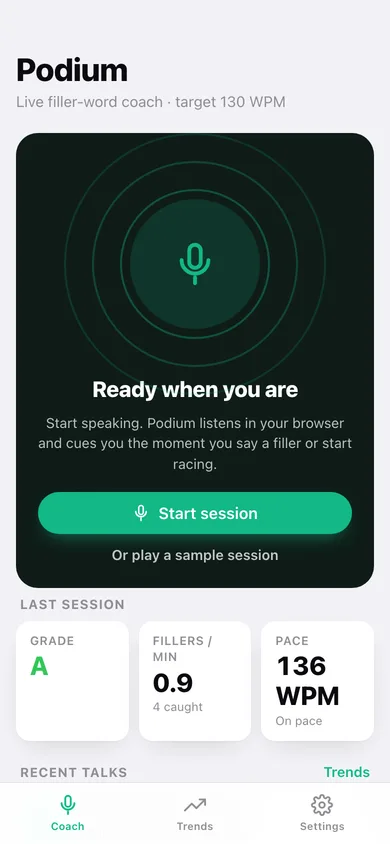
Start a session or play the sample talk; last grade, fillers per minute and pace at a glance.
-
2
Live session
Pace gauge, filler count, live transcript and the cue log while you speak.
-
3
Scorecard
Grade, WPM, fillers, longest run, pause ratio, filler breakdown and coach’s note.
-
4
Trends
Fillers-per-minute and pace over every session, top filler and best grade.
-
5
Filler words
Add, remove or reset the words and phrases Podium listens for.
-
6
Settings
Pace target, buzz cue, filler list, export, sample data and erase.
Try it with sample data: Adds nine practice talks over the last five weeks whose fillers per minute fall from about 5 to 1 and whose pace settles onto target. You can start fresh at any time.
Ready? It's free.
No account, no install, no subscription. Everything you do stays in this browser.
Your say
What should Podium: Speech Coach do? Tell us before we build it.
Tell us what to build next.
Comments need a free Google sign-in, so every one is from a real person.
Sign in with Google to commentNo comments yet — be the first to say what this app should do next.
Questions
Is the web version of Podium: Speech Coach free?+
Yes. Every screen is free to use: no subscription, no in-app purchases, no account.
Do I need an account?+
No. Open Podium: Speech Coach and start using it right away. Sign in with Google only if you want to upvote an app, save it to your list, or leave a comment.
Where is my data stored?+
Only in this browser's local storage. Nothing you enter is sent to our servers, so we can't see it, back it up, or restore it. Clearing site data, a private window, or another device starts empty. Export a backup from the in-app menu to keep it.
Is there a Podium: Speech Coach app for iPhone or Android?+
Not yet. Podium: Speech Coach is a community proposal: the browser version is complete, and we build the iPhone and Android app once 100 people upvote it. Upvoters get one email when it ships.