
Web app · Health And Fitness
PocketPlate
Count calories and macros with a real food table — no account, no daily cap
Search a bundled USDA whole-food table offline, log unlimited foods to breakfast, lunch, dinner and snacks, and watch a calorie ring plus protein/carb/fat bars fill up. Mifflin-St Jeor targets, weight trends and CSV export — free, nothing to install.
Stored in your browser only. Nothing you do in the web version is sent to our servers. Clear your browser data and it's gone — so export a backup from the in-app menu if you want to keep it.
This app is a community proposal.
Try the full browser version now. We build the iPhone and Android app once 100 people upvote it.
We'll email you once, when it ships. Unsubscribe anytime.
In your browser
What you can do in PocketPlate on the web
Search the bundled USDA table
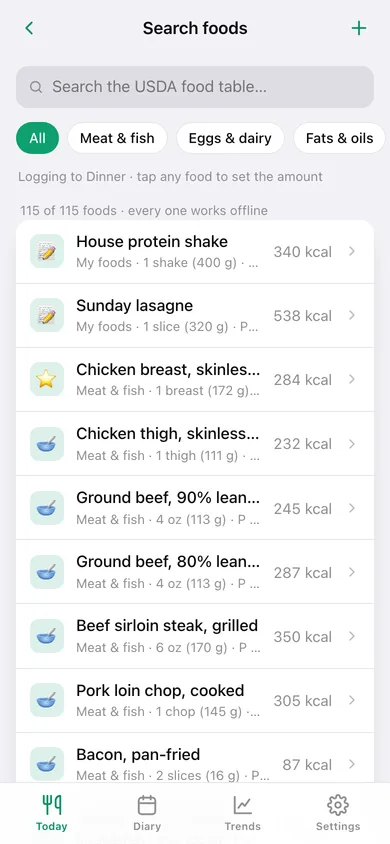
Whole foods from USDA FoodData Central with per-100 g calories, protein, carbs and fat, filtered by category — chicken breast to medjool dates, all searchable with no network.
Unlimited logging, four meals
Log any amount in grams or in servings (½×, 1×, 2× the real serving size) to breakfast, lunch, dinner or snacks. There is no five-food cap here and nothing is locked.
Calorie budget + macro bars
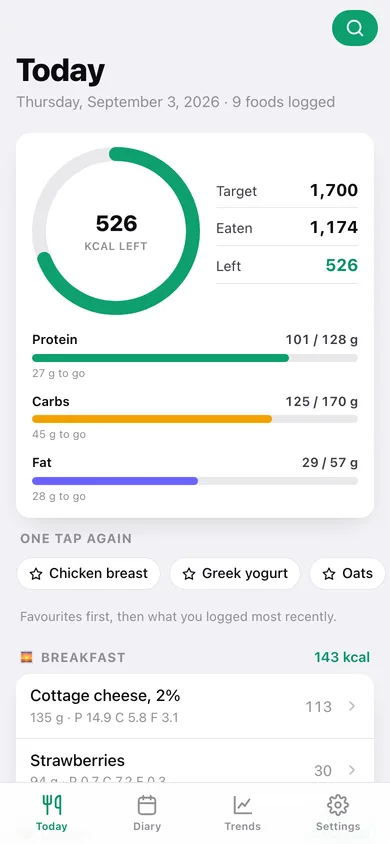
Today shows a ring with calories left, then protein, carbs and fat bars against your targets and exactly how many grams are still to go.
Mifflin-St Jeor targets on device
Enter age, height, weight, activity and goal and the app computes BMR, maintenance and a daily calorie target, split into macros four ways — or type your coach's number instead.
Favourites and custom foods
Star what you eat every day for one-tap logging, and add your own foods with the numbers off the label so your shake and your gran's lasagne count properly.
Weight, trends and CSV
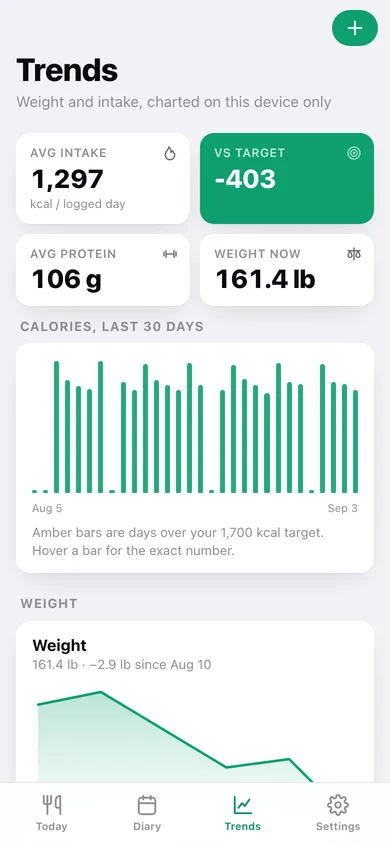
Log weigh-ins, see 30 days of intake against your target, a weight line and a macro donut, then export the whole diary to CSV.
Screens
Every screen, rebuilt for the browser
-
1
Today
Calorie ring, macro bars, one-tap favourites and the day laid out by meal.
-
2
Search foods
The bundled USDA table with category filters and per-serving calories.
-
3
Logged food
Change the amount or meal of something you logged, or take it back off the day.
-
4
Diary
Every day you have logged with totals against target and a 14-day bar chart.
-
5
Trends
30 days of calories, your weight line and where the calories came from.
-
6
My foods
Favourites for one-tap logging plus the custom foods you built yourself.
-
7
Custom food
Add or edit a food with the per-100 g numbers from its label.
-
8
Goal & targets
The Mifflin-St Jeor calculator, macro split picker and custom target override.
-
9
Settings
Units, diary options, CSV and JSON export, sample data and erase.
Try it with sample data: Adds four weeks of a realistic diary — around 240 logged foods across breakfast, lunch, dinner and snacks, seven weigh-ins, two custom foods and four favourites. You can start fresh at any time.
Ready? It's free.
No account, no install, no subscription. Everything you do stays in this browser.
Your say
What should PocketPlate do? Tell us before we build it.
Tell us what to build next.
Comments need a free Google sign-in, so every one is from a real person.
Sign in with Google to commentNo comments yet — be the first to say what this app should do next.
Questions
Is the web version of PocketPlate free?+
Yes. Every screen is free to use: no subscription, no in-app purchases, no account.
Do I need an account?+
No. Open PocketPlate and start using it right away. Sign in with Google only if you want to upvote an app, save it to your list, or leave a comment.
Where is my data stored?+
Only in this browser's local storage. Nothing you enter is sent to our servers, so we can't see it, back it up, or restore it. Clearing site data, a private window, or another device starts empty. Export a backup from the in-app menu to keep it.
Is there a PocketPlate app for iPhone or Android?+
Not yet. PocketPlate is a community proposal: the browser version is complete, and we build the iPhone and Android app once 100 people upvote it. Upvoters get one email when it ships.