
Web app · Finance
PesaLog
Log every shilling — and every fee — the way mobile money actually works
A spending log built around Send Money, Paybill, Buy Goods (Till), Withdraw, Airtime and Deposit, with a fee field on every entry, a monthly fee ledger, and a daily float ring that rolls unspent shillings into tomorrow. Free, no install, no account.
Stored in your browser only. Nothing you do in the web version is sent to our servers. Clear your browser data and it's gone — so export a backup from the in-app menu if you want to keep it.
This app is a community proposal.
Try the full browser version now. We build the iPhone and Android app once 100 people upvote it.
We'll email you once, when it ships. Unsubscribe anytime.
In your browser
What you can do in PesaLog on the web
Six mobile-money types, not one generic 'expense'
Log the way you paid — Send Money, Paybill, Buy Goods (Till), Withdraw, Airtime or Deposit — with recipient prompts that change per rail and recent-recipient chips for repeat payments.
A fee on every transaction
Each entry carries the charge you actually paid, so out-of-pocket is amount plus fee and deposits cost you only the fee.
The published tariff bands, built in
PesaLog knows the banded charge for a send, a paybill and a withdrawal at any amount — it suggests the likely fee as you type so you can check what you were actually charged, and it knows a till is free at every band.
Fee Ledger with paybill vs till
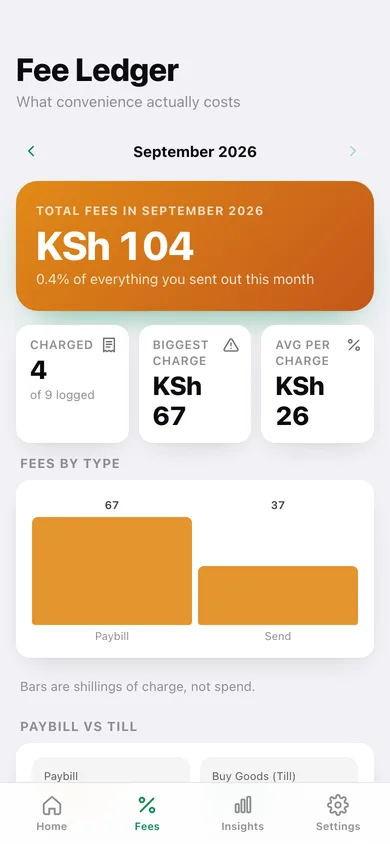
Monthly fee total, fees as a percentage of what you sent out, charges broken down by transaction type, and a paybill-versus-till comparison that tells you what the wrong rail is costing you.
Daily float with rollover
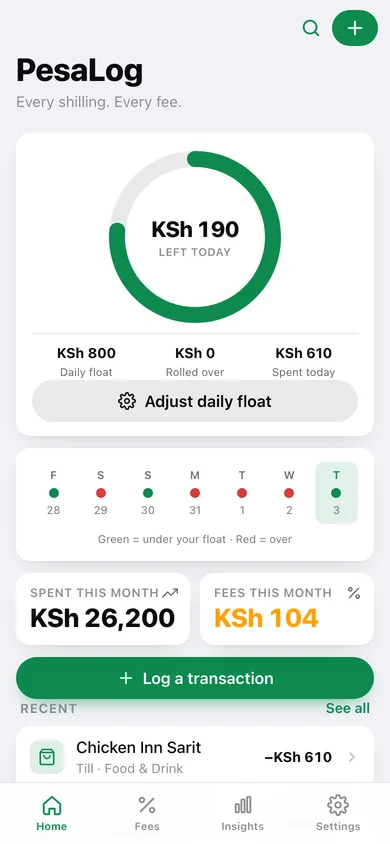
Set what you allow yourself per day; a countdown ring shows what is left today, unspent float carries forward day by day, and a seven-day strip shows which days you stayed under.
Monthly review
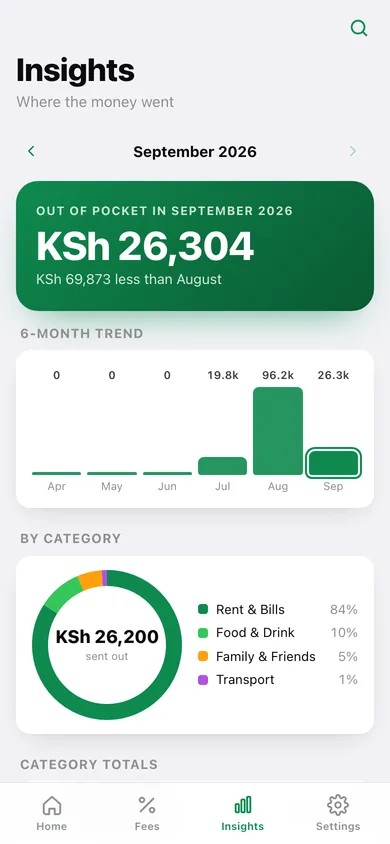
Out-of-pocket versus last month, a six-month trend, a category donut, spend by transaction type and your top five recipients — all for any month you scroll back to.
Screens
Every screen, rebuilt for the browser
-
1
Today
The daily float ring with rollover, a seven-day under/over strip, this month's spend and fees, and your recent transactions.
-
2
Fee Ledger
Total charges for the month, fees by transaction type, paybill vs till, and every transaction that carried a charge.
-
3
Insights
Out-of-pocket versus last month, six-month trend, category donut, spend by type and top recipients.
-
4
Log Transaction
Pick the rail, enter amount and fee, choose the recipient from recent chips, tag a category and a date.
-
5
Transaction detail
Amount, fee, out-of-pocket, category and note for one transaction — with edit, log-again and delete.
-
6
History
Everything you have logged, grouped by day with daily totals, searchable and filterable by transaction type.
-
7
Daily Float
Set the daily allowance, toggle rollover, see your 14-day spending bars and restart the float from today.
-
8
Settings
Float shortcut, category management, CSV and JSON export, sample data and erase.
Try it with sample data: Loads six weeks of Nairobi mobile money — daily boda fares and till shopping, money sent to family, airtime, agent withdrawals, two salary deposits and the monthly rent, power, water, fibre and chama paybills — with every fee taken from the published tariff bands, plus a KSh 800 daily float with rollover. You can start fresh at any time.
Ready? It's free.
No account, no install, no subscription. Everything you do stays in this browser.
Your say
What should PesaLog do? Tell us before we build it.
Tell us what to build next.
Comments need a free Google sign-in, so every one is from a real person.
Sign in with Google to commentNo comments yet — be the first to say what this app should do next.
Questions
Is the web version of PesaLog free?+
Yes. Every screen is free to use: no subscription, no in-app purchases, no account.
Do I need an account?+
No. Open PesaLog and start using it right away. Sign in with Google only if you want to upvote an app, save it to your list, or leave a comment.
Where is my data stored?+
Only in this browser's local storage. Nothing you enter is sent to our servers, so we can't see it, back it up, or restore it. Clearing site data, a private window, or another device starts empty. Export a backup from the in-app menu to keep it.
Is there a PesaLog app for iPhone or Android?+
Not yet. PesaLog is a community proposal: the browser version is complete, and we build the iPhone and Android app once 100 people upvote it. Upvoters get one email when it ships.