
Web app · Finance
Nestegg
Watch the ring fill — savings goals with a live weekly pace, in your browser
Name a goal, give it a target and a deadline, log every contribution, and Nestegg recalculates the exact weekly rate you need and tells you whether you're ahead, on track or behind. No bank link, no account, free.
Stored in your browser only. Nothing you do in the web version is sent to our servers. Clear your browser data and it's gone — so export a backup from the in-app menu if you want to keep it.
This app is a community proposal.
Try the full browser version now. We build the iPhone and Android app once 100 people upvote it.
We'll email you once, when it ships. Unsubscribe anytime.
In your browser
What you can do in Nestegg on the web
Goal cards with progress rings
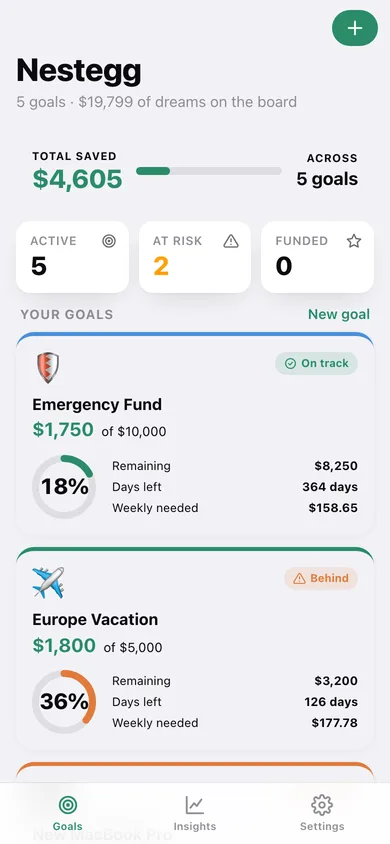
Every goal gets an emoji, a colour, an animated progress ring and a pace chip, with the grand total saved across all goals on top.
Live weekly pace calculator
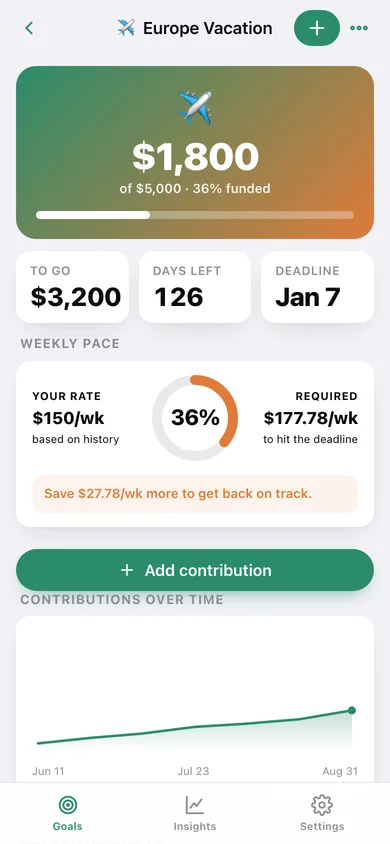
After every contribution Nestegg recomputes your actual weekly rate against the rate required to hit the deadline, and labels the goal ahead, on track, behind or complete — the same rule the iPhone app uses.
Contributions timeline
Log a deposit with a date and a note, edit or delete any past entry, and watch the running-total chart and the ring update instantly.
Insights that flag at-risk goals
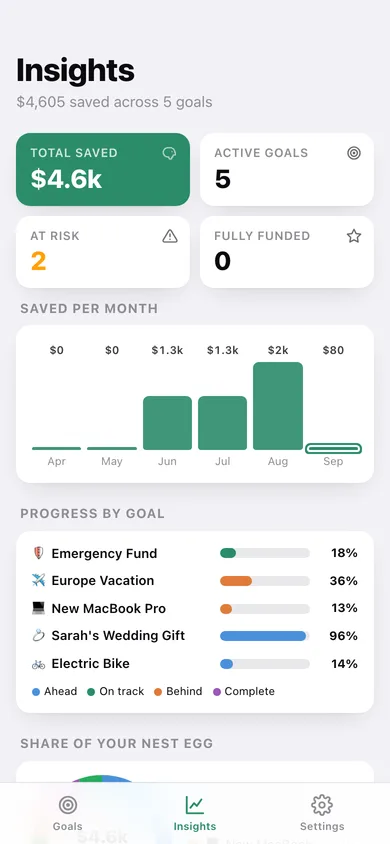
Saved-per-month bars, progress-by-goal bars, a share-of-your-nest-egg donut, plus Needs attention, Ahead of schedule and Fully funded lists with the exact dollars-per-week gap.
Quick amounts and CSV export
One tap logs $25, $50, $100, $250 or $500 to a goal today; export every contribution as CSV or the whole nest egg as a JSON backup.
Stays in your browser
No bank connection, no login, nothing uploaded — goals and contributions are saved locally and everything is unlocked.
Screens
Every screen, rebuilt for the browser
-
1
Goals
Total saved, active / at-risk / funded counts, and a card per goal with its ring, pace chip and weekly-needed figure.
-
2
Goal detail
Funded-percentage hero, remaining and days left, the weekly pace card with your rate vs required, a running-total chart and every contribution.
-
3
Add contribution
Quick amounts, or an amount, date and note with a live preview of the ring after saving.
-
4
Goal editor
Name, emoji, target amount, target date and ring colour, with the weekly savings needed previewed as you type.
-
5
Insights
Saved per month, progress by goal, share of your nest egg, and the goals that need attention or are ahead of schedule.
-
6
Settings
Hide funded goals, default deadline, milestone chime, plus export, sample data and erase.
Try it with sample data: Loads five goals — Europe Vacation, Emergency Fund, New MacBook Pro, Sarah's Wedding Gift and Electric Bike — with twenty-four contributions spread over the last three months so every pace state is represented. You can start fresh at any time.
Ready? It's free.
No account, no install, no subscription. Everything you do stays in this browser.
Your say
What should Nestegg do? Tell us before we build it.
Tell us what to build next.
Comments need a free Google sign-in, so every one is from a real person.
Sign in with Google to commentNo comments yet — be the first to say what this app should do next.
Questions
Is the web version of Nestegg free?+
Yes. Every screen is free to use: no subscription, no in-app purchases, no account.
Do I need an account?+
No. Open Nestegg and start using it right away. Sign in with Google only if you want to upvote an app, save it to your list, or leave a comment.
Where is my data stored?+
Only in this browser's local storage. Nothing you enter is sent to our servers, so we can't see it, back it up, or restore it. Clearing site data, a private window, or another device starts empty. Export a backup from the in-app menu to keep it.
Is there a Nestegg app for iPhone or Android?+
Not yet. Nestegg is a community proposal: the browser version is complete, and we build the iPhone and Android app once 100 people upvote it. Upvoters get one email when it ships.