
Finance
Nestegg: visual savings goal tracker
Save visually, reach goals faster
No account, no install. What you do stays in your browser.
This app is a community proposal.
Try the full browser version now. We build the iPhone and Android app once 100 people upvote it.
We'll email you once, when it ships. Unsubscribe anytime.
| Price | Free, no subscription |
|---|---|
| Account | None needed to try |
| Works offline | Yes |
| Data | On your device, never on our servers |
| Platforms | Browser |
| Status | Community proposal (built for phones at 100 upvotes) |
| Last updated | 2026-06-08 |
Accessibility: Larger Text · Light & Dark · iPad layout · Browser version How we checked →
 Try it live
The full Nestegg, right here in your browser.
No account and no install. What you enter is saved in this browser only, never on our servers.
Open Nestegg →


About this app
What Nestegg does
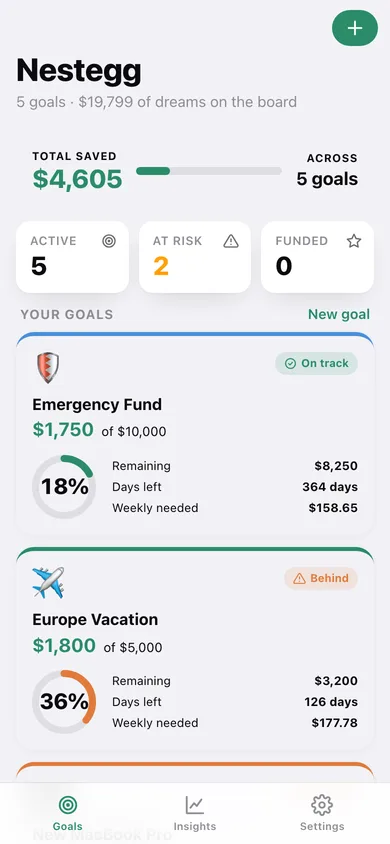
Nestegg turns fuzzy savings dreams into concrete, trackable goals you actually want to open every day. Create a goal — vacation, emergency fund, new laptop, wedding gift — give it a target amount and a deadline, then log contributions as you make them. A gorgeous progress ring fills with every deposit while a live pace card recalculates exactly how much you need to save each week to hit your date on time. The home screen shows all your goals at a glance with a single total-saved number so you feel the momentum of every dollar. Drill into any goal for a full contributions timeline, a pace history sparkline, and quick notes on each deposit. An insights view surfaces which goals need attention and celebrates milestones with a gentle confetti burst. No bank links. No account. No internet ever required. SwiftData keeps everything on-device.
Features
Built to be useful, not noisy.
Goal cards with progress rings
Home screen shows each savings goal as a card with an animated progress ring, emoji, target amount, current balance, and days remaining. A banner at the top displays the grand total saved across all goals.
Live weekly pace calculator
After every contribution, Nestegg recalculates the exact weekly save rate needed to hit the goal by the target date. GoalDetailView shows current pace vs required pace as a simple colour-coded label (ahead / on track / behind).
Contributions timeline
A chronological list of every deposit with amount, date, and an optional short note. Users can edit or delete past entries; the progress ring and pace update instantly.
Insights view
A summary screen that highlights goals at risk of missing their deadline (pace is too slow), goals ahead of schedule, and a simple bar chart comparing progress across all goals.
Why it exists
The problem
Most savings goal trackers either require bank integration (raising privacy concerns) or are buried as a minor feature inside budgeting apps like YNAB or Mint. People who just want to visualize progress toward a few named goals have no lightweight, offline, delightful option.
What's different
How Nestegg stands out
Nestegg is the only savings-goal app built entirely around visual progress rings and a live weekly-pace calculator — fully offline, no bank link, no subscription for core use — unlike Qapital (bank-linked, subscription) or the goal features inside Mint/YNAB (requires accounts and internet).
You might also like
All apps →
Overtime Tax Tracker
Finance
Your No-Tax-Overtime deduction, adding up

PayLater Tracker
Finance
All your pay-in-4 in one place

Bill Creep
Finance
Track bill creep, call it back

CertDay
Finance
Never lose a benefit week

DealChase
Finance
Chase every brand deal payment

DuesWatch
Finance
Your HOA dues, with receipts
FAQ
Questions about Nestegg
How much does Nestegg cost?▾
Nestegg is free. All features are included from day one — no subscription, no in-app purchases, no paid tiers. Everything you see in this listing works the moment you install it.
Where does Nestegg store my data?▾
Nestegg stores what you enter on your device. No account is required, and we never sell your data. Any anonymous usage data or optional notifications are explained in the Nestegg privacy policy.
What platforms does Nestegg support?▾
iOS, on iPhone and iPad. You can find the latest availability on this page.
How do I get support for Nestegg?▾
Use the Support link on this page, or email support@allthingsn.com. We answer every message and keep responses on the same thread.
Related guide
Best subscription tracker apps that aren't a subscription, 2026
More money & finance apps with no subscription →
More in Finance

