
Health And Fitness
Limber: guided stretching timer
Stretch & mobility, your way
No account, no install. What you do stays in your browser.
This app is a community proposal.
Try the full browser version now. We build the iPhone and Android app once 100 people upvote it.
We'll email you once, when it ships. Unsubscribe anytime.
| Price | Free, no subscription |
|---|---|
| Account | None needed to try |
| Works offline | Yes |
| Data | On your device, never on our servers |
| Platforms | Browser |
| Status | Community proposal (built for phones at 100 upvotes) |
| Last updated | 2026-06-08 |
Accessibility: Larger Text · Light & Dark · Haptics · iPad layout · Browser version How we checked →
 Try it live
The full Limber, right here in your browser.
No account and no install. What you enter is saved in this browser only, never on our servers.
Open Limber →


About this app
What Limber does
Limber makes guided stretching dead simple — pick a focus area, follow the timed sequence, and build a streak without overthinking it. Whether you have two minutes at your desk or twenty minutes before bed, Limber meets you where you are. Every routine plays like a patient coach: a full-screen countdown tells you exactly how long to hold, a next-up preview keeps you relaxed, and cues remind you which side is which. When you finish, your session is logged and your streak grows. Built-in routines cover the areas people neglect most — neck tension, tight hips, lower back, full-body mobility, and quick desk breaks. The custom builder lets you assemble your own sequence from the stretch library and set your own hold times. 100% offline. No account required. Nothing leaves your device. Not a substitute for medical advice.
Features
Built to be useful, not noisy.
Guided player
Full-screen timed sequence player showing a large countdown, the current stretch name and cue, a next-up preview card, and pause/skip controls. Haptic feedback at each transition.
Routine library
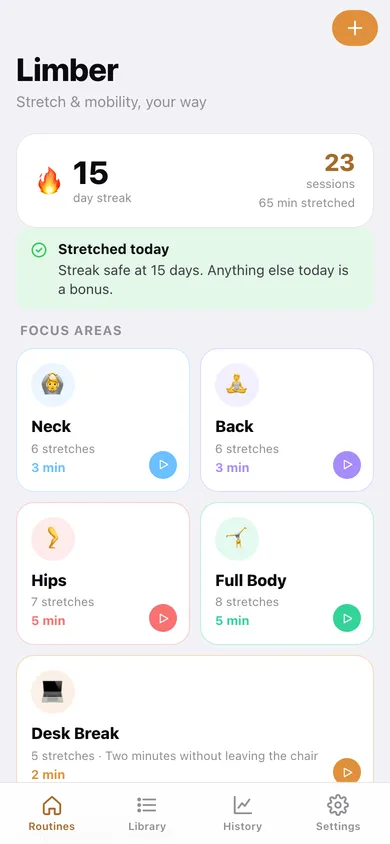
Five curated focus routines (neck, back, hips, full-body, desk break) displayed as swipeable cards on the home screen with estimated duration and step count.
Custom routine builder
Pick stretches from the full library, set hold time per stretch, reorder with drag-and-drop, and save unlimited custom routines under a name of your choice.
Streak and history
Daily activity ring, current streak count, longest streak, and a scrollable calendar-style history of completed sessions with duration and routine name.
Why it exists
The problem
People know they should stretch but skip it because opening a video app, deciding what to do, and tracking time feels like friction — most fitness apps are gym-centric or require subscriptions for offline use, leaving a gap for a dead-simple timed-stretch companion.
What's different
How Limber stands out
Limber is the only stretch app that pairs a distraction-free full-screen countdown player (with next-up preview) with a lightweight custom routine builder and streak tracking — 100% offline, no account, no subscription gate on core guided routines, unlike Stretch It, StretchMinder, or Down Dog.
You might also like
All apps →
Roundbell
Health And Fitness
Tabata, EMOM & Boxing Rounds

Footfall
Health And Fitness
Free Pedometer, No Ads

Yoga Coach
Health And Fitness
Free AI yoga trainer with real pose feedback

Resonate: Voice Trainer
Health And Fitness
Pitch and resonance, live

StrideLab: Run Form
Health And Fitness
Running form from a slo-mo

PaceGrid
Health And Fitness
Split your race, hit your time
FAQ
Questions about Limber
How much does Limber cost?▾
Limber is free. All features are included from day one — no subscription, no in-app purchases, no paid tiers. Everything you see in this listing works the moment you install it.
Where does Limber store my data?▾
Limber stores what you enter on your device. No account is required, and we never sell your data. Any anonymous usage data or optional notifications are explained in the Limber privacy policy.
What platforms does Limber support?▾
iOS, on iPhone and iPad. You can find the latest availability on this page.
How do I get support for Limber?▾
Use the Support link on this page, or email support@allthingsn.com. We answer every message and keep responses on the same thread.
Related guide
Best offline fitness tracker apps, 2026
More fitness & workouts apps with no subscription →
More in Health And Fitness

