
Web app · Health And Fitness
LaborClock
Time contractions in your browser — and never lose one
One big button: tap when a contraction starts, tap when it ends. Every tap is written to this browser the instant it happens, the 5-1-1 check tells you in plain language when it may be time to call your provider, and editing a mistimed entry is free. No ads, no account, no rating prompt mid-contraction.
Stored in your browser only. Nothing you do in the web version is sent to our servers. Clear your browser data and it's gone — so export a backup from the in-app menu if you want to keep it.
This app is a community proposal.
Try the full browser version now. We build the iPhone and Android app once 100 people upvote it.
We'll email you once, when it ships. Unsubscribe anytime.
In your browser
What you can do in LaborClock on the web
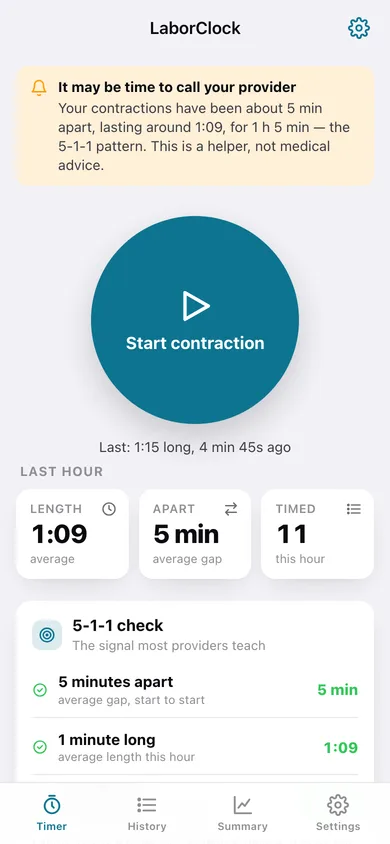
Tap to time, saved instantly
The whole timer is one button. Length and the gap since the last contraction are written the moment you stop, so a refresh or a closed tab loses nothing.
The 5-1-1 check, spelled out
Three plain lines — about 5 minutes apart, about 1 minute long, for 1 hour — each ticking green as your pattern meets it, with a calm banner when all three do.
Editing is free, always
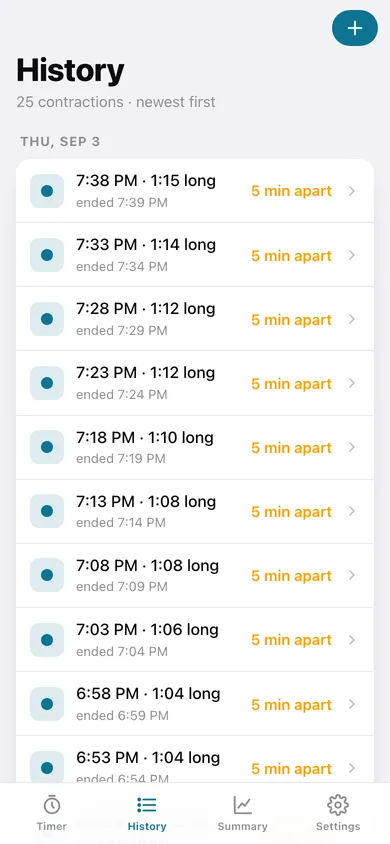
Tap any contraction to fix its date, start time or length; the gaps on either side are recalculated for you. Delete one, or add one you timed by hand.
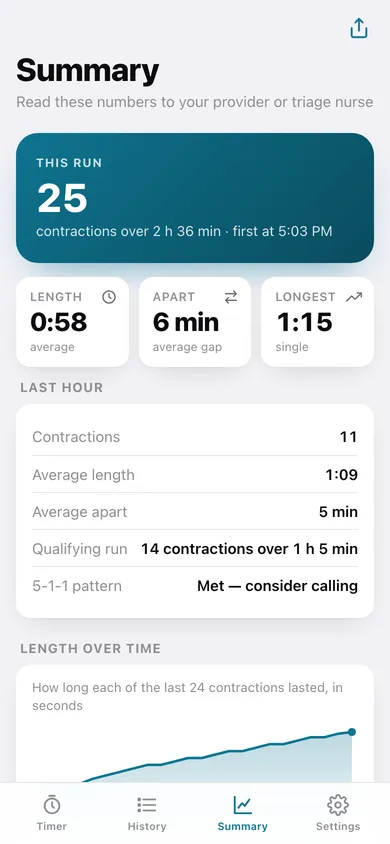
A read-out for triage
Average length, average gap, longest contraction, the qualifying run, a length-over-time line and a minutes-apart bar chart — copy the whole summary as one sentence to read to the nurse.
Works with the signal off
No network connection is ever opened. Export a CSV of the run or a full JSON backup whenever you want.
Screens
Every screen, rebuilt for the browser
-
1
Timer
The big tap button, last-hour averages and the live 5-1-1 check.
-
2
History
Every contraction, newest first, grouped by day with its length and the gap before it.
-
3
Edit a contraction
Fix the date, start time or length of one entry and see the contractions either side of it.
-
4
Summary
Session averages, the qualifying run, length over time and minutes apart.
-
5
Settings
Sound cue, the 5-1-1 banner, CSV export, backup, sample data and erase.
Try it with sample data: Loads a realistic early-labour run — 25 contractions over about two and a half hours, gaps tightening from 10 to 5 minutes and lengths growing from 35 to 75 seconds, ending in a qualifying 5-1-1 pattern. You can start fresh at any time.
Ready? It's free.
No account, no install, no subscription. Everything you do stays in this browser.
Your say
What should LaborClock do? Tell us before we build it.
Tell us what to build next.
Comments need a free Google sign-in, so every one is from a real person.
Sign in with Google to commentNo comments yet — be the first to say what this app should do next.
Questions
Is the web version of LaborClock free?+
Yes. Every screen is free to use: no subscription, no in-app purchases, no account.
Do I need an account?+
No. Open LaborClock and start using it right away. Sign in with Google only if you want to upvote an app, save it to your list, or leave a comment.
Where is my data stored?+
Only in this browser's local storage. Nothing you enter is sent to our servers, so we can't see it, back it up, or restore it. Clearing site data, a private window, or another device starts empty. Export a backup from the in-app menu to keep it.
Is there a LaborClock app for iPhone or Android?+
Not yet. LaborClock is a community proposal: the browser version is complete, and we build the iPhone and Android app once 100 people upvote it. Upvoters get one email when it ships.