
Health And Fitness
LaborClock: contraction timer
Time contractions. Never lose a one.
No account, no install. What you do stays in your browser.
This app is a community proposal.
Try the full browser version now. We build the iPhone and Android app once 100 people upvote it.
We'll email you once, when it ships. Unsubscribe anytime.
| Price | Free, no subscription |
|---|---|
| Account | None needed to try |
| Works offline | Yes |
| Data | On your device, never on our servers |
| Platforms | Browser |
| Status | Community proposal (built for phones at 100 upvotes) |
| Last updated | 2026-05-01 |
Accessibility: Larger Text · VoiceOver labels · Haptics · iPad layout · Browser version How we checked →
 Try it live
The full LaborClock, right here in your browser.
No account and no install. What you enter is saved in this browser only, never on our servers.
Open LaborClock →
Try it live
The full LaborClock, right here in your browser.
No account and no install. What you enter is saved in this browser only, never on our servers.
Open LaborClock →


About this app
What LaborClock does
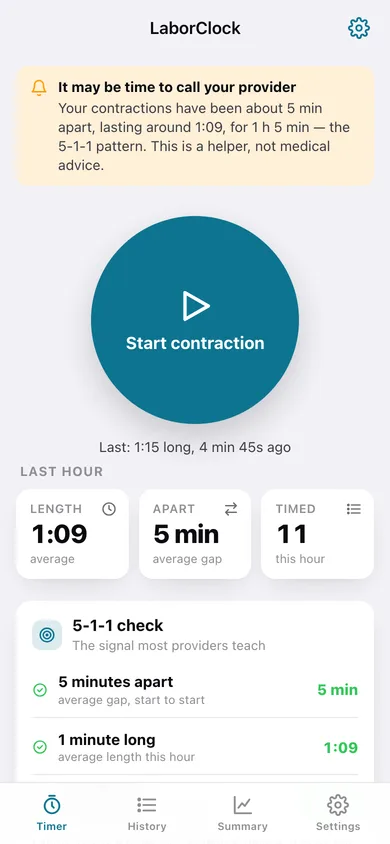
LaborClock is the contraction timer that does the one job right at the most stressful moment of your life: it never loses your data, never shows you an ad, and tells you in plain language when it's time to call your provider. The contraction-timer category is used by nearly every full-term pregnancy in its final weeks — and it's full of horror stories: apps that lost five hours of overnight contractions after a restart, apps that popped a 'rate us!' prompt mid-contraction, apps that paywall the ability to edit a mistimed entry. LaborClock fixes all of it. What LaborClock does: — Tap to start, tap to stop. Each contraction's duration and the interval since the last one are saved the instant you tap — SwiftData autosave, so a crash or restart loses nothing. — The 5-1-1 alert. LaborClock watches your pattern and tells you clearly when contractions reach 5 minutes apart, lasting 1 minute, for 1 hour — the standard 'time to call your provider' signal. (Your provider's guidance always wins; this is a helper, not medical advice.) — Live Activity + Dynamic Island. The current contraction timer lives on your lock screen so you're not unlocking the phone every few minutes during labor. — Fully editable history, free. Mistimed one? Edit or delete it. No paywall. — Session summary. Average duration, average interval, trend — show it to your partner or read it to the triage nurse. — Zero ads. No account. No subscription. No cloud. Works in airplane mode in the car on the way to the hospital. For the 3.4 million US pregnancies each year, in the moment they need a calm, reliable tool most.
Features
Built to be useful, not noisy.
Timer
Big tap-to-start/stop; duration + interval saved per tap
511 alert
Detects 5-1-1 pattern; clear call-your-provider prompt
Live Activity
Lock-screen + Dynamic Island current-contraction timer
History
Editable list of every contraction, free
Summary
Average duration/interval + trend to read to triage
Why it exists
The problem
Contraction timers are used during active labor — the most stressful moment — yet the category routinely loses data on restart, shows ads/rating prompts mid-contraction, and paywalls editing entries.
What's different
How LaborClock stands out
LaborClock is the only contraction timer that autosaves every tap to SwiftData (never loses a session on crash/restart), shows the timer as a lock-screen Live Activity + Dynamic Island, gives a clear 5-1-1 'call your provider' alert, and keeps editing free with zero ads — incumbent timers lose overnight data, pop rati…
You might also like
All apps →
Roundbell
Health And Fitness
Tabata, EMOM & Boxing Rounds

Footfall
Health And Fitness
Free Pedometer, No Ads

Yoga Coach
Health And Fitness
Free AI yoga trainer with real pose feedback

Resonate: Voice Trainer
Health And Fitness
Pitch and resonance, live

StrideLab: Run Form
Health And Fitness
Running form from a slo-mo

PaceGrid
Health And Fitness
Split your race, hit your time
FAQ
Questions about LaborClock
How much does LaborClock cost?▾
LaborClock is free. All features are included from day one — no subscription, no in-app purchases, no paid tiers. Everything you see in this listing works the moment you install it.
Where does LaborClock store my data?▾
On your device. LaborClock is built privacy-first: no account is required, no analytics SDKs, no third-party trackers. Nothing is uploaded to a server we control — the app works without one.
What platforms does LaborClock support?▾
iOS, on iPhone and iPad. You can find the latest availability on this page.
How do I get support for LaborClock?▾
Use the Support link on this page, or email support@allthingsn.com. We answer every message and keep responses on the same thread.
Related guide
Best offline fitness tracker apps, 2026
More fitness & workouts apps with no subscription →
More in Health And Fitness

