
Productivity
Interactive Record: ADA accommodation tracker
Your private record of the conversation your employer controls.
No account, no install. What you do stays in your browser.
This app is a community proposal.
Try the full browser version now. We build the iPhone and Android app once 100 people upvote it.
We'll email you once, when it ships. Unsubscribe anytime.
| Price | Free, no subscription |
|---|---|
| Account | None needed to try |
| Works offline | Yes |
| Data | On your device, never on our servers |
| Platforms | Browser |
| Status | Community proposal (built for phones at 100 upvotes) |
| Last updated | 2026-05-18 |
Accessibility: VoiceOver labels · iPad layout · Browser version How we checked →
 Try it live
The full Interactive Record, right here in your browser.
No account and no install. What you enter is saved in this browser only, never on our servers.
Open Interactive Record →
Try it live
The full Interactive Record, right here in your browser.
No account and no install. What you enter is saved in this browser only, never on our servers.
Open Interactive Record →


About this app
What Interactive Record does
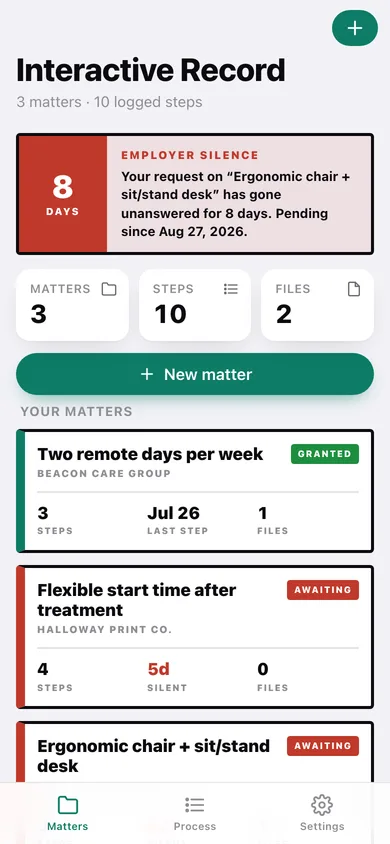
When you ask your employer for a workplace accommodation, the ADA "interactive process" is a back-and-forth the company documents in its own HR file — leaving you with no neutral, timestamped record of what you asked for, when, what was promised, and when they went silent. And under 2025 EEOC and law-firm guidance, employer silence or delay is itself a denial. To later prove the timeline of a denial or retaliation, you need a contemporaneous personal log. The authoritative resources — JAN's Workplace Accommodation Toolkit, EEOC guidance, WHN's March 2025 ADA template — ship only sample request letters and fillable PDFs aimed at employers, not an employee-side tracker. The one dedicated app, JustiProof, shut down in 2025, vacating the market. Employment attorneys uniformly tell disabled workers to keep a private journal — notebook, encrypted file, or app — because the employer owns the official record. Interactive Record is that journal, built for the job. You log each step of the interactive process as a locked, timestamped entry: request made, medical-form/inquiry received, employer deadline given, response or silence, accommodation granted or denied. Entries prompt you to record the workplace barrier — per EEOC, "sitting long periods causes severe back pain," not your diagnosis — so the record stays focused on the legal question. A silence flag dates how long an unanswered request has been pending, making the employer's delay visible and dated. You can keep copies of your own request emails and letters attached to each step, and export the full dated timeline as a PDF to hand to your own attorney. What ships in v1: the interactive-process timeline, problem-framed entry prompts, silence/delay flagging, on-device evidence attachments, and offline PDF export. Everything stays on this phone — SwiftData, no account, no network, no analytics. You are documenting your own employer, often anticipating retaliation; the most sensitive record you own should never live on a third-party server that could be breached or subpoenaed. That is the line incumbents cannot cross: employer-side SaaS exists to share with HR, and cloud apps are exactly what made attorneys keep recommending a private journal. For disabled employees navigating an ADA accommodation request who need the one record the employer's HR file will never show. Free, no account, on-device.
Features
Built to be useful, not noisy.
Interactive-process timeline
Log each step as a locked, timestamped entry: request made, medical-inquiry received, employer deadline, response or silence, granted or denied.
Problem-framed entries
Each entry prompts you to record the workplace barrier (e.g., can't complete an 8-hour desk shift), not your diagnosis, per EEOC documentation guidance.
Silence flagging
Marks elapsed time since your request so an unanswered request — itself a legal denial — is visibly dated.
On-device evidence
Attach copies of your own request emails and letters to each step; stored locally, never uploaded.
Offline PDF export
Export the full dated timeline as a PDF to hand to your own attorney, generated entirely on-device.
Privacy posture
100% on-device, no account, no network, no analytics — surfaced plainly so you can trust the record stays yours.
Why it exists
The problem
The ADA interactive process is documented only in the employer's HR system. The employee — who must later prove the timeline of a denial or retaliation, including employer silence (itself a legal denial) — has no neutral, timestamped, step-structured personal record. Authoritative resources (JAN, EEOC, WHN) ship only…
What's different
How Interactive Record stands out
Interactive Record is the only employee-owned, on-device tracker structured around the ADA interactive process itself — request, medical inquiry, deadline, response or silence, grant or denial — as locked timestamped steps, with EEOC-aligned prompts to record the workplace barrier not the diagnosis and a silence flag…
You might also like
All apps →
Show Me Once
Productivity
Film it once. Get the step-by-step guide.

Relay
Productivity
Run Shortcuts on a schedule

Shotbox: Screenshot Finder
Productivity
Find any screenshot by meaning

ClassProof
Productivity
Your own attendance record

DUI Road
Productivity
Every deadline back to driving

H1B Clock
Productivity
Recapture your H-1B days
FAQ
Questions about Interactive Record
How much does Interactive Record cost?▾
Interactive Record is free. All features are included from day one — no subscription, no in-app purchases, no paid tiers. Everything you see in this listing works the moment you install it.
Where does Interactive Record store my data?▾
On your device. Interactive Record is built privacy-first: no account is required, no analytics SDKs, no third-party trackers. Nothing is uploaded to a server we control — the app works without one.
What platforms does Interactive Record support?▾
iOS, on iPhone and iPad. You can find the latest availability on this page.
How do I get support for Interactive Record?▾
Use the Support link on this page, or email support@allthingsn.com. We answer every message and keep responses on the same thread.
Related guide
Best iPhone apps with no subscription (one-time purchase & free), 2026
More notes & productivity apps with no subscription →
More in Productivity

