
Web app · Productivity
Interactive Record
Your own dated record of the accommodation conversation your employer controls
Log each step of the ADA interactive process as a locked, timestamped entry — request made, medical inquiry, deadline, response or silence, granted or denied — with a silence flag that dates employer delay and an export for your attorney. Free, in your browser.
Stored in your browser only. Nothing you do in the web version is sent to our servers. Clear your browser data and it's gone — so export a backup from the in-app menu if you want to keep it.
This app is a community proposal.
Try the full browser version now. We build the iPhone and Android app once 100 people upvote it.
We'll email you once, when it ships. Unsubscribe anytime.
In your browser
What you can do in Interactive Record on the web
Interactive-process timeline
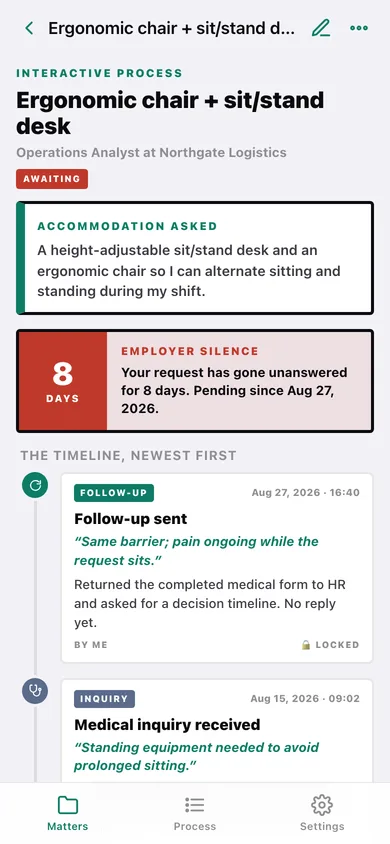
Eight defined step types — request made, medical inquiry received, deadline given, employer response, follow-up sent, granted, denied, note — on one dated vertical rail per matter.
Silence flag that dates the delay
When your latest request or follow-up has no employer response, grant or denial after it, the matter is marked Awaiting and the days are counted from the date the ask actually happened.
Problem-framed entries
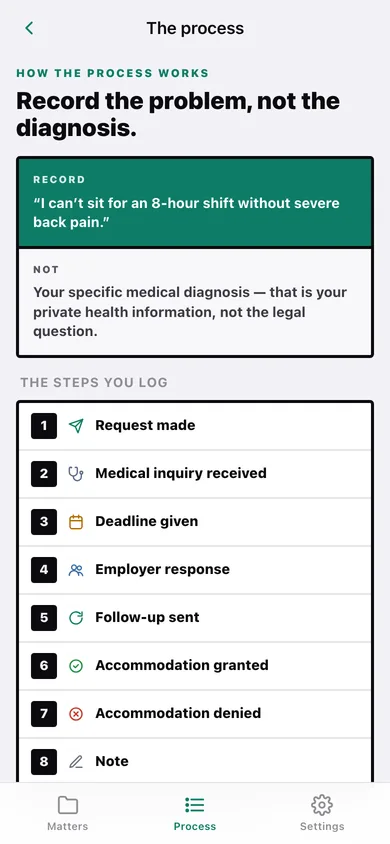
Every step prompts for the workplace barrier — “can’t sit for an 8-hour shift without severe back pain” — not your diagnosis, the way EEOC guidance frames it.
Locked, separately dated entries
Each step stores the date the event occurred alongside the moment you logged it, and locks on save; you can unlock to fix a typo and re-lock.
Evidence copies kept with the step
Paste your own request email or the employer’s reply and it stays attached to that step — stored in this browser, never uploaded.
Export the dated record
Download or copy the whole account — every step, barrier, deadline and attached letter — as a plain-text file to hand to your own attorney.
Screens
Every screen, rebuilt for the browser
-
1
Matters
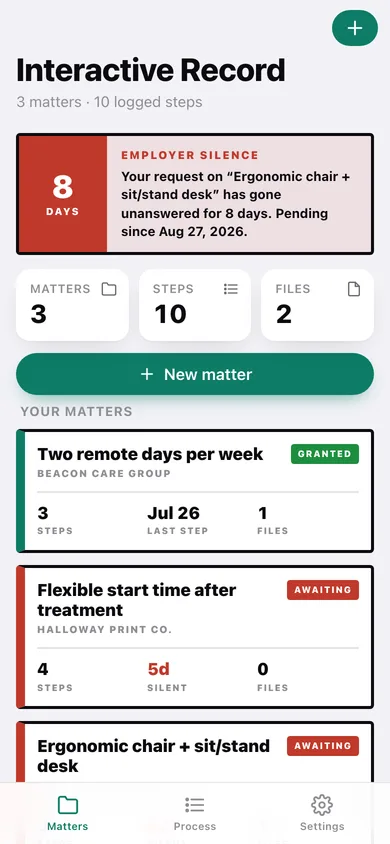
The loudest silence flag, matter/step/file counts, and a card per matter with status, steps, silent days and files.
-
2
Timeline
One matter's interactive process on a dated rail, with the accommodation asked and the silence banner.
-
3
Step detail
One locked entry: the barrier, what was said, the deadline, when it occurred versus when it was logged, and the evidence copies.
-
4
New matter
Name the accommodation you asked for, the employer, your role and the request in plain language.
-
5
Export record
A summary of what the file contains, then download or copy the full dated account.
-
6
The process
Record the problem, not the diagnosis — the eight steps you log and why employer silence counts as denial.
-
7
Settings
Entry locking, the barrier prompt, privacy posture, backup, sample matters and erase.
Try it with sample data: Loads three worked matters — an ergonomic-chair request sitting unanswered with the silence flag running, a remote-work request that ran the full process and was granted, and a flexible-start-time request mid-negotiation — with evidence copies attached. You can start fresh at any time.
Ready? It's free.
No account, no install, no subscription. Everything you do stays in this browser.
Your say
What should Interactive Record do? Tell us before we build it.
Tell us what to build next.
Comments need a free Google sign-in, so every one is from a real person.
Sign in with Google to commentNo comments yet — be the first to say what this app should do next.
Questions
Is the web version of Interactive Record free?+
Yes. Every screen is free to use: no subscription, no in-app purchases, no account.
Do I need an account?+
No. Open Interactive Record and start using it right away. Sign in with Google only if you want to upvote an app, save it to your list, or leave a comment.
Where is my data stored?+
Only in this browser's local storage. Nothing you enter is sent to our servers, so we can't see it, back it up, or restore it. Clearing site data, a private window, or another device starts empty. Export a backup from the in-app menu to keep it.
Is there a Interactive Record app for iPhone or Android?+
Not yet. Interactive Record is a community proposal: the browser version is complete, and we build the iPhone and Android app once 100 people upvote it. Upvoters get one email when it ships.