
Web app · Education
IEP Vault
Your IEP paper trail — what was written, what was delivered, who said what, and when
A private binder for your child's IEP or 504 plan: enter every accommodation and service with its written minutes, tap delivered / partial / skipped each school day, log meetings, calls and emails, keep deadline clocks, store scans and export a dated evidence packet. Free, no account — nothing leaves your browser.
Stored in your browser only. Nothing you do in the web version is sent to our servers. Clear your browser data and it's gone — so export a backup from the in-app menu if you want to keep it.
This app is a community proposal.
Try the full browser version now. We build the iPhone and Android app once 100 people upvote it.
We'll email you once, when it ships. Unsubscribe anytime.
In your browser
What you can do in IEP Vault on the web
IEP / 504 binder
Accommodations (classroom, testing or both) and related services with provider, weekly minutes, sessions and location — entered once, exactly as written.
One-tap daily delivery log
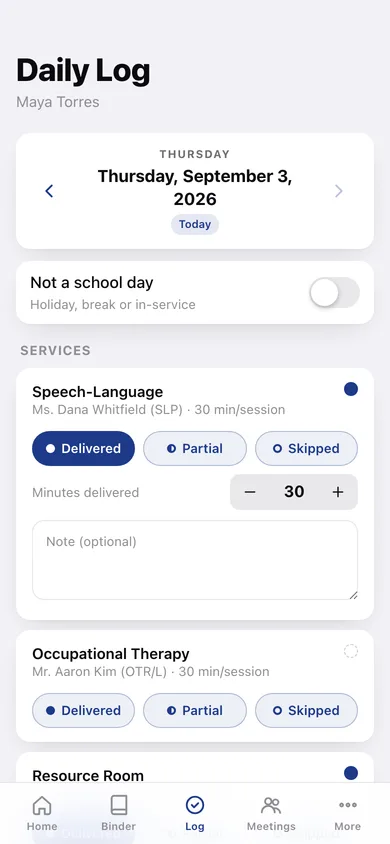
Delivered, partial or skipped per service and accommodation per school day, with minutes delivered and a note; mark holidays as no-school days.
Delivery history month grid
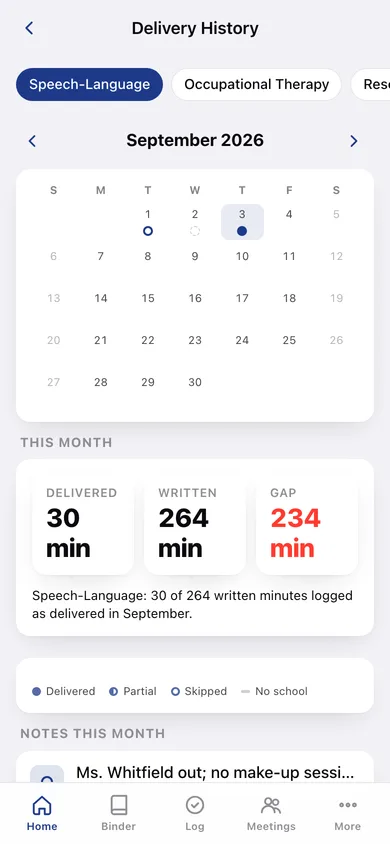
Filled, half, hollow and dash dots per day for any item, plus delivered-versus-written minutes for the month — the pattern, not the anecdote.
Meetings and communication log
Annual IEP, amendment, eval and conference records with attendees, promises and follow-ups; every call, email, in-person and note-home contact with person, role and summary.
Deadline clocks
Evaluation timelines, annual reviews, promised follow-ups and requested documents with day counts, overdue flags and a done checklist.
Document vault and evidence packet
Photos and scans kept inside the binder, linkable to meetings and contacts; a dated, chronological packet of logs, meetings, communications and documents you can print to PDF.
Screens
Every screen, rebuilt for the browser
-
1
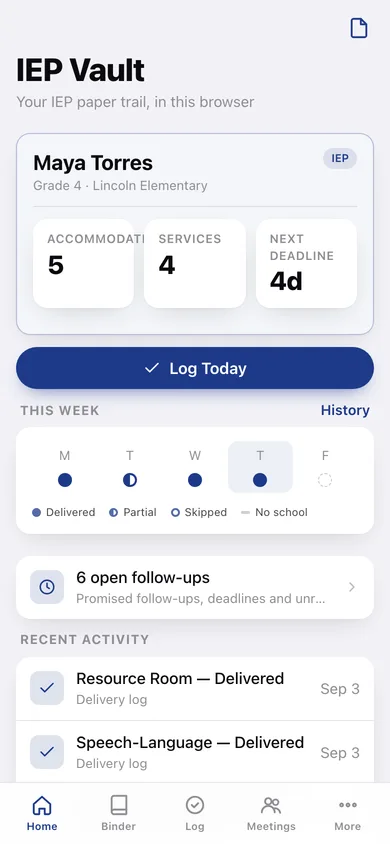
Home
Child header with plan counts and next deadline, Log Today, this week's delivery strip, open follow-ups and recent activity.
-
2
Binder
Accommodations with their setting and related services with min/wk and sessions.
-
3
Accommodation
Title as written, detail, classroom/testing/both, active toggle.
-
4
Service
Type, provider, location, written minutes and sessions per week.
-
5
Daily Log
Date navigation, no-school toggle, and delivered / partial / skipped per service and accommodation with minutes and notes.
-
6
Delivery History
Item picker, month grid of status dots, delivered-versus-written minutes and notes for the month.
-
7
Meetings
Meetings and Communications, each as dated cards with follow-ups.
-
8
Meeting
Date, type, attendees, summary, promises, follow-up date and resolved.
-
9
Communication
Date, channel, person, role, summary, follow-up date and resolved.
-
10
Deadlines
Upcoming and done dates with day-count chips, plus promised follow-ups pulled from meetings and contacts.
-
11
Deadline
Title, kind, due date, note and done.
-
12
Evidence Packet
Date range, what to include, entry and page estimate, preview and a printable packet download.
-
13
Documents
Scans and photos grouped by month; add from your device.
-
14
Document
Full image, editable caption, linked meeting or contact, download and delete.
-
15
Child
Name, grade, school, district, plan type and dates, notes.
-
16
More
Children, record shortcuts, backup, sample data, privacy and about.
Try it with sample data: Loads a sample binder for Maya Torres (Grade 4, IEP): five accommodations, four services, four weeks of delivery logs with missed and partial sessions, four meetings, five communications, four deadlines and three sample scans. You can start fresh at any time.
Ready? It's free.
No account, no install, no subscription. Everything you do stays in this browser.
Your say
What should IEP Vault do? Tell us before we build it.
Tell us what to build next.
Comments need a free Google sign-in, so every one is from a real person.
Sign in with Google to commentNo comments yet — be the first to say what this app should do next.
Questions
Is the web version of IEP Vault free?+
Yes. Every screen is free to use: no subscription, no in-app purchases, no account.
Do I need an account?+
No. Open IEP Vault and start using it right away. Sign in with Google only if you want to upvote an app, save it to your list, or leave a comment.
Where is my data stored?+
Only in this browser's local storage. Nothing you enter is sent to our servers, so we can't see it, back it up, or restore it. Clearing site data, a private window, or another device starts empty. Export a backup from the in-app menu to keep it.
Is there a IEP Vault app for iPhone or Android?+
Not yet. IEP Vault is a community proposal: the browser version is complete, and we build the iPhone and Android app once 100 people upvote it. Upvoters get one email when it ships.