
Web app · Sports
Harvest Log
The hunting notebook for the stand — every sit, every observation, logged
Start a sit and it stamps the wind off your stand's heading and works out the moon phase on the spot. Tap BUCK, DOE, FAWN, COYOTE, TURKEY or OTHER the second you see it, log the harvest with your state's tag-burn checklist, and check the bundled 50-state season dates. Free, offline, no account.
Stored in your browser only. Nothing you do in the web version is sent to our servers. Clear your browser data and it's gone — so export a backup from the in-app menu if you want to keep it.
This app is a community proposal.
Try the full browser version now. We build the iPhone and Android app once 100 people upvote it.
We'll email you once, when it ships. Unsubscribe anytime.
In your browser
What you can do in Harvest Log on the web
One-tap sit with a live clock
Pick the pin and the stand, hit START, and the sit runs with a ticking elapsed clock — auto-stamped with wind direction from the stand's facing heading and the moon phase computed right here in the browser.
Six quick-observation buttons
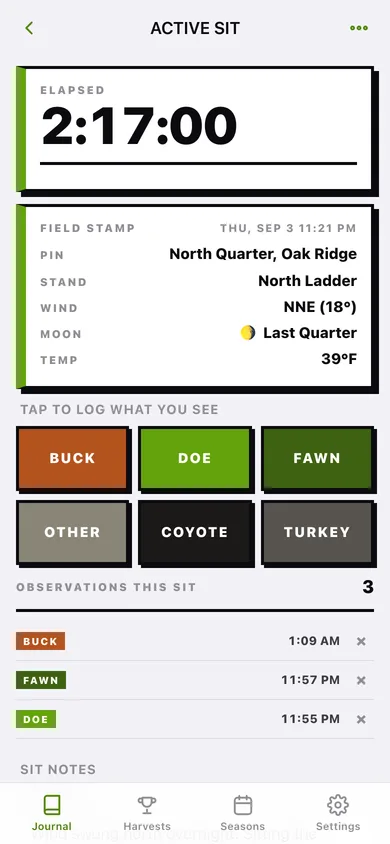
BUCK, DOE, FAWN, OTHER, COYOTE and TURKEY, each stamped to the second and stacked into a timeline for that sit. Closed sits lock their buttons so the record stays honest.
Harvest entry with the tag-burn checklist
Nine species, seven sex options, weight, notes, and the five-step state tag checklist — notch the tag, void the e-tag, validate date and time, confirm the bag limit, plan the check-station report.
Bundled 50-state season tracker
Archery, firearm and muzzleloader open and close dates for all fifty states, with today's openings worked out on the spot — including the seasons that run across New Year's Day.
Property pins and stands
Save stands, food plots and access trails with coordinates and each stand's compass heading — no map tiles, nothing loaded from a map service.
The harvest book
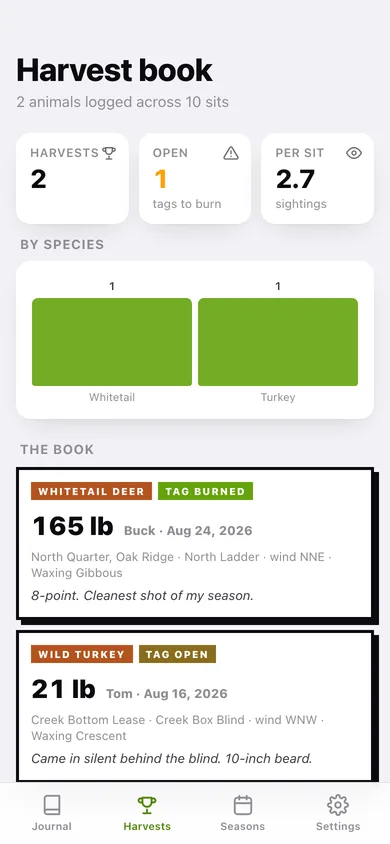
Every animal you have tagged with weight, sex, the wind and moon on the day, and whether the tag is burned — exportable as CSV or a full JSON backup.
Screens
Every screen, rebuilt for the browser
-
1
Field journal
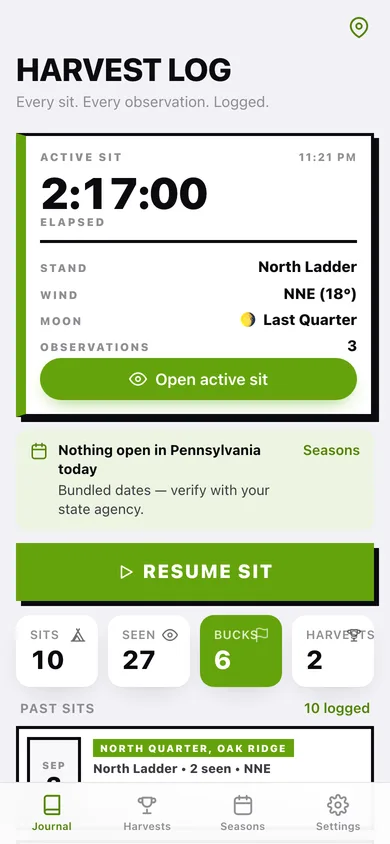
The active sit's running clock, what's open in your state today, Start Sit, and every past sit as a dated card.
-
2
Sit
Elapsed clock, the field stamp (pin, stand, wind, moon, temp), the six observation buttons and the sit's timeline.
-
3
New sit
Pick the property pin and stand, add a note, and see exactly what will be auto-stamped before you hit START.
-
4
Harvest
Species, sex, weight, notes and the five-step state tag-burn checklist with that state's season dates.
-
5
Harvest book
Every animal logged, by species, with open-tag warnings and the conditions on the day.
-
6
Property pins
Your land: pins with coordinates and each stand's compass heading, the number the wind stamp comes from.
-
7
Seasons
All fifty states, searchable, badged with whether anything is open today.
-
8
State seasons
Archery, firearm and muzzleloader open and close dates for one state, and whether each is open right now.
-
9
Settings
Your home state, in-the-stand options, journal totals, CSV and JSON export, sample data and erase.
Try it with sample data: Loads two properties with three stands, eleven sits across the last four weeks — one of them still running — thirty-odd observations, and two harvests including a Wild Turkey with the tag still open. You can start fresh at any time.
Ready? It's free.
No account, no install, no subscription. Everything you do stays in this browser.
Your say
What should Harvest Log do? Tell us before we build it.
Tell us what to build next.
Comments need a free Google sign-in, so every one is from a real person.
Sign in with Google to commentNo comments yet — be the first to say what this app should do next.
Questions
Is the web version of Harvest Log free?+
Yes. Every screen is free to use: no subscription, no in-app purchases, no account.
Do I need an account?+
No. Open Harvest Log and start using it right away. Sign in with Google only if you want to upvote an app, save it to your list, or leave a comment.
Where is my data stored?+
Only in this browser's local storage. Nothing you enter is sent to our servers, so we can't see it, back it up, or restore it. Clearing site data, a private window, or another device starts empty. Export a backup from the in-app menu to keep it.
Is there a Harvest Log app for iPhone or Android?+
Not yet. Harvest Log is a community proposal: the browser version is complete, and we build the iPhone and Android app once 100 people upvote it. Upvoters get one email when it ships.