
Web app · Finance
Gigday
The platform shows you gross. Gigday shows you what you kept.
Log the gross from every app you drove for, plus fuel, commission, recharges and repairs, and see true net per day, per week and per hour — then which platforms, days and hours are actually worth driving. Free, no platform login.
Stored in your browser only. Nothing you do in the web version is sent to our servers. Clear your browser data and it's gone — so export a backup from the in-app menu if you want to keep it.
This app is a community proposal.
Try the full browser version now. We build the iPhone and Android app once 100 people upvote it.
We'll email you once, when it ships. Unsubscribe anytime.
In your browser
What you can do in Gigday on the web
One shift, every platform
Uber, Bolt, Ola, Grab, Gojek, inDrive, Swiggy and Zomato in the same day — each with its own gross, hours and trips.
Gross to net, drawn out
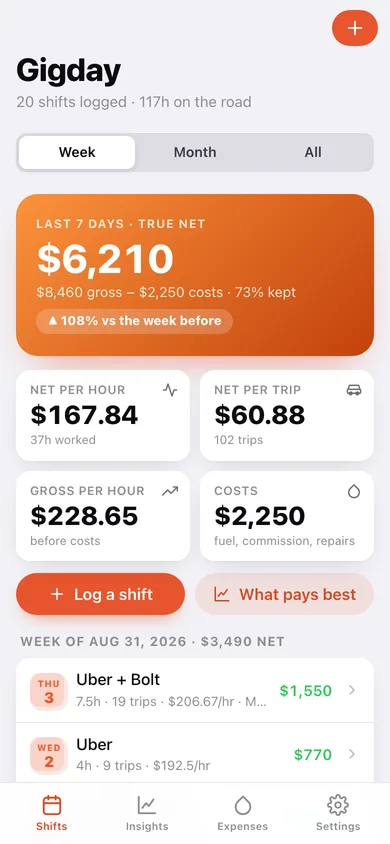
A waterfall showing gross, what the costs took, and what you actually kept, on every shift and every period.
Net per hour and per trip
The only fair way to compare a six-hour Friday against a two-hour dinner rush, or one app against another.
Costs split fairly across apps
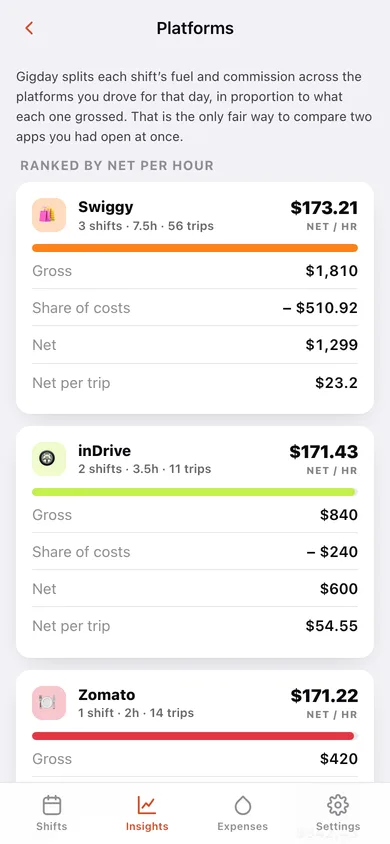
Each shift's fuel and commission is shared between the platforms you drove for in proportion to what each grossed, so the per-platform ranking is honest.
Best day, best platform, worst hour
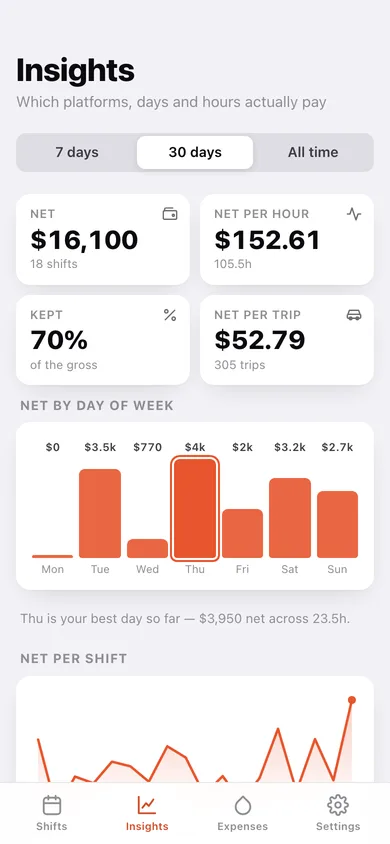
Net by day of week, gross by platform, a net-per-shift trend line, and the highlights that tell you when to go out.
Any currency, no driver account
Naira, rupees, pesos, dollars — pick a symbol and go. Gigday never connects to a platform or asks for a login.
Screens
Every screen, rebuilt for the browser
-
1
Shift log
True net for the week or month against the period before, net per hour and per trip, and every shift grouped by week.
-
2
Insights
Net by day of week, net per shift over time, gross by platform, and the best-day / best-platform highlights.
-
3
Platforms ranked
Every app ranked by net per hour after its share of your fuel and commission.
-
4
Shift detail
The gross-to-net waterfall, per-platform gross and hours, and every cost that came off the day.
-
5
Log / edit a shift
Add a row per platform with gross, hours and trips, then the costs — the true net updates as you type.
-
6
Expenses
Where the money goes by category, standing vehicle costs, and every cost logged on a shift.
-
7
Settings
Currency, main platform, cost splitting, CSV export, backup, sample data and erase.
Try it with sample data: Loads twenty shifts across the last five weeks on Uber, Bolt, Ola, Gojek, inDrive, Swiggy and Zomato — with fuel, commission, data recharges and a puncture — plus three standing vehicle costs. You can start fresh at any time.
Ready? It's free.
No account, no install, no subscription. Everything you do stays in this browser.
Your say
What should Gigday do? Tell us before we build it.
Tell us what to build next.
Comments need a free Google sign-in, so every one is from a real person.
Sign in with Google to commentNo comments yet — be the first to say what this app should do next.
Questions
Is the web version of Gigday free?+
Yes. Every screen is free to use: no subscription, no in-app purchases, no account.
Do I need an account?+
No. Open Gigday and start using it right away. Sign in with Google only if you want to upvote an app, save it to your list, or leave a comment.
Where is my data stored?+
Only in this browser's local storage. Nothing you enter is sent to our servers, so we can't see it, back it up, or restore it. Clearing site data, a private window, or another device starts empty. Export a backup from the in-app menu to keep it.
Is there a Gigday app for iPhone or Android?+
Not yet. Gigday is a community proposal: the browser version is complete, and we build the iPhone and Android app once 100 people upvote it. Upvoters get one email when it ships.