
Finance
Gigday: gig driver earnings tracker
Gig driver earnings, net & clear
No account, no install. What you do stays in your browser.
This app is a community proposal.
Try the full browser version now. We build the iPhone and Android app once 100 people upvote it.
We'll email you once, when it ships. Unsubscribe anytime.
| Price | Free, no subscription |
|---|---|
| Account | None needed to try |
| Works offline | Yes |
| Data | On your device, never on our servers |
| Platforms | Browser |
| Status | Community proposal (built for phones at 100 upvotes) |
| Last updated | 2026-06-07 |
Accessibility: Larger Text · Light & Dark · VoiceOver labels · iPad layout · Browser version How we checked →
 Try it live
The full Gigday, right here in your browser.
No account and no install. What you enter is saved in this browser only, never on our servers.
Open Gigday →
Try it live
The full Gigday, right here in your browser.
No account and no install. What you enter is saved in this browser only, never on our servers.
Open Gigday →


About this app
What Gigday does
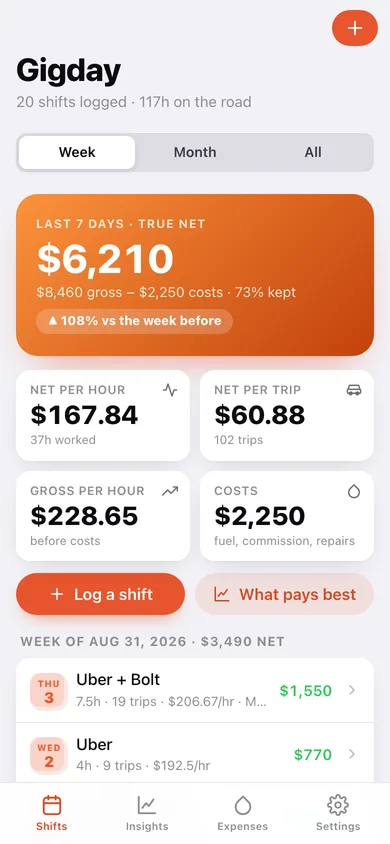
Gigday shows ride-hailing and delivery drivers what they really earn. After each shift, log your gross from each platform along with fuel, commission, recharges and repairs — Gigday subtracts the costs and shows your true net for the day, the week, and per hour worked. See which platforms, days and hours actually pay, so you stop guessing and drive when it's worth it. Built for drivers juggling multiple apps, it works for any currency and needs no platform login. No account. No platform connection. No ads. Your earnings stay private, on your phone.
Who it's for
Who Gigday is for, and how it works
Gigday is for ride-hailing and delivery drivers who work more than one platform and want to know what a shift actually paid after fuel, commission and repairs, not the gross number the platform dashboard shows. It works in any currency, so it fits drivers in Lagos, Manila or Mexico City as well as in the US, and it needs no platform login, which matters if you would rather not hand a third-party app your driver account.
How it works: after each shift you log the gross from each platform, the hours and the trips, then the costs (fuel, commission, recharges, repairs). Gigday subtracts them and shows true net for the day, the week and per hour worked. Over a few weeks the insights view shows which platforms, days and hours actually pay, so you can stop guessing and drive when it is worth it. Everything stays on the phone: no account, no platform connection, no ads.
Features
Built to be useful, not noisy.
Shift log
Record gross per platform, hours, trips, and expenses for each shift.
Net earnings
Compute net after fuel/commission/expenses; per day, week, and hour.
Insights
Best-paying days, platforms, and hours.
Expenses
Track recurring and one-off vehicle/work expenses.
Why it exists
The problem
Gig drivers see platform 'gross' figures but rarely know their true net after fuel, commission and expenses, or which platforms and hours actually pay; platform apps don't reveal this, and generic finance apps don't fit a multi-platform driver's day.
What's different
How Gigday stands out
A driver-first, offline earnings logbook that nets out fuel, commission and expenses to reveal true take-home per day and per hour and the best platforms/times — no platform login, no account, multi-currency, unlike platform dashboards (gross only) and US-centric mileage/tax apps (MileWay) or solo-business apps (SoloS…
You might also like
All apps →
Overtime Tax Tracker
Finance
Your No-Tax-Overtime deduction, adding up

PayLater Tracker
Finance
All your pay-in-4 in one place

Bill Creep
Finance
Track bill creep, call it back

CertDay
Finance
Never lose a benefit week

DealChase
Finance
Chase every brand deal payment

DuesWatch
Finance
Your HOA dues, with receipts
FAQ
Questions about Gigday
How much does Gigday cost?▾
Gigday is free. All features are included from day one — no subscription, no in-app purchases, no paid tiers. Everything you see in this listing works the moment you install it.
Where does Gigday store my data?▾
On your device. Gigday is built privacy-first: no account is required, no analytics SDKs, no third-party trackers. Nothing is uploaded to a server we control — the app works without one.
What platforms does Gigday support?▾
iOS, on iPhone and iPad. You can find the latest availability on this page.
How do I get support for Gigday?▾
Use the Support link on this page, or email support@allthingsn.com. We answer every message and keep responses on the same thread.
Related guide
Best subscription tracker apps that aren't a subscription, 2026
More money & finance apps with no subscription →
Guides featuring Gigday
More to read
More in Finance

