
Web app · Finance
FlipLedger
Every flip has two numbers — this one shows what you actually kept
Log finds with their cost basis, record sales with each marketplace's real fee schedule, watch your death pile age, and pull a Schedule C ready COGS summary for the year. Free in your browser, nothing to install.
Stored in your browser only. Nothing you do in the web version is sent to our servers. Clear your browser data and it's gone — so export a backup from the in-app menu if you want to keep it.
In App Review — coming to the App Store
FlipLedger is with Apple now. You can use the full browser version today, and we'll email you the day the app is live.
0 waiting for launch
We'll email you once, when it ships. Unsubscribe anytime.
In your browser
What you can do in FlipLedger on the web
Five-second sourcing intake
Cost first, then title and source — the record lands in inventory with its cost basis, sourcing spot and date already documented.
Real marketplace fee math
eBay 13.6% + $0.40, Poshmark 20%, Mercari 10% + 2.9% + $0.50, Depop, Whatnot — the bundled schedules are applied to every sale and are fully editable.
Death pile aging
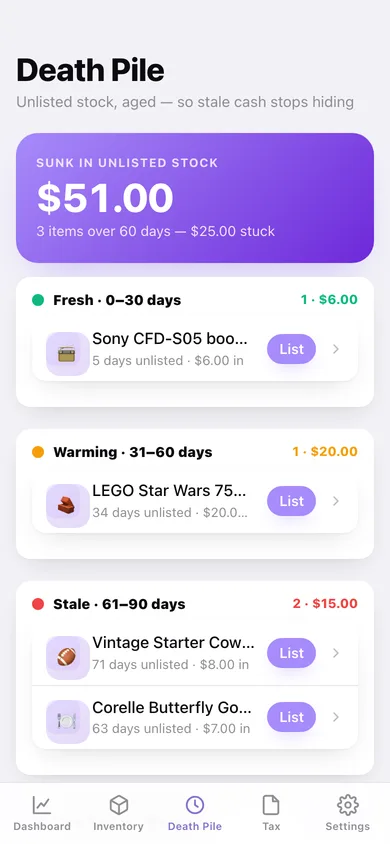
Unlisted stock is bucketed at 30, 60 and 90+ days with a running sunk-cash total and a one-tap List button on every stale item.
Flip card
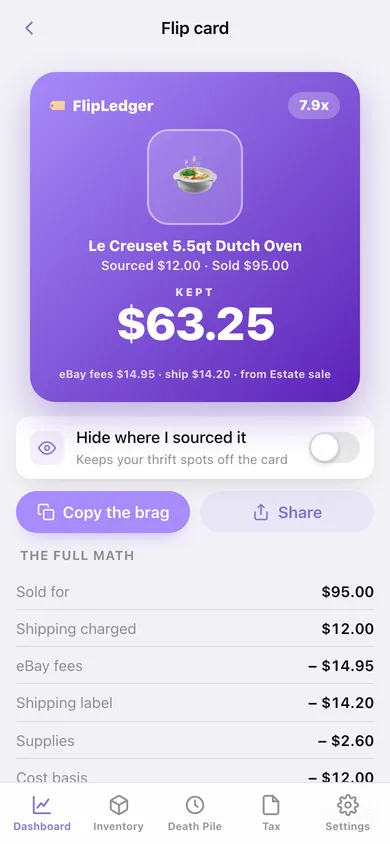
Any sold item renders as a shareable square — sourced $4, sold $45, kept $12.83 after fees — with a copy-the-brag button.
Schedule C tax report
Gross receipts, COGS, marketplace fees, shipping labels and supplies mapped to their Schedule C lines, with a CSV export for the year.
Profit dashboard
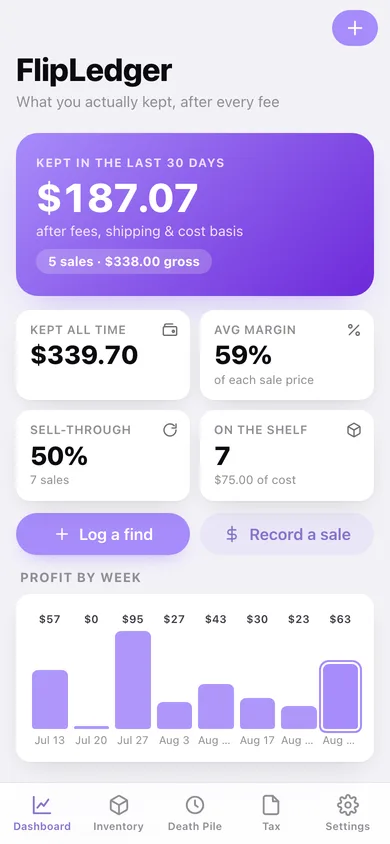
This month's kept total, sell-through, average margin, profit by week, marketplace mix and your best flip.
Screens
Every screen, rebuilt for the browser
-
1
Dashboard
This month's kept total, sell-through and margin, profit by week, marketplace mix and your best flip.
-
2
Flip card
The shareable square: sourced, sold, kept — with the full fee breakdown underneath.
-
3
Death Pile
Unlisted stock aged into 30/60/90+ buckets with the cash sunk in each.
-
4
Inventory
Every item with cost basis, source and days held, filtered by sourced / listed / sold.
-
5
Item detail
Cost basis, source, days held, the sourced→listed→sold timeline and the full kept breakdown.
-
6
Log a find
The five-second intake: what you paid, where you sourced it, what it is.
-
7
Edit item
Change the title, cost basis, category, sourcing spot or notes.
-
8
Record sale
Pick the marketplace and type the numbers — the you-keep figure updates live as you type.
-
9
Tax report
Schedule C summary for the year with business expenses and a CSV export.
-
10
Year in review
What you kept, items sourced vs sold, best month, top marketplace and your top five flips.
-
11
Fee tables
The bundled fee schedules for every marketplace, editable, with a $50-sale example.
-
12
Settings
Default marketplace and sourcing spot, flip-card privacy, backup, sample data and erase.
Try it with sample data: Loads twelve sourced items — five sold across eBay, Poshmark, Mercari and Whatnot, two listed, five in a real death pile — plus three shipping-supply expenses. You can start fresh at any time.
Ready? It's free.
No account, no install, no subscription. Everything you do stays in this browser.
Your say
What should FlipLedger do? Tell us before we build it.
Tell us what to build next.
Comments need a free Google sign-in, so every one is from a real person.
Sign in with Google to commentNo comments yet — be the first to say what this app should do next.
Questions
Is the web version of FlipLedger free?+
Yes. Every screen is free to use: no subscription, no in-app purchases, no account.
Do I need an account?+
No. Open FlipLedger and start using it right away. Sign in with Google only if you want to upvote an app, save it to your list, or leave a comment.
Where is my data stored?+
Only in this browser's local storage. Nothing you enter is sent to our servers, so we can't see it, back it up, or restore it. Clearing site data, a private window, or another device starts empty. Export a backup from the in-app menu to keep it.
When is the FlipLedger iPhone app out?+
FlipLedger is in App Review with Apple now. Tap “Notify me at launch” and we'll email you once, the day it's live.