
Web app · Business
DockLedger
Run the depot yard off paper — gate-in to gate-out, unload memo, issue register and the daily report
Log every truck with transporter, DO, plant and tonnage, allocate dock, supervisor and labour gang, build the unload memo line by line, raise shortage / damage / interchange / dirty-stock issues that move Open → Reported → Follow-up → Closed, track outbound plans, and get the pending-vs-closed report. Free, no install.
Stored in your browser only. Nothing you do in the web version is sent to our servers. Clear your browser data and it's gone — so export a backup from the in-app menu if you want to keep it.
This app is a community proposal.
Try the full browser version now. We build the iPhone and Android app once 100 people upvote it.
We'll email you once, when it ships. Unsubscribe anytime.
In your browser
What you can do in DockLedger on the web
Yard log
Inbound and outbound truck visits from At Gate → On Dock → Working → Completed → Gate Out, with dock, supervisor, labour gang and driver details.
Four-phase CEAT DC SOP checklist
Every inbound truck carries Phase 1 (gate → SAP → unloading → POD → GRN) and every plan carries Phases 2–4, tick-able with document capture for memo, bay, GRN, JDA, PO, DO, invoice and E-way bill numbers.
Digital unload memo
Line items with quantity and the OLD column, totals for bags, loose tubes & flaps and nags, plus unloaded-by, re-checked-by and inspected-by sign-off.
Issue register
Shortage, damage, interchange and dirty/old issues linked to a truck, owned by Commercial, DC, Computer Dept or Transporter, with age in days and a status workflow.
Daily & monthly report
Trucks in, gate outs, plans dispatched, raised vs closed vs pending now, pending by type and the oldest open issues — copied as clean text or downloaded.
Loading plan register
Plan no., destination, CFA, FTL / PTL / SXL 32FT, vehicle length, load factor, truck assignment and status from Planned to Dispatched.
Screens
Every screen, rebuilt for the browser
-
1
Yard
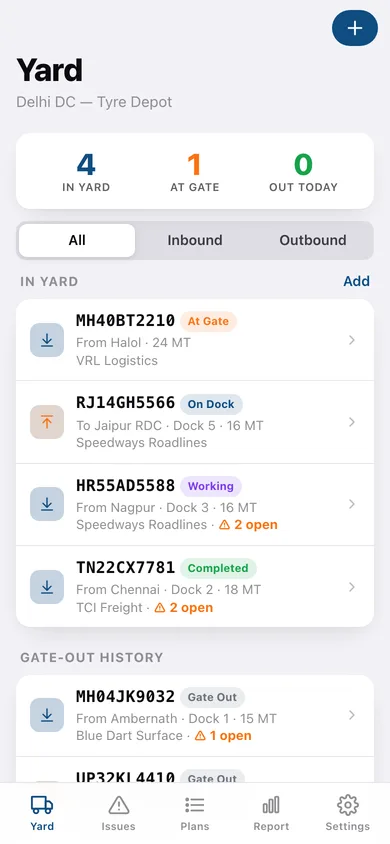
In-yard, at-gate and out-today counts with every truck in the yard and the gate-out history.
-
2
Truck detail
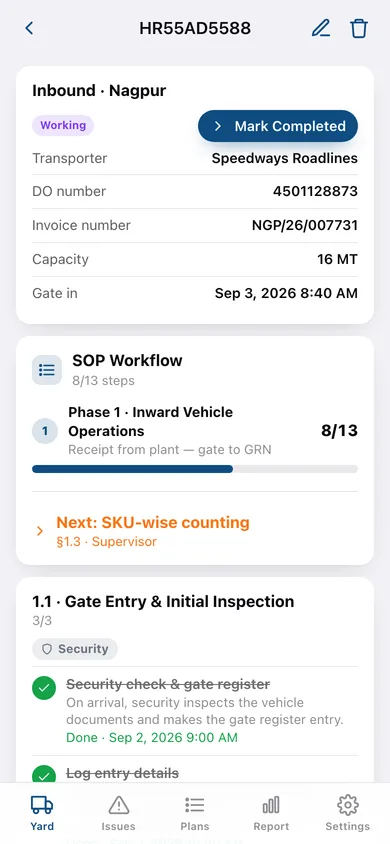
Status pipeline, Phase 1 SOP checklist, allocation, unload memo, sign-off and issues for one truck.
-
3
New / edit truck
Direction, truck number, transporter, DO, invoice, plant, tonnage, dock, supervisor, labour gang and driver.
-
4
Issues
Pending / closed / all-time counts with status and type filters over the register.
-
5
Issue detail
Move it forward — Mark Reported, Log Follow-up, Close or Reopen — plus owner department, dates and notes.
-
6
Plans
Open plans, loading now and dispatched today, with the plan register.
-
7
Plan detail
Plan fields, Phases 2–4 SOP checklist, vehicle assignment and the linked yard truck.
-
8
Report
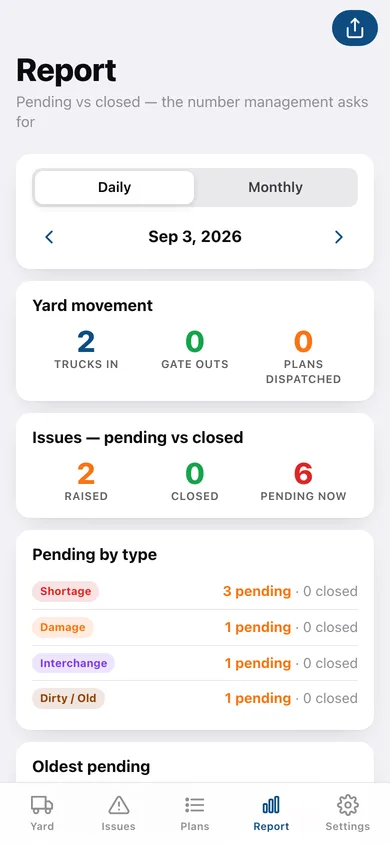
Daily or monthly yard movement, pending vs closed, pending by type and oldest pending, shareable as text.
-
9
CEAT DC SOP
The full four-phase, twelve-section Delhi DC procedure as a reference.
-
10
Settings
Depot name, your name and mobile, SOP guide, backup, CSV export, sample data and erase.
Try it with sample data: Adds eight trucks from Nagpur, Halol, Chennai, Ambernath and Nashik plus outbound loads over three weeks with memo lines and SOP progress, ten issues across every status, and five loading plans. You can start fresh at any time.
Ready? It's free.
No account, no install, no subscription. Everything you do stays in this browser.
Your say
What should DockLedger do? Tell us before we build it.
Tell us what to build next.
Comments need a free Google sign-in, so every one is from a real person.
Sign in with Google to commentNo comments yet — be the first to say what this app should do next.
Questions
Is the web version of DockLedger free?+
Yes. Every screen is free to use: no subscription, no in-app purchases, no account.
Do I need an account?+
No. Open DockLedger and start using it right away. Sign in with Google only if you want to upvote an app, save it to your list, or leave a comment.
Where is my data stored?+
Only in this browser's local storage. Nothing you enter is sent to our servers, so we can't see it, back it up, or restore it. Clearing site data, a private window, or another device starts empty. Export a backup from the in-app menu to keep it.
Is there a DockLedger app for iPhone or Android?+
Not yet. DockLedger is a community proposal: the browser version is complete, and we build the iPhone and Android app once 100 people upvote it. Upvoters get one email when it ships.