
Web app · Health And Fitness
Chairkeep
The wheelchair repair binder that keeps time on the supplier
Open a case the day the chair breaks, log every call with who promised what and when, and Chairkeep turns weeks of he-said-she-said into a dated escalation packet for the supplier, your insurer, or a state AG. Free, no install.
Stored in your browser only. Nothing you do in the web version is sent to our servers. Clear your browser data and it's gone — so export a backup from the in-app menu if you want to keep it.
This app is a community proposal.
Try the full browser version now. We build the iPhone and Android app once 100 people upvote it.
We'll email you once, when it ships. Unsubscribe anytime.
In your browser
What you can do in Chairkeep on the web
One case per breakdown
Title, what broke, the date it happened, and whether it left you stranded, cost you work, or cost you a medical appointment — the sentences an appeals reviewer reads first.
Dated call-and-promise timeline
Log calls, emails, tech visits, insurance steps, parts ordered and parts arrived. Every promised date is tracked, and one that passes with no action is flagged red in the case and in the packet.
Escalation lines you set
Case cards turn amber past four weeks and red past seven — the PIRG wait thresholds — and you can move both lines in Settings.
Escalation packet
A chronological, chair-and-serial-headed record with the event log, part numbers, prices and every missed promise, ready to copy into an email or a complaint portal, or download as a file.
Preventive maintenance schedule
Interval checks for the components that strand people most — batteries at 30 days, tires at 60, casters at 90, cushion, bearings and a frame bolt walk-around — with an overdue-first due list.
Chair profile and 5-year clock
Serial number, supplier and insurer contacts, and a replacement clock that counts the five-year insurance cycle down to the month you become eligible.
Part number vault
Every part number a tech ever read you over the phone, searchable, with vendor and price, so you never re-hunt a caster or joystick part again.
Screens
Every screen, rebuilt for the browser
-
1
Binder
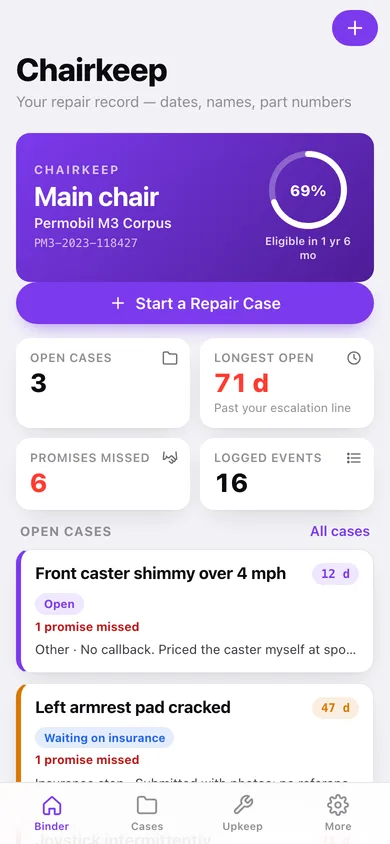
Your chair, the five-year replacement clock, open cases with days-open badges, and the maintenance checks coming due.
-
2
Cases
Open, resolved or all cases, with the average days your resolved repairs actually took.
-
3
Case timeline
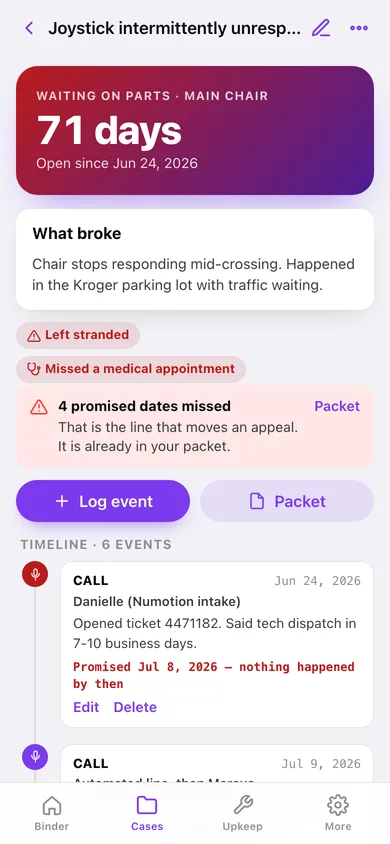
Days open, impact flags, missed-promise banner, and the full dated timeline of calls, tech visits and insurance steps.
-
4
Open a case
What broke, when, where it stands, and the stranded / missed-work / missed-appointment toggles.
-
5
Log an event
Kind, date, who you spoke to, what was said, and the date they promised.
-
6
Upkeep
Interval checks sorted overdue-first, one-tap Mark done, and component coverage.
-
7
Interval check
Component, interval in days, and when it was last done.
-
8
Chair profile
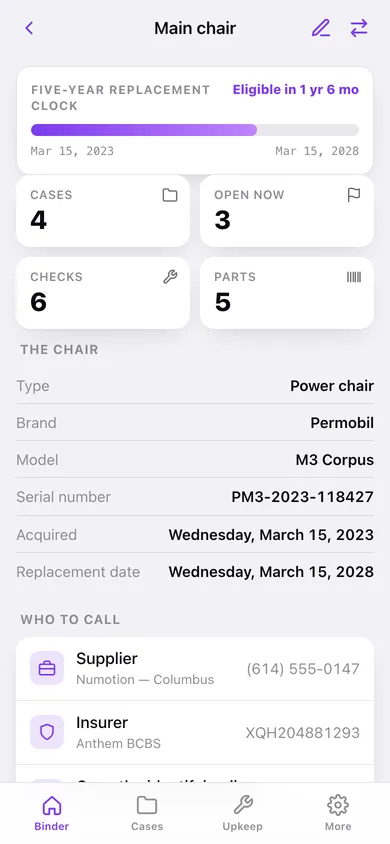
The five-year replacement clock, serial number, supplier and insurer contacts, and every case on that chair.
-
9
Edit chair
Nickname, power or manual, brand, model, serial, supplier and insurance details.
-
10
Part vault
Searchable part numbers grouped by component, with vendor, price and the case each belongs to.
-
11
Part record
Part name, number, component, vendor, price and the case it was quoted on.
-
12
Escalation packet
Pick one case or all of them, choose what goes in, preview the packet and copy or download it.
-
13
More
Escalation thresholds, your chairs, starter checks, CSV and JSON export, sample data and erase.
Try it with sample data: Loads two chairs (a Permobil M3 Corpus and a backup Quickie 2), four repair cases including a joystick case open 71 days with two missed promises, sixteen dated timeline events, six maintenance checks and five saved part numbers. You can start fresh at any time.
Ready? It's free.
No account, no install, no subscription. Everything you do stays in this browser.
Your say
What should Chairkeep do? Tell us before we build it.
Tell us what to build next.
Comments need a free Google sign-in, so every one is from a real person.
Sign in with Google to commentNo comments yet — be the first to say what this app should do next.
Questions
Is the web version of Chairkeep free?+
Yes. Every screen is free to use: no subscription, no in-app purchases, no account.
Do I need an account?+
No. Open Chairkeep and start using it right away. Sign in with Google only if you want to upvote an app, save it to your list, or leave a comment.
Where is my data stored?+
Only in this browser's local storage. Nothing you enter is sent to our servers, so we can't see it, back it up, or restore it. Clearing site data, a private window, or another device starts empty. Export a backup from the in-app menu to keep it.
Is there a Chairkeep app for iPhone or Android?+
Not yet. Chairkeep is a community proposal: the browser version is complete, and we build the iPhone and Android app once 100 people upvote it. Upvoters get one email when it ships.