
Web app · Finance
Chainwallet
Watch your crypto without ever typing a seed phrase
A read-only watchlist for self-custody: label your public addresses by chain, keep a tax-event log that exports as CSV, check any contract against the bundled scam registry, and run the 12-item risk audit. Free, no account, nothing leaves your browser.
Stored in your browser only. Nothing you do in the web version is sent to our servers. Clear your browser data and it's gone — so export a backup from the in-app menu if you want to keep it.
This app is a community proposal.
Try the full browser version now. We build the iPhone and Android app once 100 people upvote it.
We'll email you once, when it ships. Unsubscribe anytime.
In your browser
What you can do in Chainwallet on the web
Public addresses only, never a key
Add EVM, Solana and Bitcoin addresses across Ethereum, Polygon, Arbitrum, Base, Solana and Bitcoin, labelled the way you think about them — trading wallet, savings · cold storage, NFT wallet. Chainwallet cannot sign, send or move anything.
Positions built from your own log
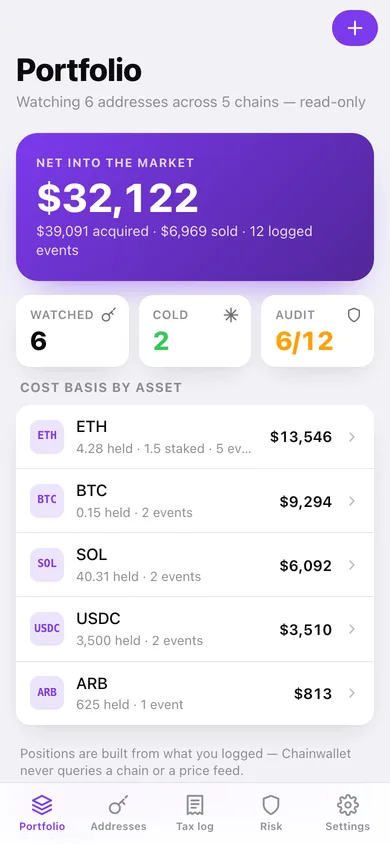
Buys, swaps, airdrops and interest add to a position; sells and losses take from it; staking moves coins without disposing of them. The home screen shows net USD into the market, cost basis, proceeds and per-asset holdings.
Tax-event log with a year-end CSV
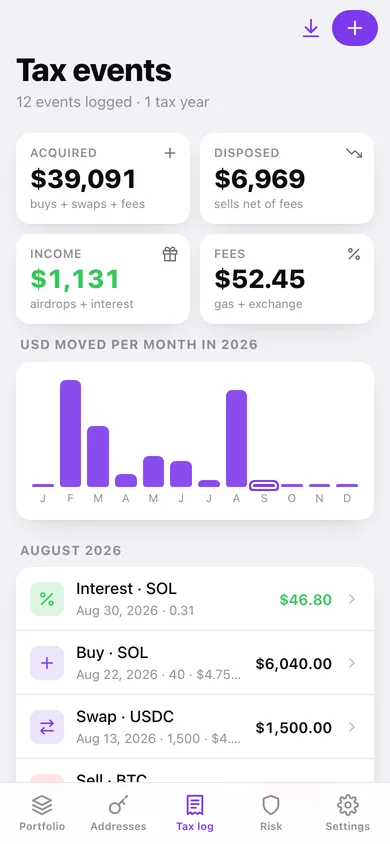
Log every buy, sell, swap, stake, interest payment, airdrop, gift and loss with date, amount, USD value at the time and fee. Filter by tax year or asset, see USD moved per month, and export a CSV for TurboTax, Koinly or your accountant.
Offline scam-token scanner
Paste a contract or an address before you trust it: the bundled registry catches impersonators, drainers, honeypots and OFAC-sanctioned contracts, and the local heuristics catch burn addresses, malformed pastes and address-poisoning lookalikes of your own wallets.
The 12-item risk self-audit
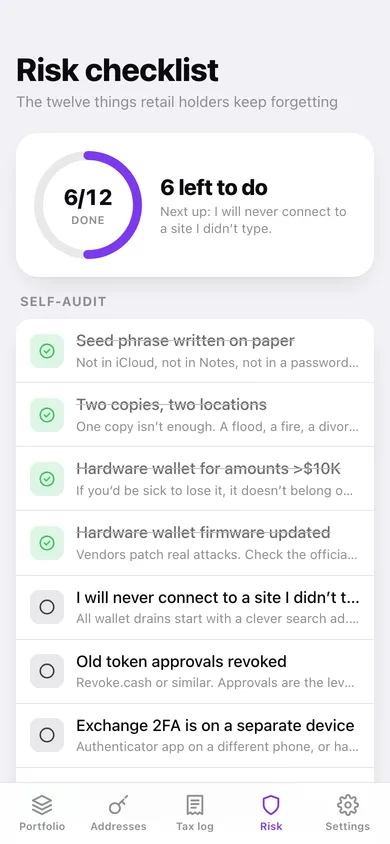
Seed on paper, two copies in two places, hardware wallet over $10K, firmware current, approvals revoked, 2FA off the wallet phone, a recovery drill actually done — checked off with a progress ring that tells you what is left.
Presentation-safe mode
One toggle blurs every dollar figure on screen so you can show someone your setup without showing what is in it.
Screens
Every screen, rebuilt for the browser
-
1
Portfolio
Net USD into the market, per-asset positions from your tax log, and every watched address grouped by chain.
-
2
Tax events
Acquired, disposed, income and fees for a tax year, USD moved per month, and every event grouped by month.
-
3
Risk checklist
The 12-item self-audit with a progress ring and the next thing to fix.
-
4
Addresses
Every public address you watch, searchable, plus the six chains Chainwallet knows.
-
5
Address detail
One wallet: chain, explorer, format check, cold-storage flag, notes and a copy button.
-
6
Watch an address
Label, chain, public address with per-chain format validation, cold-storage toggle and a note.
-
7
Tax event
Date, kind, asset, amount, USD value at the time, fee and notes.
-
8
Scam registry
Paste a contract or address and check it locally against the registry, burn list, format rules and poisoning heuristics.
-
9
Settings
Presentation-safe balances, default fee, CSV and JSON export, sample data and erase.
Try it with sample data: Loads six watched addresses across Ethereum, Arbitrum, Base, Solana and Bitcoin, twelve tax events spanning the last seven months, and a half-finished risk audit. You can start fresh at any time.
Ready? It's free.
No account, no install, no subscription. Everything you do stays in this browser.
Your say
What should Chainwallet do? Tell us before we build it.
Tell us what to build next.
Comments need a free Google sign-in, so every one is from a real person.
Sign in with Google to commentNo comments yet — be the first to say what this app should do next.
Questions
Is the web version of Chainwallet free?+
Yes. Every screen is free to use: no subscription, no in-app purchases, no account.
Do I need an account?+
No. Open Chainwallet and start using it right away. Sign in with Google only if you want to upvote an app, save it to your list, or leave a comment.
Where is my data stored?+
Only in this browser's local storage. Nothing you enter is sent to our servers, so we can't see it, back it up, or restore it. Clearing site data, a private window, or another device starts empty. Export a backup from the in-app menu to keep it.
Is there a Chainwallet app for iPhone or Android?+
Not yet. Chainwallet is a community proposal: the browser version is complete, and we build the iPhone and Android app once 100 people upvote it. Upvoters get one email when it ships.