
Web app · Finance
Wall Street Friend
Know how a stock moves on earnings — reactions, calendar, backtests
See what a company actually does the day after it reports: typical move, beat rate, biggest gain and drop, and every quarter on record. Then get a scored options idea from implied move versus history and backtest it against those same reports. Free, no install, no sign-in.
Stored in your browser only. Nothing you do in the web version is sent to our servers. Clear your browser data and it's gone — so export a backup from the in-app menu if you want to keep it.
In your browser
What you can do in Wall Street Friend on the web
Earnings reaction analytics
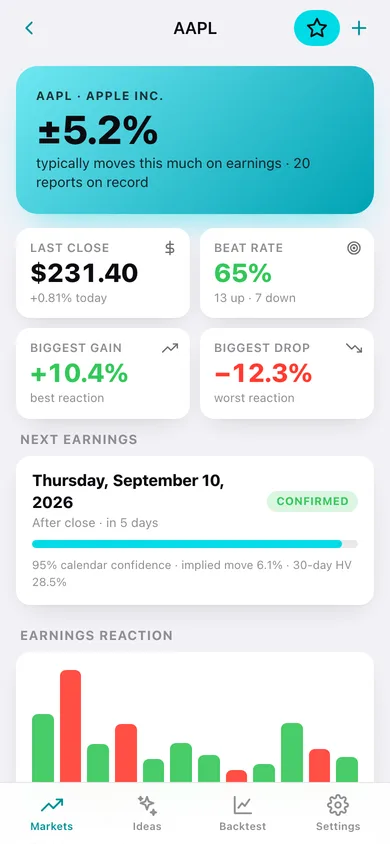
Typical move, median, beat rate, biggest gain and drop, current streak and a bar per quarter — recomputed the moment you add or correct a report.
Confidence-scored earnings calendar
Week by week, before open or after close, with each name's own average move and how firm the date is — confirmed, high confidence, estimated or projected.
Scored options-strategy ideas
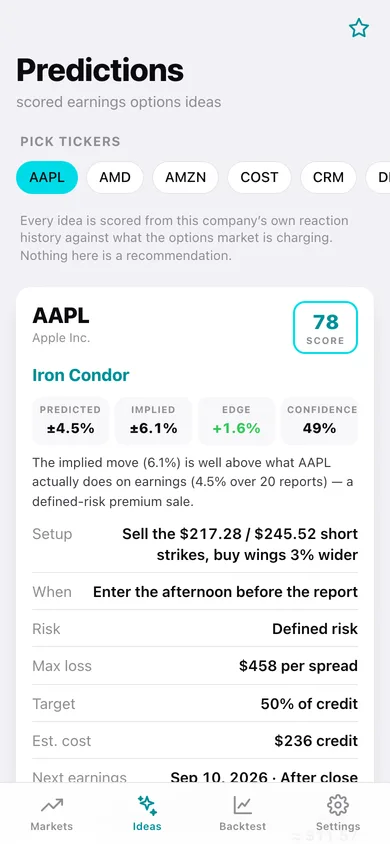
Edge is the implied move minus what the stock actually does. Rich premium screens as an Iron Condor, cheap premium as a Long Straddle, and no edge says no trade — with setup, risk, max loss and estimated cost.
Backtest against real reports
Run an Iron Condor, Short Strangle, Long Straddle or Long Strangle across up to 20 past reports and get win rate, total P&L, best and worst trades and a full trade log.
Company directory and filings
16 large caps across nine sectors with industry, price, SEC filing counts and a direct link to the company's EDGAR page — or add your own ticker and type in its reports.
Saved ideas you grade yourself
Star an idea, mark it won or lost afterwards, and watch your own hit rate — the honesty loop the iPhone app keeps behind sign-in.
Screens
Every screen, rebuilt for the browser
-
1
Markets
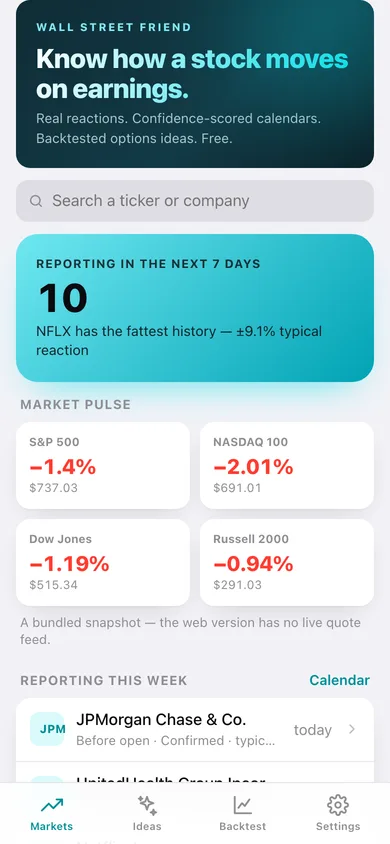
Who reports this week, market pulse, the latest reactions, coverage stats and search.
-
2
Earnings reactions
One company in full: typical move, beat rate, biggest swings, a bar per quarter, three-year price, every report, next date with confidence, filings and peers.
-
3
Earnings calendar
Any week, forwards or backwards, with each day's reporters and what they did when they already reported.
-
4
Companies
The whole library by sector and industry, searchable, with each name's report count and typical move.
-
5
Predictions
Pick tickers and get a scored primary strategy plus alternatives, with the edge maths spelled out.
-
6
Saved ideas
Ideas you kept, graded won or lost, with your own hit rate.
-
7
Backtest
Configure symbol, strategy, number of reports and wing width, run it, and read the trade log and P&L per quarter.
-
8
Settings
Watchlist, library size, add a company, CSV and JSON export, and the legal notes.
Try it with sample data: Loads the bundled research library: 16 large caps across nine sectors, each with 20 quarters of earnings reactions, plus three saved ideas and one finished Iron Condor backtest. You can start fresh at any time.
Ready? It's free.
No account, no install, no subscription. Everything you do stays in this browser.
Your say
Is Wall Street Friend useful? Tell us what to build next.
Sign in with Google to vote.
Tell us what to build next.
Comments need a free Google sign-in, so every one is from a real person.
Sign in with Google to commentNo comments yet — be the first to say what this app should do next.
Questions
Is the web version of Wall Street Friend free?+
Yes. Every screen is free to use: no subscription, no in-app purchases, no account.
Do I need an account?+
No. Open Wall Street Friend and start using it right away. Sign in with Google only if you want to upvote an app, save it to your list, or leave a comment.
Where is my data stored?+
Only in this browser's local storage. Nothing you enter is sent to our servers, so we can't see it, back it up, or restore it. Clearing site data, a private window, or another device starts empty. Export a backup from the in-app menu to keep it.
How is the web version different from the Wall Street Friend phone app?+
The iPhone app streams live coverage from wsfriend.com; the web version has no network at all, so it ships the app's bundled research library instead — every price, report and filing count is editable, and you can add any ticker yourself. There are no live quotes, no news feed, no 13-F institutional holdings and no options chain on the web; the market-pulse tiles are a bundled snapshot. The backtest assumes today's implied move was the option market's price at every past report, because there is no historical option chain in the browser; short strikes sit at that implied move and positions come off the morning after. The iPhone app can connect an Alpaca paper-trading account for positions and an equity curve; on the web you grade saved ideas won or lost yourself. Everything is saved in this browser only. Wall Street Friend is for research and education — it is not investment advice and never places an order.