Web app · Business
Workflow Studio
Design tightly scoped AI copilots with human review baked in — and pilot them in your browser
Build a workflow from typed steps (collect, look up, AI classify, AI draft, human review, send, update), put guardrails on it, run it in the pilot lane, clear the review queue, and watch approval rate and minutes saved before you promote it to live. Free, no install.
Stored in your browser only. Nothing you do in the web version is sent to our servers. Clear your browser data and it's gone — so export a backup from the in-app menu if you want to keep it.
This app is a community proposal.
Try the full browser version now. We build the iPhone and Android app once 100 people upvote it.
We'll email you once, when it ships. Unsubscribe anytime.
In your browser
What you can do in Workflow Studio on the web
Typed step builder
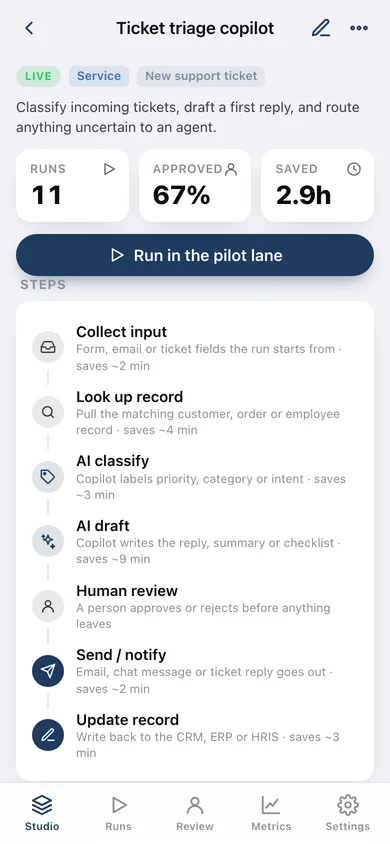
Seven step kinds with icons, reorder and remove; AI steps carry a confidence score, human review steps stop the run until a person decides.
Guardrails as configuration
Human review before anything is sent, a confidence threshold that routes uncertain AI steps to a person, a maximum number of actions per run, PII redaction and business-hours-only.
Pilot-lane runs
Each run walks the steps deterministically, records confidence, timings and every guardrail hit, and pauses in the review queue when a gate fires.
Human review queue
Approve to let the remaining steps complete, or reject so nothing leaves — every decision is recorded with the reviewer's name.
Launch checklist and promotion
Six launch checks (trigger, owner, two-plus steps, review before send, written scope, threshold ≥ 70%) gate Draft → Pilot, and three clean runs at 80%+ approval gate Pilot → Live.
Metrics that matter
Runs per day, approval rate, minutes saved by team and by workflow, guardrail hits and outcomes — goodput, not noise.
Screens
Every screen, rebuilt for the browser
-
1
Studio
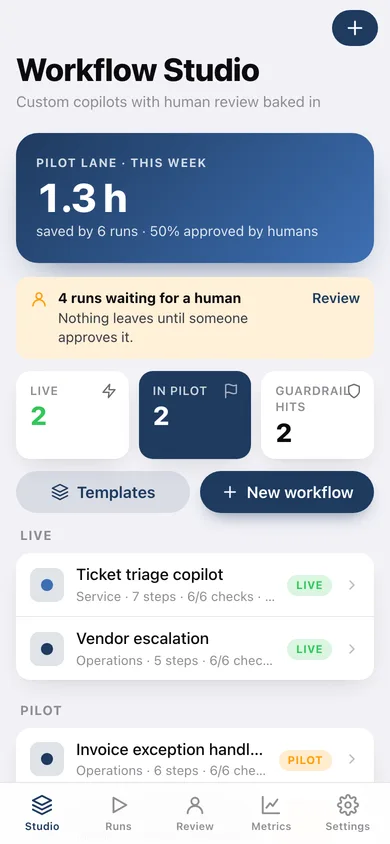
Minutes saved this week, the review backlog, live / pilot counts and every workflow grouped by status.
-
2
Workflow
Steps pipeline, guardrail chips, run/approval/minutes stats, the launch checklist and promotion button, recent runs.
-
3
Design a workflow
Name, team, owner, trigger, scope, ordered steps and the five guardrails with live launch-check feedback.
-
4
Templates
Six scoped starting points — ticket triage, invoice exceptions, onboarding, reply drafting, vendor escalation, weekly digest.
-
5
Runs
Every pilot-lane run by day with status, guardrail hits and minutes saved.
-
6
Run
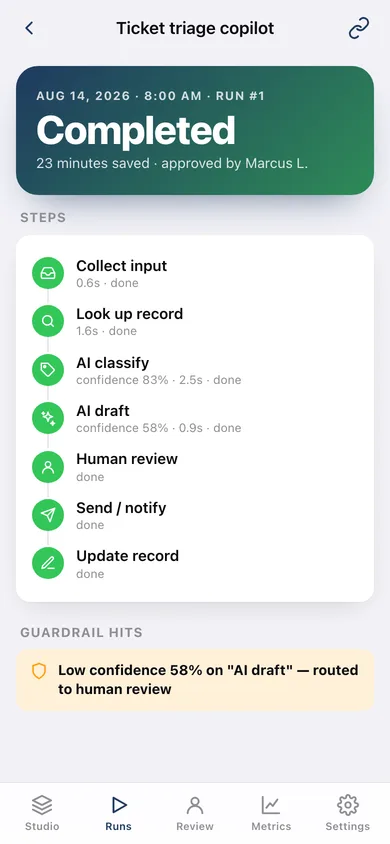
Step-by-step outcome with confidence and timings, guardrail hits, and approve / reject when it is waiting on you.
-
7
Review queue
Runs waiting for a human, and the most recent decisions.
-
8
Metrics
Runs per day, approval rate, minutes saved by team and workflow, outcomes.
-
9
Settings
Reviewer name, default guardrails, backup, CSV export, sample data and erase.
Try it with sample data: Loads five workflows across Service, Operations and Internal (two live, two in pilot, one draft) and three weeks of pilot-lane runs including guardrail hits, approvals, a rejection and runs still waiting in the review queue. You can start fresh at any time.
Ready? It's free.
No account, no install, no subscription. Everything you do stays in this browser.
Your say
What should Workflow Studio do? Tell us before we build it.
Tell us what to build next.
Comments need a free Google sign-in, so every one is from a real person.
Sign in with Google to commentNo comments yet — be the first to say what this app should do next.
Questions
Is the web version of Workflow Studio free?+
Yes. Every screen is free to use: no subscription, no in-app purchases, no account.
Do I need an account?+
No. Open Workflow Studio and start using it right away. Sign in with Google only if you want to upvote an app, save it to your list, or leave a comment.
Where is my data stored?+
Only in this browser's local storage. Nothing you enter is sent to our servers, so we can't see it, back it up, or restore it. Clearing site data, a private window, or another device starts empty. Export a backup from the in-app menu to keep it.
Is there a Workflow Studio app for iPhone or Android?+
Not yet. Workflow Studio is a community proposal: the browser version is complete, and we build the iPhone and Android app once 100 people upvote it. Upvoters get one email when it ships.