
Web app · Lifestyle
VisitProof
Document every care visit — dates, staff names, and what the facility said
A private visit and incident binder for families with a parent in a nursing home, assisted living or memory care. Stamped visit logs, categorised incidents with the facility's response, a care-conference agenda, a chronological evidence packet and the ombudsman office for all 50 states. Free, nothing to install.
Stored in your browser only. Nothing you do in the web version is sent to our servers. Clear your browser data and it's gone — so export a backup from the in-app menu if you want to keep it.
This app is a community proposal.
Try the full browser version now. We build the iPhone and Android app once 100 people upvote it.
We'll email you once, when it ships. Unsubscribe anytime.
In your browser
What you can do in VisitProof on the web
Stamped visit log
Date, arrival time and how long you stayed, plus who was on shift, what you observed and whether they seemed good, okay or concerning.
Categorised incident timeline
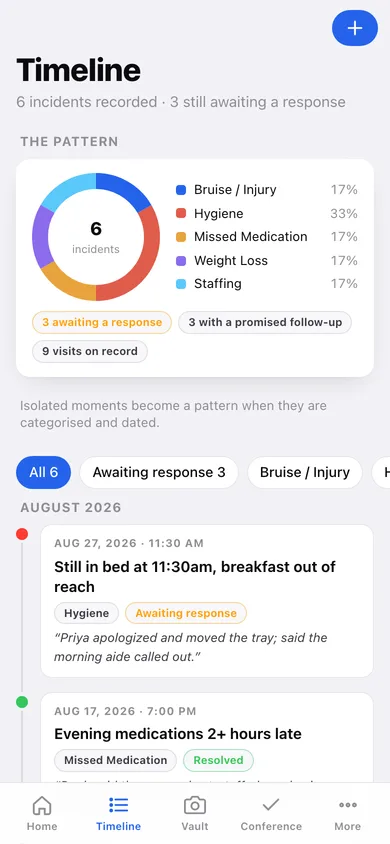
Bruise or injury, hygiene, missed medication, weight loss, fall, staffing or other — each with the staff involved, the facility's exact response, a follow-up date, and a resolved flag, drawn as a dated timeline with a pattern chart.
Evidence vault
Each photo you take gets a caption, a timestamp and the incident or visit it belongs to, filed away from the five thousand unrelated pictures in your camera roll.
Care-conference agenda
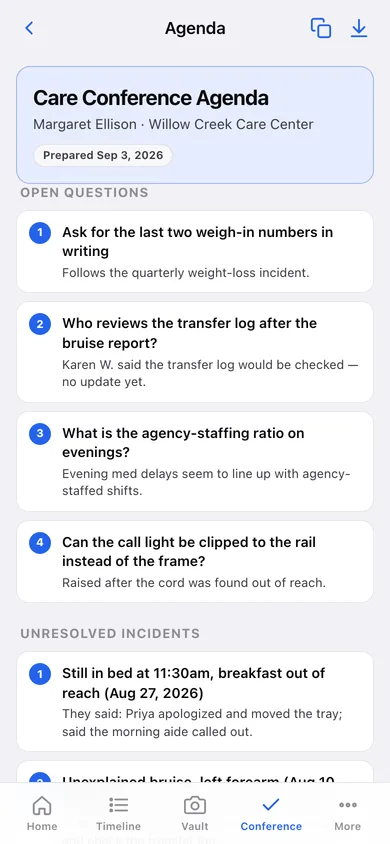
Add a question the moment you think of it; open questions, unresolved incidents and promised follow-ups assemble into a numbered agenda you can copy or download.
Chronological evidence packet
Pick a date range and what to include, see the entry and page estimate, then download a strictly date-ordered record for an ombudsman, state inspector or elder-law attorney.
Ombudsman directory, all 51 offices
Every state plus DC with the program name, phone number, website and a plain-language note on what that free, confidential office can actually do.
Screens
Every screen, rebuilt for the browser
-
1
Home
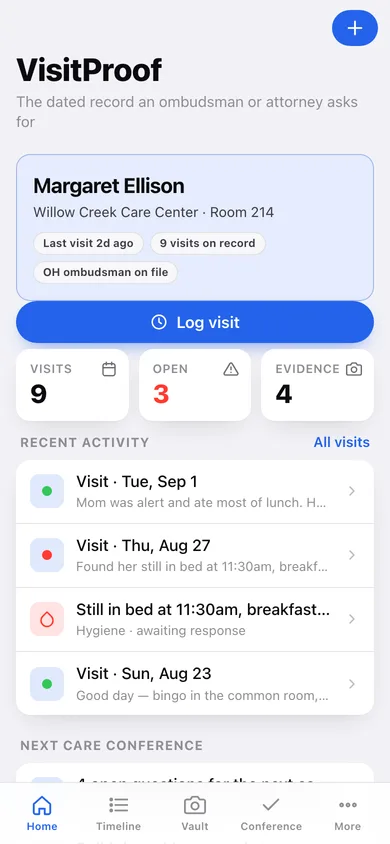
Your resident, days since the last visit, recent visits and incidents, and the open questions waiting for the next care conference.
-
2
All visits
Every visit by month with duration, condition dot and the observations you wrote.
-
3
Visit
One visit: stamped arrival and duration, who was on shift, observations, and any incident recorded from it.
-
4
Log visit
The one-minute visit form — date, arrival time, duration, staff, observations, condition.
-
5
Timeline
Incidents in date order with the facility's response under each, filtered by category or by what is still awaiting an answer.
-
6
Incident
One incident in full: details, staff involved, the facility's words, follow-up date and its evidence.
-
7
Record incident
Category, title, details, staff, facility response, follow-up date and resolved status.
-
8
Vault
Evidence grouped by incident, each tile stamped with its capture date and caption.
-
9
Conference
Unresolved incidents to raise plus your running list of questions for the next care conference.
-
10
Agenda
The numbered care-conference agenda — open questions, unresolved incidents, promised follow-ups.
-
11
Evidence packet
Date range, what to include, entry and page estimate, and the chronological packet to download.
-
12
Ombudsman directory
All 50 states plus DC with phone, website and what that office can do.
-
13
More
Residents, escalation tools, CSV and JSON export, sample data and erase.
Try it with sample data: Loads a three-month record for a fictional resident — Margaret Ellison at Willow Creek Care Center — with eight visits, five incidents including an unexplained bruise and late evening medications, four filed pieces of evidence and six care-conference questions. You can start fresh at any time.
Ready? It's free.
No account, no install, no subscription. Everything you do stays in this browser.
Your say
What should VisitProof do? Tell us before we build it.
Tell us what to build next.
Comments need a free Google sign-in, so every one is from a real person.
Sign in with Google to commentNo comments yet — be the first to say what this app should do next.
Questions
Is the web version of VisitProof free?+
Yes. Every screen is free to use: no subscription, no in-app purchases, no account.
Do I need an account?+
No. Open VisitProof and start using it right away. Sign in with Google only if you want to upvote an app, save it to your list, or leave a comment.
Where is my data stored?+
Only in this browser's local storage. Nothing you enter is sent to our servers, so we can't see it, back it up, or restore it. Clearing site data, a private window, or another device starts empty. Export a backup from the in-app menu to keep it.
Is there a VisitProof app for iPhone or Android?+
Not yet. VisitProof is a community proposal: the browser version is complete, and we build the iPhone and Android app once 100 people upvote it. Upvoters get one email when it ships.